A real website can still serve a fake security check. SANS researcher Brad Duncan has documented fresh activity from a macOS ClickFix campaign he calls Macfinger: injected pages steer visitors toward a command disguised as verification. His September 22 observations distinguish browsing the trap from executing its payload. [1]
The page tracks attention before the Mac runs anything
In one captured interaction, the visitor clicked but abandoned the instructions; the page nevertheless sent tracking requests. A separate infection trace showed a shell-script download, Mac executables for both Apple Silicon and Intel, and subsequent traffic to endpoints including /api/credentials.
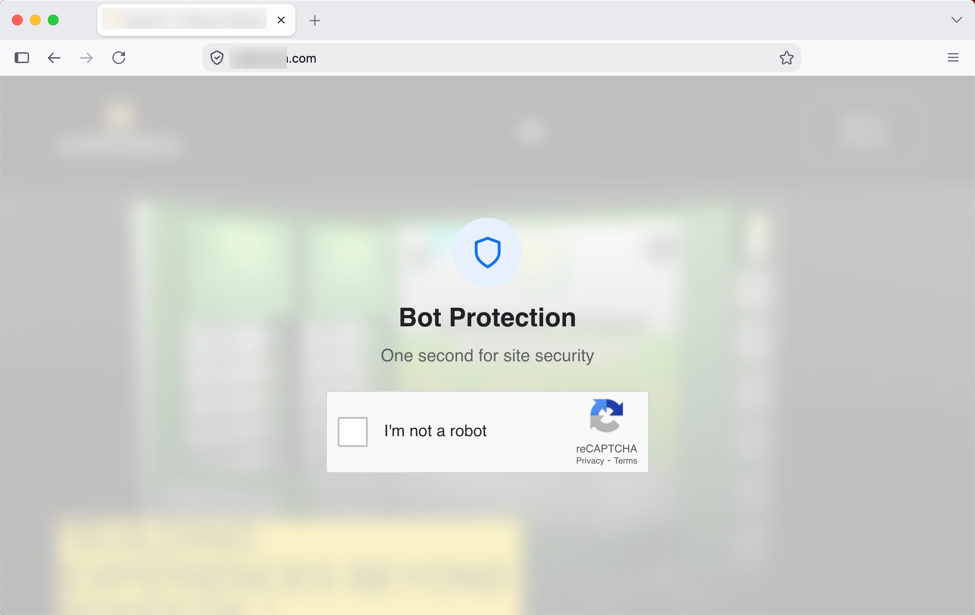
Those are different levels of evidence. A browser request can establish contact with the lure without establishing that its command ran. Conversely, once an untrusted command executes, closing the browser is no longer a complete response: the investigation has moved from the page to the computer.
The screenshot explains the persuasion. A familiar checkbox asks for an ordinary, low-effort action. The dangerous change is the next demand: moving a website instruction into Terminal, where it can act with the user’s permissions. The page is borrowing the appearance of a browser check to obtain a different kind of authority.
An analytics disguise keeps the campaign in circulation
Duncan links this activity to Ransom-ISAC’s September 17 investigation. That team counted over 1,650 infected websites and 154 infrastructure hostnames during tracking beginning July 28. Its report describes a loader masquerading as Google Analytics, filtering bots, then displaying the lure; it identifies the payload as an AMOS variant. [2]
The website count is not a count of infected Macs. Nor does a script’s analytics-like name identify Google as the attacker. For a site owner, the useful question is whether the script belongs there and where it loads code from. For a visitor, a familiar address does not authorize every instruction delivered through that page.
Domain rotation also changes the defensive task. A match to a published indicator is useful evidence, but a non-match is not a clean bill of health. Investigators should connect the visit time, browser activity and any subsequent Terminal or process activity. Treating every analytics request as malware would create the opposite problem: false alarms that obscure the relevant sequence.
September 25 follow-up: a stealer with a different persistence trail
In a follow-up published September 25, Duncan examined a September 24 infection on a physical Mac running macOS 27.0. He questioned the earlier AMOS identification because the architecture selection, data transfer and persistence differed from AMOS samples he had documented. His conclusion remained provisional: this was an information stealer, but its family name was unresolved. [4]
The loader checked the Mac’s architecture and selected an arm64 or x86_64 executable. It saved the initial binary under the user’s Library/Caches/com.apple.securityd/ directory. In that test, the host then used WebSocket traffic as well as HTTP POST requests, including uploads to /api/credentials. These are observations from the recorded infection, not a claim that every Macfinger encounter follows identical endpoints.
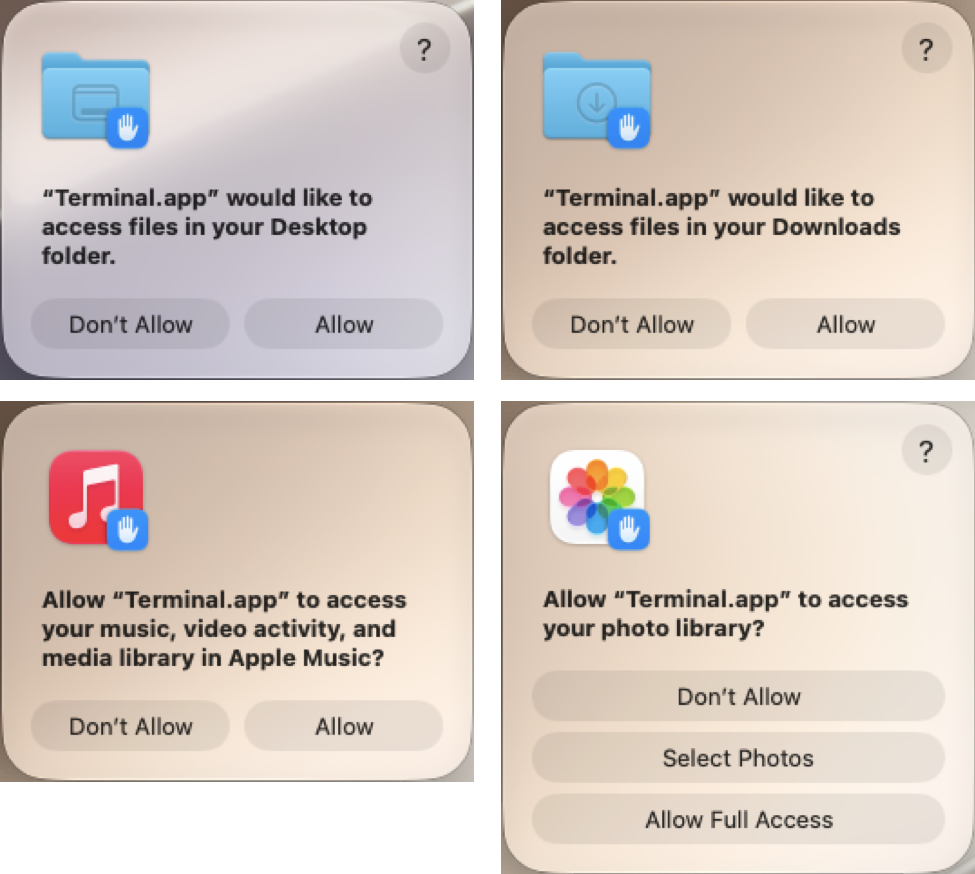
The test Mac requested access to folders, applications and credentials after the command ran. Familiar labels such as Terminal.app described the application requesting access; they did not establish that the command running through it was trustworthy. The later persistence trail was a user LaunchAgent, ~/Library/LaunchAgents/com.apple.softwareupdated.plist, launching a copy at ~/Library/Caches/com.apple.softwareupdate/SoftwareUpdate. That pairing matters during investigation: closing the lure or deleting the first downloaded file does not address a separately configured startup copy. The Apple-like names are camouflage in this observed chain, not proof that unrelated Apple files should be deleted.
The boundary to protect is browser-to-command execution
Microsoft’s broader ClickFix research explains why this approach works: the attacker recruits the user to launch the command instead of relying solely on a conventional malicious download. Its examples span Windows and macOS; that context does not establish that every ClickFix incident uses the same payload. [3]
If you only encountered the check, close it and do not run its instructions. If you executed the command, stop using that Mac for sensitive logins, disconnect it while investigating, and give workplace IT the page address, approximate time and command history. Secure potentially exposed accounts from a trusted device and revoke sessions where available; removing a file does not invalidate a copied login session.
Our fake human-verification guide explains the recognition cues. The separate AMOS toolkit case shows why a familiar Terminal permission prompt deserves scrutiny too. Macfinger’s lesson is specific: trust in the page must not become permission to execute its commands.
References
- Brad Duncan. “Macfinger ClickFix campaign.” SANS Internet Storm Center, September 22, 2026; updated September 23 UTC. Investigation and indicators.
- Ransom-ISAC. macOS ClickFix/AMOS campaign investigation, September 17, 2026. Infrastructure tracking report.
- Microsoft Threat Intelligence and Microsoft Defender Experts. “Think before you Click(Fix): Analyzing the ClickFix social engineering technique.” Microsoft Security Blog, August 21, 2025; accessed September 23, 2026. Technique and defensive guidance.
- Brad Duncan. “A Closer Look at Malware From the Macfinger ClickFix Campaign.” SANS Internet Storm Center, September 25, 2026. Payload, permission requests and persistence analysis.