A document-looking shortcut can start a chain of scheduled Windows tasks instead of opening an invitation. Microsoft’s September 29 investigation of Star Blizzard describes RedFlick, a delivery technique used to install the CosmicPulse backdoor with less victim interaction than the group’s earlier ClickFix attacks. The campaign targets Ukrainian individuals and institutions, alongside organizations connected to support for Ukraine.
The newly published report reconstructs activity observed from January through August 2026. It is a disclosure of an evolving campaign, rather than evidence that every stage first appeared this week. Its practical distinction is simple: a convincing follow-up email can lead to executable machinery hidden behind an ordinary document workflow.
The attachment arrives after the conversation starts
Star Blizzard often begins with an email without an attachment. A recipient who replies can then receive a password-protected ZIP or RAR archive, supposedly containing conference material, a private invitation or a payment notice. Microsoft documented at least 13 larger-scale phishing campaigns during 2026, with activity affecting more than 100 organizations primarily in the US and UK. Those observations do not establish that every recipient or organization was successfully compromised.
One July follow-up pretended that an attachment had been left out of an earlier message. The archive password appeared as an image in the email. That combination makes the second message feel like the completion of an existing conversation: the reader has already expressed interest, and the sender now seems to be correcting a small mistake.
Example
Subject: Private roundtable invitation
Sender: Events Desk, events [at] example [dot] invalid
Message: Thank you for your interest in the private roundtable. I left out the attachment in my last message. Please open the attached archive to view the invitation.
Password: Example 9415
Attachment: Invitation.zip
The wording above illustrates the lure pattern. A ZIP file and a password are not a security verdict. Confirm an unexpected invitation through an established contact method before opening its contents. A password supplied by the sender does not establish who created the archive.
The sender’s domain is also an imperfect shortcut for trust. Microsoft found accounts on compromised websites being used to send these emails. A real website domain can therefore lend its reputation to an attacker-controlled mailbox; a recognizable name in the part before the @ does not authenticate the named organization.
A PDF disguise leads to Windows tasks
In the January chain, a virtual disk file carried a Windows shortcut, or .lnk, disguised as a PDF. Opening it started a hidden command sequence while displaying a genuine decoy document. That visible document gave the recipient something plausible to read while an installer prepared the next stage.
By April, Microsoft observed an MSI installer creating three tasks with routine-sounding names: Internet Quality Test Connection, Network Configuration Manager and System Health Monitor. Their roles differed. One reported basic device and user information and supported remote DLL execution; another prepared Windows’ WebDAV access; the third used control.exe to run the next stage from a remote location.
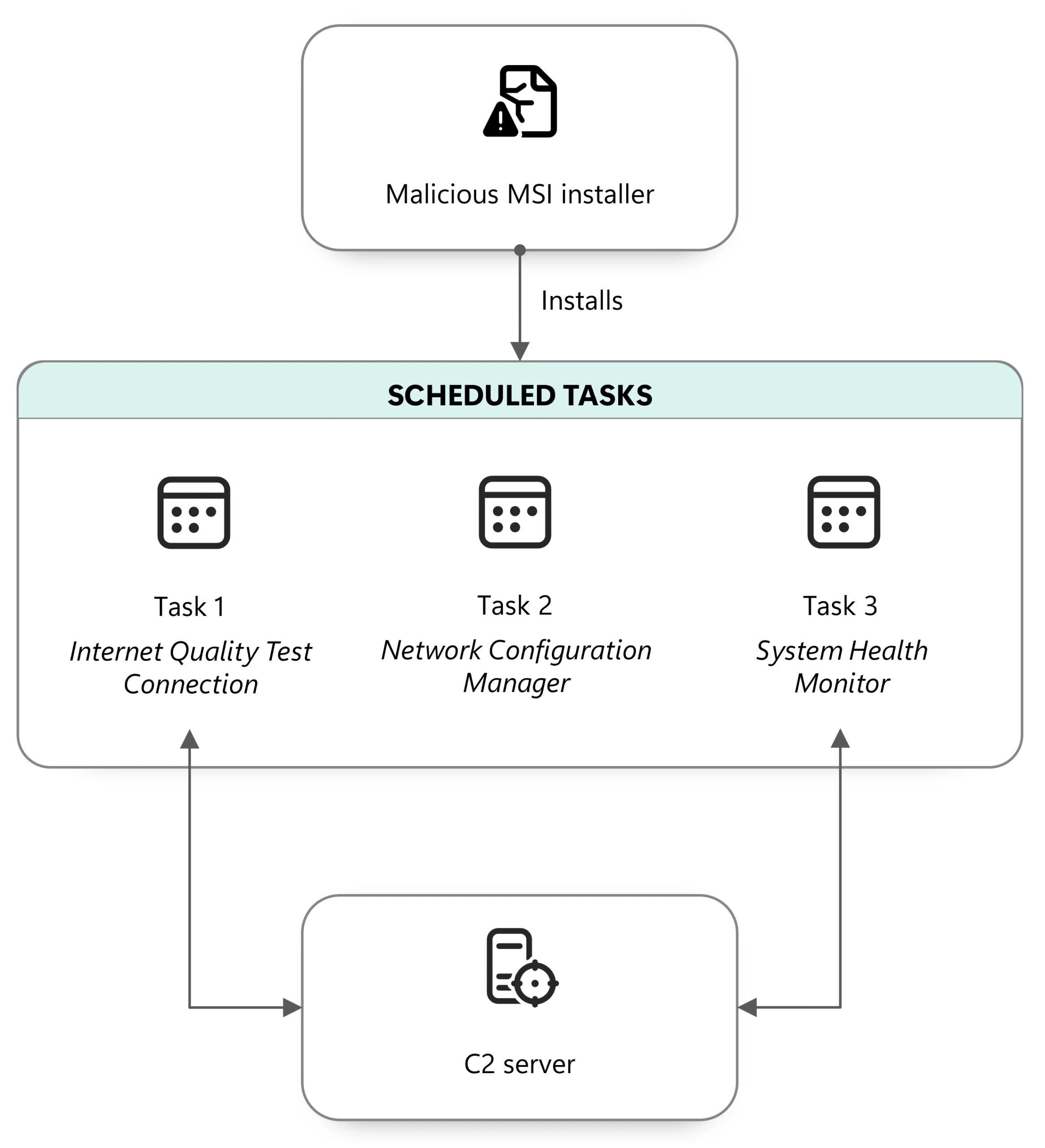
WebDAV allows a web-hosted resource to be accessed through a file-like path. Here that mattered because the apparent Windows maintenance workflow could reach code hosted on the attacker’s server. The downloader was packaged as a Control Panel applet, a .cpl file. Using Windows components to launch it did not make the downloaded code a Windows update.
Microsoft did not obtain the remote payload used by the first task. In at least one incident, it observed the first or third task delivering CosmicPulse. That limit matters: the three-task structure is documented, but it is not a license to invent an identical payload or outcome for every victim.
The later PDF carried a hidden instruction
The July variant added another disguise. A shortcut from a nested archive downloaded a PDF, then PowerShell searched inside it for a marker and decoded a small embedded instruction. That instruction attempted to fetch an MSI installer, which attempted to create two further tasks, including a task to execute a remote Control Panel applet.
The mechanism was execution by the surrounding command chain. Microsoft’s description does not say that simply reading any PDF triggers RedFlick, or identify a universal PDF-reader vulnerability. The shortcut and the processes it started are the important distinction. This differs from ClickFix lures that ask the victim to paste and run a command: reducing the visible steps can make an execution request easier to overlook.
Check the launch chain, not just the invitation
If you received the email but did not run its contents, preserve the message and report it to your security team. Verify the sender independently. If you launched a shortcut or installer from it on a work computer, disconnect that device from the network and involve the response team; retain the email, archive and available execution records.
For investigators, task names alone are weak evidence. Correlate new tasks with the archive or shortcut launch, installer activity, unexpected remote paths and Control Panel processes. Legitimate Windows utilities can appear in a malicious chain, so the useful question is what they launched and why. Removing a downloaded payload does not necessarily remove the scheduled tasks that delivered it. On a personal Windows PC, a scan with Gridinsoft Anti-Malware can help check for malicious files and persistence; it does not recover information already exposed or replace a targeted investigation.
RedFlick’s revealing feature is the handoff: a familiar conversation leads to a document-looking file, and that file delegates further work to Windows tasks. Verifying the conversation and recognizing the executable file type are two separate trust decisions.
References
- Microsoft Threat Intelligence. “Star Blizzard refines phishing and malware delivery with the RedFlick technique.” Microsoft Security Blog, September 29, 2026. Investigation and detection guidance.