A SumUp Transaction Problem email should be treated as phishing when it pushes you to solve a vague merchant-account issue through a button, especially if the link opens a sign-in page. Do not use the button. Open the installed SumUp app or type the official address yourself, then compare account notifications, transactions, payouts, and support messages. A real alert can exist, so the wording alone is not proof of fraud. The safe decision comes from what appears inside your account and whether the message asks for a password, verification code, or payment data.
Check it without the email
- Do not press View Problem, Review Transaction, or a similar email button.
- Open SumUp independently from the installed app, bookmark, or an address you type yourself.
- Compare the message with real transactions, payouts, account notices, and support conversations.
- Never provide a password, PIN, verification code, or account details because an email asks for them.
- If you entered data, change the password and contact SumUp through the real app or site.
What is the SumUp Transaction Problem email scam?
The lure impersonates a payment-platform notice. It claims that a recent transaction has a problem, that payouts could be affected, or that the merchant must review account activity. The button leads away from the normal account path and may open a fake SumUp-style login page designed to capture credentials.
SumUp warns that phishing messages can look convincing, use urgent language, and send users to lookalike sites. It also says its staff will not ask for passwords, verification codes, account details, or a money transfer through an unsolicited message [1]. INCIBE documented a SumUp impersonation campaign in which the fraudulent page copied the sign-in flow and collected credentials [2].
Example
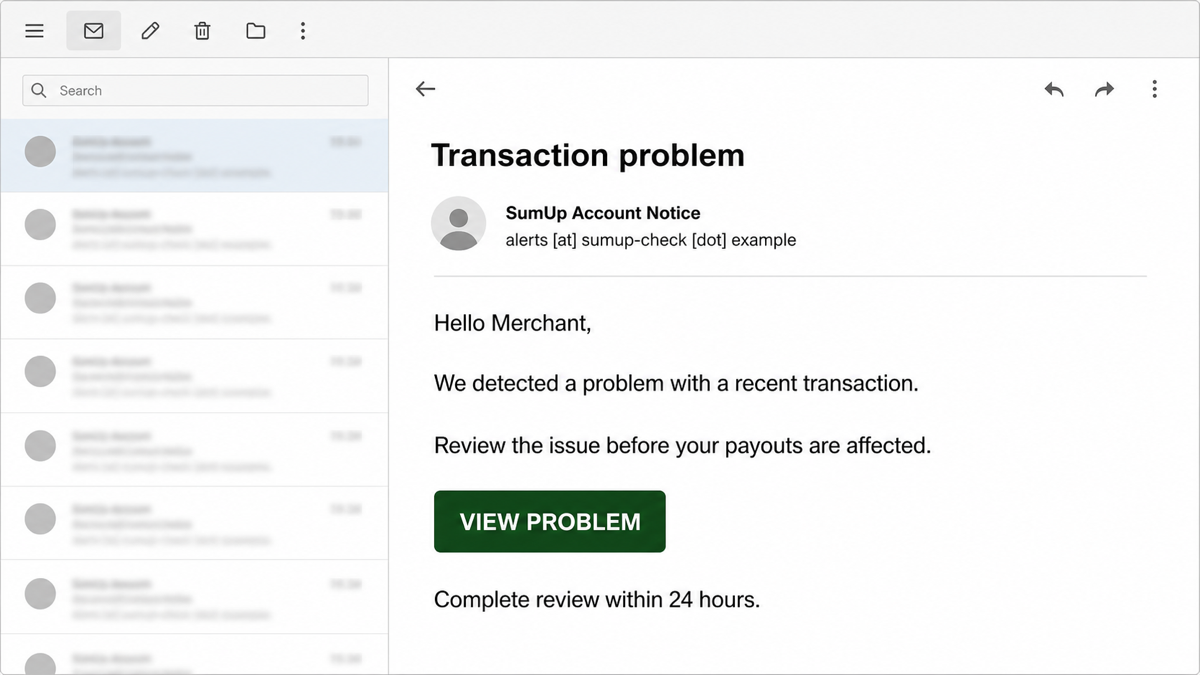
Subject: Transaction problem
From: SumUp Account Notice <alerts [at] sumup-check [dot] example>
Hello Merchant,
We detected a problem with a recent transaction.
Review the issue before your payouts are affected.
Button: VIEW PROBLEM
Complete review within 24 hours.
The sender above uses the reserved .example domain. Real campaigns can change the subject, display name, deadline, and button. The stable warning is that the message tries to move a merchant from an unexpected email into a login or account-recovery flow.
How to verify a SumUp alert without the email button
- Leave the message. Do not reply, call a number in it, download anything, or use its link.
- Open SumUp independently. Use the app you already installed, a saved bookmark, or type the known address yourself.
- Check account notices. Review transactions, payouts, messages, account restrictions, profile changes, and trusted devices where available.
- Compare the details. A legitimate issue should be visible in the real account or confirmed by support reached through that account.
- Contact support from the real service. Do not accept a support route supplied only by the suspicious email.
- Report the message. SumUp asks users to send suspicious emails to its security team and avoid replying to the sender [1].
If you want a second opinion before interacting, paste the sender, subject, and message text into the Gridinsoft Email Checker. Do not paste passwords, codes, card data, or private customer information.
Red flags and the safe check
| What the email does | Risk and safe response |
|---|---|
| Reports a vague “transaction problem” without details you can confirm. | Do not solve it from the message. Check the real merchant account and transaction history. |
| Warns that payouts or service will stop within hours. | Urgency is pressure, not proof. Verify any restriction inside SumUp. |
| Opens a sign-in page after you press the button. | Close it. A lookalike login can capture the email address and password. |
| Asks for a password, verification code, PIN, or account details. | Do not provide them. SumUp says its employees will not request those secrets. |
| Shows an unexpected receipt rather than a merchant-account warning. | Check the merchant and card statement. A receipt can be misaddressed or relate to a real purchase; it is a different problem from merchant-account phishing. |
What to do after interacting with the email
If you only opened or read it
Opening a normal email message is not the same as entering credentials. If you did not click, reply, download, scan a QR code, call a number, or share information, report the message and delete it. You can use our broader phishing-email checklist to inspect the sender and link safely.
If you clicked but entered nothing
Close the page. Do not return to test it. Clear any permission the site requested, and check browser downloads and extensions. A page visit alone does not prove account theft, but the clicked-phishing-link decision tree can help you separate a visit from credential, download, notification, and device exposure.
If you entered a password or verification code
- Move to the real SumUp app or site from a clean browser session.
- Change the SumUp password immediately and replace it anywhere it was reused.
- Secure the email account that can reset SumUp, then review its sessions, recovery methods, and forwarding rules.
- Sign out unknown sessions and remove unfamiliar devices or account changes where the service provides those controls.
- Contact SumUp through the official account path and explain exactly what was entered.
- Review payouts, linked bank details, transactions, and profile changes.
If the attacker changed settings or retained access, use the fuller hacked-account recovery order so email, sessions, recovery methods, and connected services are not overlooked. Broadcom reported SumUp-themed phishing specifically aimed at account takeover, making credential entry more important than the wording of the original alert [3].
If an unknown transaction or payout change is real
Preserve the email, headers, screenshots, timestamps, transaction references, and account notifications. Contact SumUp through the authenticated app or site. If a linked bank account or payment card is affected, contact that financial institution through its official app or the number printed on the card. Do not argue with the email sender or use a number supplied by the suspicious page.
If the email led to a download or support tool
Disconnect an unexpected remote-support session, remove the downloaded file or unapproved extension, and avoid payment or email accounts on that device until it is checked. Deleting the email does not remove a file, extension, startup item, scheduled task, or remote-access tool that was installed afterward. Gridinsoft Anti-Malware can help check for unwanted apps, hidden files, browser changes, startup entries, scheduled tasks, and persistence.
If the page or email made you download an invoice, coupon, tracking app, browser extension, or support tool, scan the PC before opening it again or logging into sensitive accounts.
Scan after a suspicious downloadReceipt, real account alert, or phishing?
- Unexpected receipt: you may be a cardholder or the address may have been entered incorrectly. Check the merchant and your card statement without using message links.
- Real merchant-account issue: the same restriction, transaction, payout, or support message appears after you open SumUp independently.
- Phishing alert: the problem exists only in the email, and its button leads to an unrelated or lookalike login page.
Do not report a real card purchase as merchant-account takeover simply because “SumUp” appears on a receipt or statement. The payment dispute path and the merchant login-recovery path involve different accounts and evidence.
How to reduce the next account-alert risk
- Use a unique SumUp password and a unique password for the connected email account.
- Enable the strongest account verification controls available to you.
- Train staff to open payment platforms independently instead of following alert buttons.
- Keep a known support route and incident checklist available outside the mailbox.
- Use the Gridinsoft Email Scam Checker guide when a message is plausible but the action feels risky.
FAQ
Is every SumUp transaction email a scam?
No. SumUp can send legitimate account and payment communications, and cardholders can receive real receipts. Verify the issue by opening the correct account independently; do not let the message choose the login route.
Can opening the email steal my SumUp password?
Reading an ordinary message does not hand over the password. The usual credential risk begins when you follow the link and enter data into a fake sign-in page.
What if the sender address ends in @sumup.com?
A correct-looking sender is useful context but not permission to follow an unexpected request. Sender names can be spoofed and legitimate mail systems can be abused. Confirm the same issue inside the account.
Should I change my password after clicking?
Change it immediately if you typed the password, shared a verification code, reused the password elsewhere, or see account changes. If you only opened the page and entered nothing, close it and check downloads, permissions, and extensions first.
Do I need a malware scan?
Not for reading the email alone. Scan the device if the lure caused a download, extension install, remote-support session, notification permission, or recurring security warning.
References
- Max Elias. “How to protect yourself from scammers.” SumUp Business Guide, accessed August 10, 2026. sumup.com.
- Instituto Nacional de Ciberseguridad (INCIBE). “Suplantación de tipo phishing a SumUp.” INCIBE, April 17, 2026. incibe.es.
- Broadcom / Symantec. “SumUp users targeted with account takeover phishing emails.” Protection Bulletin, October 10, 2025. broadcom.com.