A fake Ledger device check did not need to break a hardware wallet. It needed its owner to type the wallet’s recovery words into a website. In research published on September 25, Zscaler ThreatLabz traced an August phishing campaign from Google search ads through several cloud-hosted pages to a form that collected those words—even when it then told the user the phrase was invalid.[1]
The campaign targeted people searching for Ledger-related terms in the United States, Europe and parts of Asia. The report documents the lure and collection process, but gives no confirmed victim count or amount stolen. Its central warning is specific: a browser’s claim to have connected or verified your device is no reason to reveal the backup that can restore the wallet elsewhere.
A verified advertiser led to someone else’s wallet page
ThreatLabz found the malicious ad under an established, verified advertiser profile. The researchers considered account compromise a possible explanation; they did not establish that it had happened. The ad also displayed google.com and a large visit count apparently associated with that domain, rather than evidence of the destination’s popularity.
The click crossed several services. A Google Cloud Storage page redirected to a Vercel address, which forwarded the visitor to Google Sites. That final page embedded the Ledger imitation from another Vercel-hosted location in an iframe—a page displayed inside another page. A familiar address in the browser therefore identified the outer hosting service, not the operator of the wallet form.
During the investigation, the intermediate Vercel destination appeared to change every 15–20 minutes while the same Google Cloud Storage page remained in use. That gave the operators a replaceable part of the route without replacing its starting point. It also explains why judging only the first domain misses much of this attack.
The “device check” ended in a recovery-word form
The imitation offered application downloads for several operating systems and let visitors choose a Ledger device. It then displayed connection and firmware-update progress messages before claiming that the device was connected. Those messages were part of the phishing flow; the report does not establish a genuine connection to the user’s hardware.
Next came the request to confirm ownership by entering the secret recovery phrase. The form even suggested words as the visitor typed. ThreatLabz found that the page loaded the public BIP-39 English dictionary, containing 2,048 words, to provide that autocomplete. Recognizing a valid dictionary word is easy for a fake page. It does not demonstrate that Ledger is checking your particular wallet.
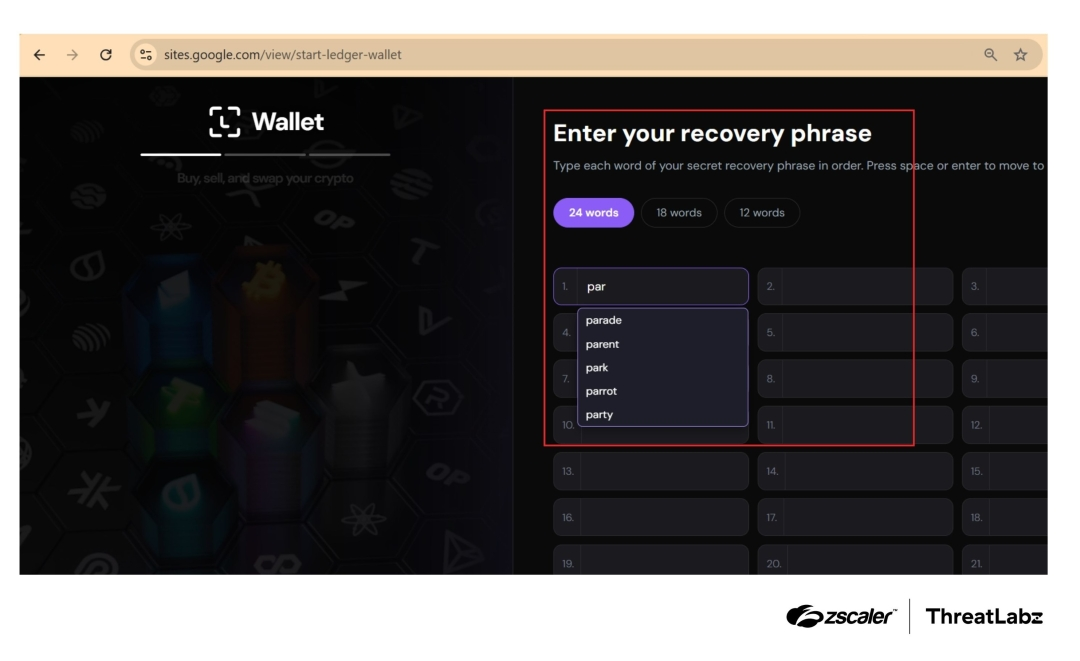
The most consequential part came after submission. The page sent the first phrase to an attacker-controlled Vercel endpoint, then displayed an invalid-phrase error and invited another attempt. A second submission was also sent before the visitor returned to the landing page. ThreatLabz did not observe server-side comparison of the two submissions. An error on screen therefore did not mean that the first phrase had stayed private.
The backup bypasses the need to hold the device
A recovery phrase restores the wallet’s keys in a compatible wallet. Ledger explains that it must remain secret and should never be entered into a computer or smartphone or shared with another person.[2] An attacker who obtains it does not need to steal the original hardware. Changing that device’s PIN does not change the exposed recovery words.
This is a different delivery route from the earlier Ledger phishing emails that used a false breach warning. The new report shows the same critical secret being requested after a search ad, cloud redirects and simulated device setup. The decisive check is what the page asks you to disclose, not how polished its progress animation looks.
If you only visited the page, close it and return through your independently saved official Ledger address. If you submitted the phrase, stop treating the on-screen error as reassurance. Ledger’s compromised-wallet guidance recommends moving remaining assets to a wallet generated from a different recovery phrase.[3] Follow that guidance through a trusted device and official support; recovery is not guaranteed, and restoring the old phrase on another device does not make it secret again.
The hardware was not the weakness demonstrated here. The phishing page tried to turn a protected offline backup into information the attacker could reuse—and made a rejection message part of the collection process.
A separate October 2026 investigation concerns physical tampering: Ledger confirmed an implant in a CryptoBilis-linked device. That hardware case differs from the fake web check described here, while both make the recovery phrase the critical secret.
References
- Prakhar Shrotriya, Zscaler ThreatLabz. Threat Actors Use Google Ads To Target Ledger Users. September 25, 2026.
- Ledger Academy. What is a Seed Phrase (Secret Recovery Phrase)? Updated June 19, 2026; accessed September 27, 2026.
- Ledger Academy and Boring Security. What To Do If Your Crypto Project Gets Hacked. Updated January 12, 2026; accessed September 27, 2026.