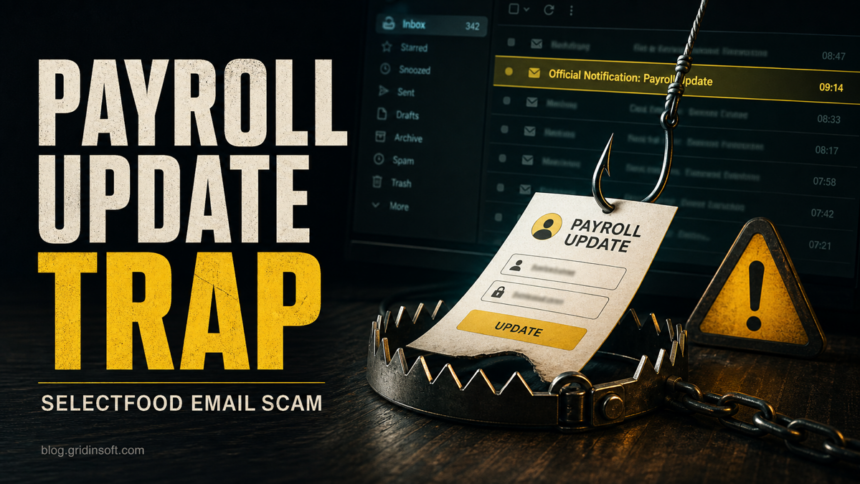
The “Selectfood Payroll” email is a phishing scam, not a safe payroll update. The message uses an “Official Notification” subject, says information is missing from a June 2026 payroll file, and pushes the recipient to an “Update My Payroll Now” button. Do not use that button. Open your real payroll or HR portal from a saved bookmark, or ask HR through a known internal channel.
What to do first
- Do not sign in from the email. Payroll changes should happen through your company’s normal HR or payroll system.
- Check the sender and destination. A display name can say Selectfood Payroll while the link points to an unrelated domain.
- If you entered a password, change it from the real account page. Then sign out other sessions and review recent account activity.
- If a file was downloaded, scan the computer before using it for payroll, banking, or password changes.
What is the Selectfood Payroll email scam?
This scam imitates an internal payroll notice. The lure is believable because employees may receive real payroll, payslip, benefits, or HR profile messages at work. The unsafe part is the route: the email moves the reader away from the company’s real payroll system and toward a fake sign-in page that can collect mailbox credentials.
A public sample of this lure used the subject “Official Notification,” claimed the recipient’s payroll file was missing required information, and used an “Update My Payroll Now” button. The landing flow was associated with indiazinhalindoya.com.br, a domain that does not match a payroll provider or a corporate email service. Several legitimate businesses may use names similar to Selectfood; this scam does not prove any real organization with that name sent the message.
What the email looks like
The wording below is illustrative. Real messages can change the sender, button text, or landing domain, but the decision point is the same: an unexpected payroll email asks you to sign in through a link you did not request.
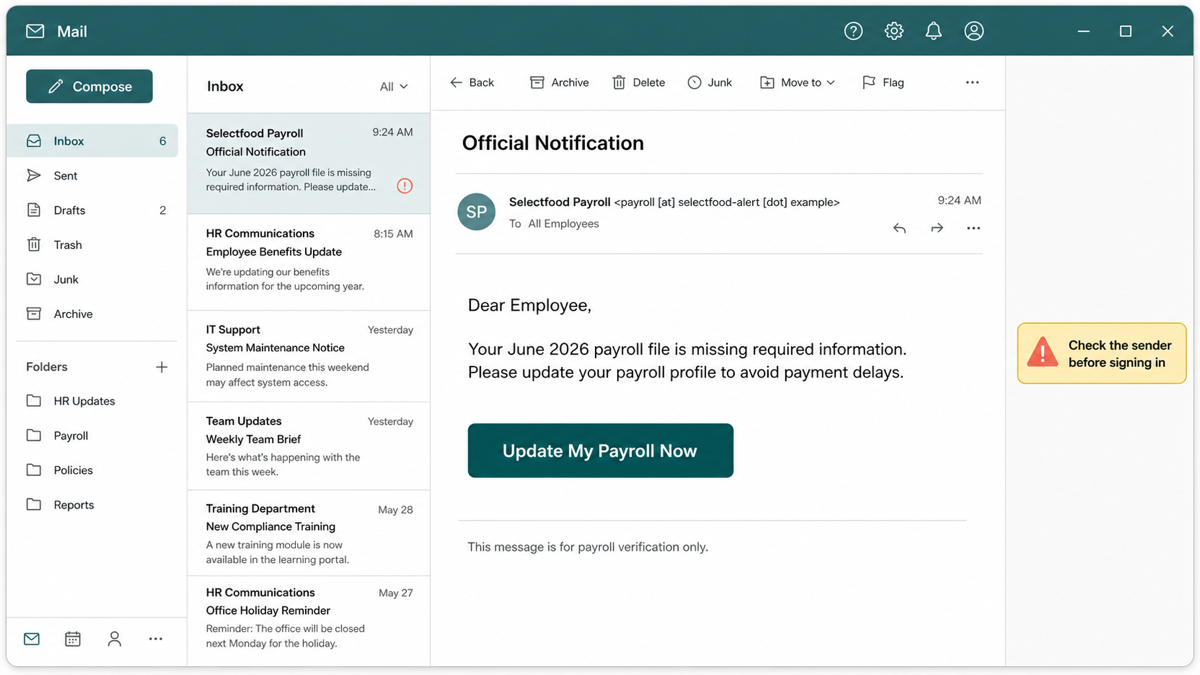
Subject: Official Notification
From: Selectfood Payroll <payroll [at] selectfood-alert [dot] example>
Dear Employee,
Your June 2026 payroll file is missing required information. Please update your payroll profile to avoid payment delays.
Button: Update My Payroll Now
This message is for payroll verification only.
Red flags in the Selectfood Payroll message
- Unexpected payroll pressure. The email creates a payment-delay fear so the recipient signs in without verifying the request.
- Generic workplace language. “Dear Employee” and “Official Notification” are easier to reuse than a real HR system message with your employer’s normal formatting.
- Unrelated destination domain. A payroll or HR update should not send you to a domain that has no clear connection to your employer, payroll vendor, or email provider.
- Email-password capture. If the page asks for a mailbox password before showing any payroll context, treat it as credential phishing.
- Button-first design. The message gives one urgent action and avoids normal ways to verify the payroll issue.
Why the related domain is risky
Gridinsoft’s URL report for indiazinhalindoya.com.br marks the site as suspicious. The report shows phishing-related signals, multiple security-provider warnings, low independent reputation data, and a 1/100 trust score. That does not mean every page with a similar-looking name is malicious, but it is enough to avoid entering passwords, personal details, payroll data, or payment information there.
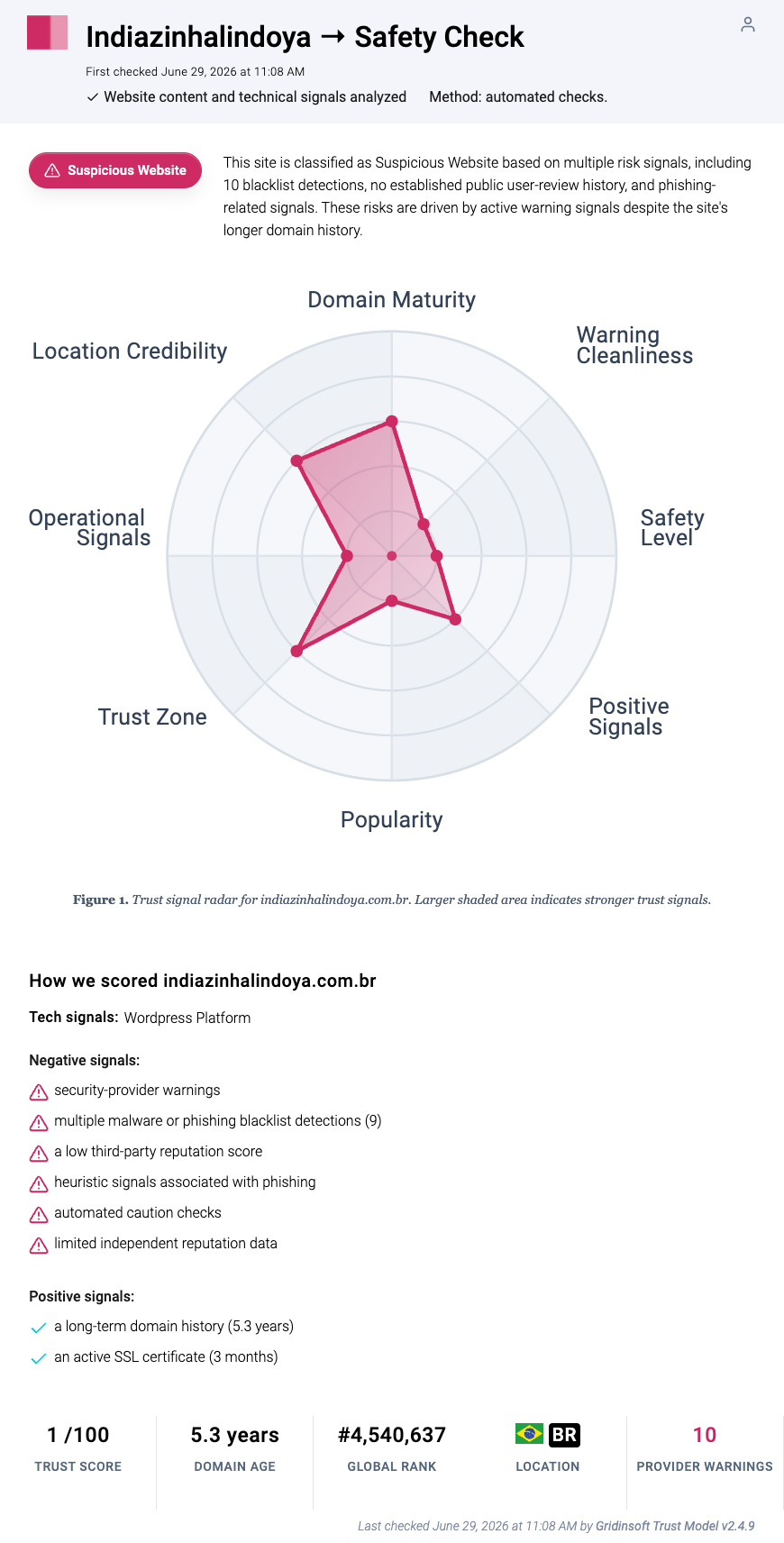
You can check a suspicious link with the Gridinsoft URL scanner before opening it. A scanner result is not a substitute for HR verification, but it can reveal known phishing, blacklist, redirect, or reputation signals before you risk an account.
What to do if you clicked the button
- Close the page. Do not test the form with a real password, work email, personal email, or one-time code.
- Open the real payroll portal manually. Use a saved bookmark, your company intranet, or a known HR contact instead of any link in the message.
- Report the email internally. Forward it to your IT/security team or use the company’s phishing-report button if one exists.
- Save evidence without spreading the link. Keep the headers, sender, subject, screenshot, and destination URL for security staff.
- Watch for a download. If the page downloaded a file, browser extension, remote-support tool, or “secure viewer,” treat the device as exposed until checked.
What to do if you entered your email password
Act quickly if you submitted a password, MFA code, or recovery detail. The attackers may try to read mailbox content, reset other accounts, create forwarding rules, or send more phishing from the compromised mailbox.
- Change the password from the real account page. Do this from a clean browser session or another trusted device.
- Sign out active sessions. Review devices, recent security events, connected apps, and remembered browsers.
- Enable or reset two-factor authentication. Remove unknown authenticator apps, backup codes, or recovery methods.
- Check mailbox rules. Delete forwarding, deletion, or archive rules you did not create.
- Warn payroll and IT. Tell them that a payroll-themed credential page may have captured your work mailbox login.
- Review linked accounts. Protect banking, cloud storage, social media, HR, and password-manager accounts that use the exposed email for resets.
If a file or extension was downloaded during the incident, run a full security scan before using the computer for account recovery or payments. Gridinsoft Anti-Malware can help check for hidden files, suspicious startup entries, unwanted browser changes, and persistence left by a phishing download, but it cannot recover stolen passwords or prove that an account was never accessed.
How HR and payroll teams should verify it
- Compare the message against the company’s normal payroll notification template, sender domain, and portal URL.
- Confirm whether a real payroll-profile campaign is active before replying to employees.
- Block the landing domain and collect message headers for your mail-security team.
- Search mail logs for the subject, sender, button URL, and similar “missing payroll file” wording.
- Alert employees through a separate internal channel if the message reached multiple mailboxes.
- Require password resets and session revocation for anyone who submitted credentials.
Related checks
If the message was about a payslip rather than a missing payroll profile, compare it with our Your Payslip Is Available email scam guide. For broader mailbox red flags, use the phishing email checklist. If you already exposed personal details, review the account takeover and personal data protection steps.
FAQ
Is the Selectfood Payroll email real?
Treat it as fake unless your employer confirms it through a known HR or payroll channel. The scam sample uses payroll wording to push recipients to a fake sign-in page.
What if my company really uses a payroll portal?
Open the portal from a saved bookmark, company intranet, password manager, or official app. Do not use a payroll link from an unexpected email just because the subject looks workplace-related.
What if I clicked but did not enter anything?
The risk is lower. Close the page, report the message, and check whether anything downloaded or asked for browser permissions. If nothing was entered or installed, credential theft is less likely.
What if I entered my Google or Microsoft password?
Change the password from the real Google or Microsoft account page, sign out other sessions, review recent activity, remove unknown recovery methods or mailbox rules, and tell IT if it was a work account.
Should I reply to the sender?
No. Replying confirms that the mailbox is active and can expose more information. Report the message through your company’s normal phishing-reporting or IT channel instead.
References
- Gridinsoft. “Indiazinhalindoya.com.br Scam Check.” Gridinsoft Website Reputation Checker, last checked June 29, 2026, accessed July 1, 2026. https://gridinsoft.com/online-virus-scanner/url/indiazinhalindoya-com-br
- Federal Trade Commission. “How To Recognize and Avoid Phishing Scams.” Consumer Advice, accessed July 1, 2026. https://consumer.ftc.gov/articles/how-recognize-avoid-phishing-scams
- Google Account Help. “Secure a hacked or compromised Google Account.” Google, accessed July 1, 2026. https://support.google.com/accounts/answer/6294825?hl=en
- Microsoft Support. “Protect yourself from phishing.” Microsoft, accessed July 1, 2026. https://support.microsoft.com/en-us/security/protect-yourself-from-phishing