Disconnect Ryuk-affected computers and network shares first, preserve ransom notes and logs, and do not overwrite encrypted originals. There is no universal guaranteed Ryuk decryptor. Before any cleanup or recovery attempt, make copies or forensic images of affected systems and encrypted data so a failed tool does not destroy the only recoverable evidence.
What to do in the first hour
- Isolate affected hosts and shares. Unplug network cables or remove Wi-Fi access. If several subnets are affected, isolate them at the switch or firewall level. Power off a device only when you cannot disconnect it; shutdown can erase evidence held in memory.
- Protect backups. Disconnect backup repositories that are still reachable from the compromised network. Do not attach clean backups to an environment where encryption or attacker access may still be active.
- Preserve evidence. Save ransom notes, security alerts, event and firewall logs, suspicious files, and a list of affected hosts. Capture system images and memory from representative devices when your incident-response process supports it.
- Confirm whether encryption is still active. Look for files being renamed or written across shares, newly affected hosts, and active suspicious sessions. Containment comes before deletion or restoration.
- Escalate early. If Ryuk reached a domain controller, server, shared storage, backups, or multiple endpoints, involve an incident-response team. Coordinate legal, insurer, regulator, and law-enforcement notifications as your organization requires.
What Ryuk ransomware is
Ryuk is ransomware associated with targeted, human-operated intrusions against organizations. Historical incident-response investigations observed Ryuk after credential theft and TrickBot access, with attackers using tools such as RDP, Empire, PsExec, scheduled tasks, and compromised administrator accounts to move through a network before deploying encryption. This history matters during recovery: removing the visible ransomware executable does not prove the original access, stolen credentials, or persistence is gone.
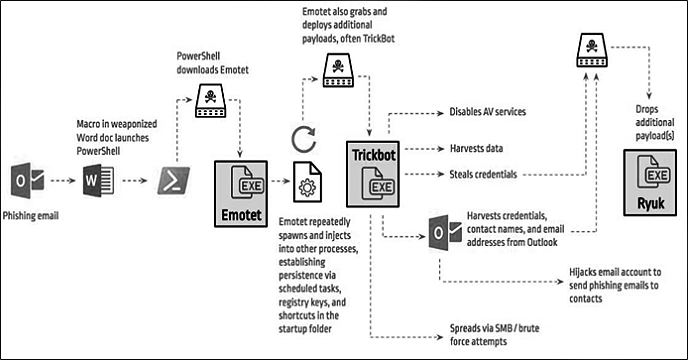
Not every Ryuk incident follows the same path, and an old TrickBot indicator alone does not prove Ryuk is present. Treat the affected environment as a potentially broader compromise until logs, accounts, remote-access routes, and persistence have been reviewed.
Can Ryuk files be decrypted?
No single public tool can be assumed to decrypt every Ryuk incident. The usable recovery path depends on the exact variant, available backups, whether files were only partly encrypted, and whether a legitimate researcher or law-enforcement partner has a case-specific option. Do not upload confidential files to random “decryptor” sites, run unknown recovery executables, or experiment on the only copy of encrypted data.
Ryuk also has a documented large-file risk. Emsisoft found that an older Ryuk version partially encrypted files larger than 57,000,000 bytes and that a criminal-supplied decryptor could truncate those files during recovery. Virtual disks and databases were especially vulnerable to damage. Always duplicate encrypted data before testing any decryptor, even when the tool comes from a seemingly credible source.
- If clean, offline backups exist: preserve evidence, eradicate the intrusion, rebuild clean systems, and then restore validated copies.
- If no usable backup exists: keep encrypted originals untouched and ask a qualified incident-response or data-recovery specialist to assess the exact variant and file state.
- If someone offers a decryptor: verify who produced it, obtain a hash and written scope when possible, and test it only against duplicated sample data in an isolated environment.
- If a criminal decryptor was already run: stop repeated attempts and preserve both the pre-decryption copies and any damaged outputs for analysis.
Ryuk recovery in the correct order
1. Contain the affected environment
Map affected endpoints, servers, hypervisors, shares, identities, and backups. Isolate systems in a coordinated way and use an out-of-band communication channel if attackers may still monitor email or collaboration tools. Keep unaffected systems separate until their status is verified.
2. Remove active malware and persistence
Identify the initial access route and any precursor malware, remote-management tools, scheduled tasks, services, startup entries, compromised accounts, or unauthorized security exclusions. The separate TrickBot investigation guide explains one Windows persistence and network-detection path, while the post-malware Windows security audit provides a broader cleanup checklist.
After evidence collection, Gridinsoft Anti-Malware can scan an isolated Windows workstation for active malware, hidden files, startup entries, scheduled tasks, and persistence. It does not decrypt Ryuk files, replace enterprise incident response, or prove that a domain-wide compromise is clean.
After uninstalling the suspicious app or deleting the visible threat, use Gridinsoft Anti-Malware to check hidden files, startup entries, scheduled tasks, bundled apps, browser changes, and other persistence points that can restore malware.
Download Anti-Malware3. Secure accounts and remote access
From a known-clean administrative device, disable attacker-controlled accounts and sessions, rotate affected domain and local administrator credentials, review newly created users and group membership, and replace exposed service-account secrets. Audit RDP, VPN, remote-management, cloud, email, and single-sign-on access. Enforce MFA where supported and remove access that is no longer required.
4. Rebuild before restoring data
Prefer rebuilding compromised systems from known-good images instead of trusting an in-place cleanup. Patch the initial access weakness, deploy current security controls, and validate that persistence and unauthorized sessions are gone. Restore prioritized data from offline, tested backups to a clean network; do not reconnect everything at once.
5. Monitor the rebuilt environment
Watch authentication, endpoint, DNS, firewall, SMB, RDP, and backup logs for renewed access or encryption. Retain the incident timeline and indicators so responders can verify that the same entry path has not reopened.
When professional incident response is necessary
Escalate immediately when Ryuk affects a domain controller, hypervisor, database, shared storage, backups, regulated data, critical operations, or more than one endpoint. Professional responders can preserve evidence, scope lateral movement, coordinate recovery priorities, and assess case-specific decryption options. A single-host antivirus scan is not enough evidence to declare a business network safe.
How to reduce the chance of another Ryuk incident
- Keep offline or immutable backups and test full restoration, not only backup creation.
- Use MFA for remote access and administrative accounts; restrict exposed RDP and VPN access.
- Separate user workstations, servers, management interfaces, and backup infrastructure.
- Use unique administrator credentials and tightly limit domain-admin sessions.
- Patch internet-facing systems and review security exclusions and remote-management tools.
- Centralize endpoint, identity, firewall, DNS, and backup logs so early-stage access is visible.
Related ransomware recovery guides
Ryuk needs its own intrusion and recovery plan. For family-specific decisions, see the Phobos ransomware recovery guide and the Petya and NotPetya recovery guide. The ransomware families and lessons overview explains how Ryuk fits into the broader shift toward targeted enterprise attacks.
FAQ
Does removing Ryuk decrypt the files?
No. Removing active ransomware and persistence stops further damage, but it does not reverse encryption. File recovery is a separate step based on clean backups, preserved encrypted copies, and any legitimate case-specific decryption option.
Should I restart a computer infected with Ryuk?
Disconnect it from the network first. Avoid restarting until an incident responder decides whether volatile memory should be captured. If you cannot disconnect the device and encryption is still spreading, powering it down may limit damage but can destroy memory evidence.
Can I safely test a Ryuk decryptor?
Only after verifying the source and creating separate copies of encrypted data. Test duplicated samples in an isolated environment. Never let a recovery tool modify the only surviving copy of a database, virtual disk, or other important file.
References
- Cybersecurity and Infrastructure Security Agency, Multi-State Information Sharing and Analysis Center, National Security Agency, and Federal Bureau of Investigation. “#StopRansomware Guide.” CISA, September 2023, accessed August 29, 2026. https://www.cisa.gov/stopransomware/ransomware-guide
- Goody, Kimberly, Jeremy Kennelly, Jaideep Natu, and Christopher Glyer. “A Nasty Trick: From Credential Theft Malware to Business Disruption.” Mandiant, Google Cloud Threat Intelligence, January 10, 2019, accessed August 29, 2026. https://cloud.google.com/blog/topics/threat-intelligence/a-nasty-trick-from-credential-theft-malware-to-business-disruption/
- Emsisoft Malware Lab. “Caution! Ryuk Ransomware Decryptor Damages Larger Files, Even If You Pay.” Emsisoft, December 20, 2019, accessed August 29, 2026. https://www.emsisoft.com/en/blog/35023/bug-in-latest-ryuk-decryptor-may-cause-data-loss/