Phobos ransomware recovery should start with isolation and evidence preservation, not with a random decryptor download. Disconnect affected systems, keep the ransom note and several encrypted files, and make a copy or image of important drives before changing them. Then check whether the official free Phobos/8Base decryptor matches the filename pattern and extension. Remove active malware before restoring data, and test decryption only on copies because the tool does not support every case or guarantee file integrity.
What to do immediately after a Phobos attack
- Isolate affected computers and servers. Disconnect Ethernet, Wi-Fi, VPN, shared drives, and removable storage. If encryption is still spreading, isolate network segments rather than shutting down every system blindly.
- Preserve evidence. Save the ransom note, a few encrypted files, their full filenames, the visible extension, screenshots of the warning, and the approximate time encryption began. Do not rename or edit the only copies.
- Protect backups. Keep offline backups disconnected. Pause automatic synchronization if it could replace older clean versions with encrypted files.
- Use a clean device for communication. Change passwords and contact your IT, insurer, legal counsel, or incident-response provider from a system that was not part of the attack.
- Do not pay or run an unknown tool immediately. Payment does not guarantee recovery. Fake decryptors and attacker-supplied utilities can add malware, destroy evidence, or expose more data.
How to recognize a Phobos or 8Base case
Phobos is a ransomware family with many variants, so one extension alone is not enough for identification. Look at the filename structure, ransom note, affected hosts, and events that preceded encryption. The FBI, CISA, and MS-ISAC have documented Phobos activity that commonly follows compromised remote access, especially exposed or poorly secured RDP.
Signal — What to record
- Changed filenames: Keep the full original-looking name, victim ID, contact field, and final extension exactly as shown.
- Known supported examples: The Japanese National Police Agency guide lists examples such as
.phobos,.8base,.elbie,.faust, and.LIZARD. Other extensions may exist. - Ransom notes: Preserve text and HTML notes such as
info.txtorinfo.hta, but do not follow their links or contact instructions from the infected machine. - Remote-access activity: Record unusual RDP logins, newly created accounts, disabled security tools, remote-support software, and suspicious administrator sessions.
- 8Base references: Do not assume every 8Base incident uses identical malware. The 8Base ransomware background explains the campaign connection, while recovery still depends on the exact encrypted-file pattern.
If the identity is uncertain, submit the ransom note and a non-sensitive encrypted sample to a reputable ransomware identification service. Do not upload contracts, medical files, identity documents, password databases, or customer data to a public service.
Can the free Phobos/8Base decryptor recover the files?
A free Phobos/8Base decryptor is available from Japan’s National Police Agency and is listed by the No More Ransom project. Use only these official paths: download the official PhDec Decryptor ZIP from the NPA, read the official English user guide (PDF), or locate Phobos / 8base Ransom on the No More Ransom decryption-tools page. This is an important recovery option, but it is not a universal Phobos master key. Eligibility depends on the variant and filename pattern, and successful processing does not guarantee that every decrypted file will be intact.
Check eligibility before running the tool
- Compare the filename pattern. The NPA guide shows a structure that includes the original filename, an ID, a contact field, and an extension. A familiar extension without the expected surrounding pattern is not enough.
- Read the current official guide. Tool support can change. Use the NPA and No More Ransom links above rather than a search ad, video description, mirror, or direct-message link.
- Preserve the originals. Keep an untouched copy or disk image before any decryption attempt. If the data is irreplaceable, stop and obtain professional forensic advice before modifying the source drive.
- Test on copies. Copy a small set of non-sensitive encrypted files to a clean, isolated test system. Do not point the first run at the only affected disk or backup.
- Validate the output. Open several recovered documents, images, archives, and databases. Check their contents, not only the filename. The official guide warns that files damaged by an encryption bug may remain unrecoverable and that integrity is not guaranteed.
- Keep failed samples. A failed test does not mean the data should be deleted. Preserve encrypted copies because a later tool update, key recovery, or law-enforcement action may help.
How to use the official PhDec Decryptor
- Prepare a clean test location. Keep the original encrypted data untouched. On a clean, isolated Windows system, make a test folder containing copies of a few non-sensitive encrypted files. Start with one file, not an entire drive.
- Download and extract the official package. Get the ZIP from the NPA link above, extract it into its own folder, and run
Phdec_gui_v*.exe. Read the terms and select Agree. Continue through Windows confirmation prompts only when the package came from the official NPA path. - Select the copied encrypted file. In the tool, choose …File and select one test file, or drag that file onto the red target area. The …Folder option processes the selected folder and its subfolders, so use it only after a single-file test succeeds.
- Choose a separate output folder. Under the output path, select …Folder and choose an empty folder that is different from the folder holding the encrypted originals.
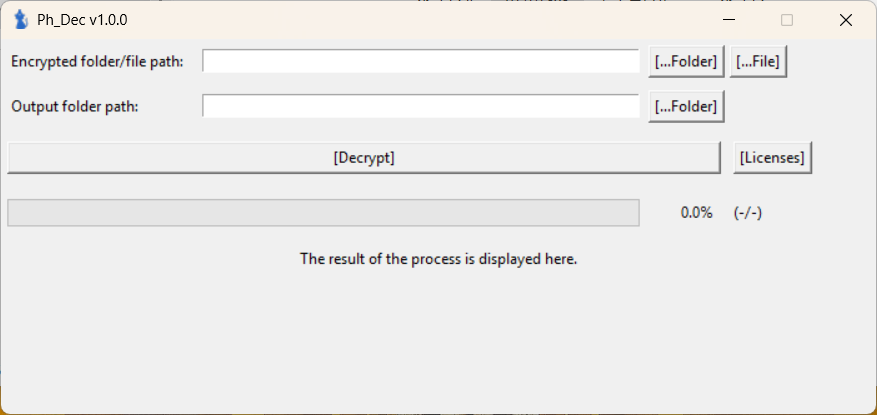
- Start decryption. Select Decrypt and wait for the Completed dialog. Do not interrupt the process or overwrite the encrypted source copies.
- Review the result. Check the target, successful, failed, untouched, and unsupported counts. The tool also writes result files such as
output_{Date}.txt,output_{Date}.csv, anderror.log; statuses can includeyes,no,no_keys, andcorrupted.
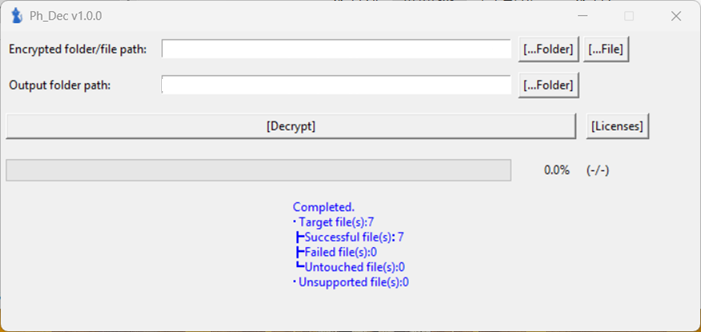
- Validate before expanding the run. Open the decrypted copy and confirm its contents are intact. Test several file types. Only then consider processing a copied folder; retain the encrypted originals even when the test succeeds.
Security software may flag a legitimate decryptor because it performs unusual file operations. Do not disable protection for a tool downloaded from an unverified source. Confirm the download originates from the official NPA path, compare the current instructions, and use an isolated clean system for testing.
Remove active Phobos malware before restoring files
Malware removal and file decryption are separate jobs. A decryptor may repair supported files, but it does not close an exposed RDP service, remove a loader, revoke stolen credentials, or prove that no other payload remains. Likewise, removing the encryptor stops further damage but does not automatically unlock files that are already encrypted.
On a personal Windows PC that is stable enough to inspect, run a full Gridinsoft Anti-Malware scan after isolation. Review detections, remove confirmed malware, reboot, and scan again if ransom notes, suspicious processes, or newly encrypted files return. Check recent downloads, Startup items, scheduled tasks, services, remote-access tools, security exclusions, and unexpected administrator accounts. If the incident affects a business, server, domain controller, or several endpoints, preserve evidence and use a qualified incident-response process instead of cleaning each machine independently.
If the process path is wrong, the name imitates a Windows component, or high CPU started after an unknown installer, scan for hidden miners, services, startup entries, and bundled components.
Scan for ransomware leftoversBefore trusting a recovered Windows system, follow the post-malware Windows security audit. Reinstall from known-good media when system integrity is uncertain, privileged accounts were compromised, security controls were disabled, or the attacker had interactive remote access.
Safe backup and restore order
- Define the clean point. Determine when the intrusion likely began, not only when encryption became visible. Backups created after initial access may contain persistence or stolen credentials.
- Build or clean the destination first. Restore to a rebuilt system or an environment that has passed malware and persistence checks.
- Test one restore set. Recover a small group of files and confirm they open normally. Watch for new extensions, ransom notes, or unexpected outbound connections.
- Restore by priority. Start with essential data and configurations. Keep the original encrypted evidence separate until validation is complete.
- Reconnect in stages. Bring systems and network shares back gradually while monitoring authentication, endpoint, firewall, and backup logs.
- Keep a second protected copy. Do not make the first successful restore your only remaining backup.
Cloud version history and snapshots can help, but check them from a clean session before resuming synchronization. The ransomware backup and protection guide explains why offline or immutable copies are safer than permanently attached storage.
Reset RDP access, accounts, and exposed credentials
Phobos recovery is incomplete if the original entry point remains available. Review RDP and VPN exposure, failed and successful remote logins, newly added users, privilege changes, and remote-support utilities. Disable unnecessary public RDP, require a VPN or gateway, enforce multi-factor authentication where supported, and restrict access by network and account.
Rotate domain, local administrator, email, cloud, backup, VPN, and remote-access credentials from a clean device. Revoke active sessions and tokens. If browsers or password managers were open on compromised machines, treat saved sessions as exposed until logs and forensic evidence show otherwise. Do not reuse the same new password on a restored host before it is trusted.
What not to do during Phobos recovery
- Do not rename encrypted files in bulk or delete their extensions.
- Do not run several decryptors against the only copy of the data.
- Do not download a tool from a sponsored result, file-sharing site, forum attachment, or attacker message.
- Do not reconnect backup drives to a system that may still contain active malware.
- Do not wipe logs or ransom notes before the incident scope and evidence needs are understood.
- Do not assume decryption means the attacker no longer has access or stolen data.
- Do not promise customers or staff that every file will be recovered until the restored data is validated.
FAQ
Is there a free Phobos ransomware decryptor?
Yes. Use the official NPA download and user-guide links in the section above; No More Ransom also lists the tool under Phobos / 8base Ransom. The decryptor supports documented filename patterns and variants, not every possible Phobos case. Test it on copies and verify the recovered files.
Does removing Phobos ransomware decrypt the files?
No. Removal stops active malware and helps make the system safe for recovery, but it does not reverse encryption. Decryption and backup restoration are separate steps.
Should I pay the Phobos ransom?
Payment does not guarantee a working key, complete recovery, deletion of stolen data, or freedom from another demand. Preserve evidence and evaluate official decryptors and clean backups first. Organizations should involve legal counsel, law enforcement, and incident-response specialists. If an outside firm contacts you during recovery, the Ransom Busters recovery-scam checklist explains how to preserve the offer and verify the contact before sharing files or paying.
Can I run the decryptor on the infected computer?
Use a clean, isolated test system and copies of encrypted files whenever possible. Running the first test on the only affected drive risks changing evidence or damaging the only recoverable copy.
Are .8base files always decryptable with the Phobos tool?
No. The extension is one eligibility signal, not a guarantee. Compare the full filename pattern with the current official guide and test representative copies. Some files can be corrupted by the original encryption process.
References
- Cybersecurity and Infrastructure Security Agency, Federal Bureau of Investigation, and Multi-State Information Sharing and Analysis Center. “#StopRansomware: Phobos Ransomware (AA24-060A).” CISA, February 29, 2024; accessed August 22, 2026. https://www.cisa.gov/news-events/cybersecurity-advisories/aa24-060a