Chinese-speaking threat actors are using Meta ads for free Netflix and other streaming services to push Android malware at Spanish-speaking users in Mexico. The downloaded APK is not a streaming app: it installs a loader called ShellA and then the PanDa remote access trojan (RAT), according to Intel 471 [1].
This is not a zero-click attack, and neither Netflix, Meta, nor Google Play was reported breached. Merely seeing or clicking an ad does not infect a phone. The dangerous steps are sideloading the APK and approving Android Accessibility access. If you did that, stop using banking and other sensitive apps on the phone until you complete the checks below.
Who needs to act after seeing the fake Netflix app
| What happened | Risk and next step |
|---|---|
| You only saw or clicked the ad | Your phone is not infected from that alone. Close the page, do not return to it, and report the ad. |
| You downloaded the APK but did not install it | Delete the file, run Google Play Protect, and disable “Install unknown apps” for the browser or social app involved. |
| You installed the app but denied Accessibility | Uninstall it and scan the phone. An untrusted app ran, but the observed full-control step was not approved. |
| You granted Accessibility or another powerful permission | Treat the phone as compromised. Isolate it, revoke the access, uninstall the app, and secure accounts from a clean device. |
| You opened banking or entered credentials afterward | Contact the bank from another device, change affected passwords, review sessions and transactions, and consider a factory reset. |
How the PanDa RAT campaign works
- A Meta ad promises free streaming. The campaign copied Netflix and other streaming brands, then sent Android users to actor-controlled landing pages.
- The page offers an APK outside Google Play. Android must allow the browser to install unknown apps before that package can run.
- ShellA prepares the RAT. Intel 471 says the loader reconstructs and re-signs its embedded payload on the device, then launches PanDa.
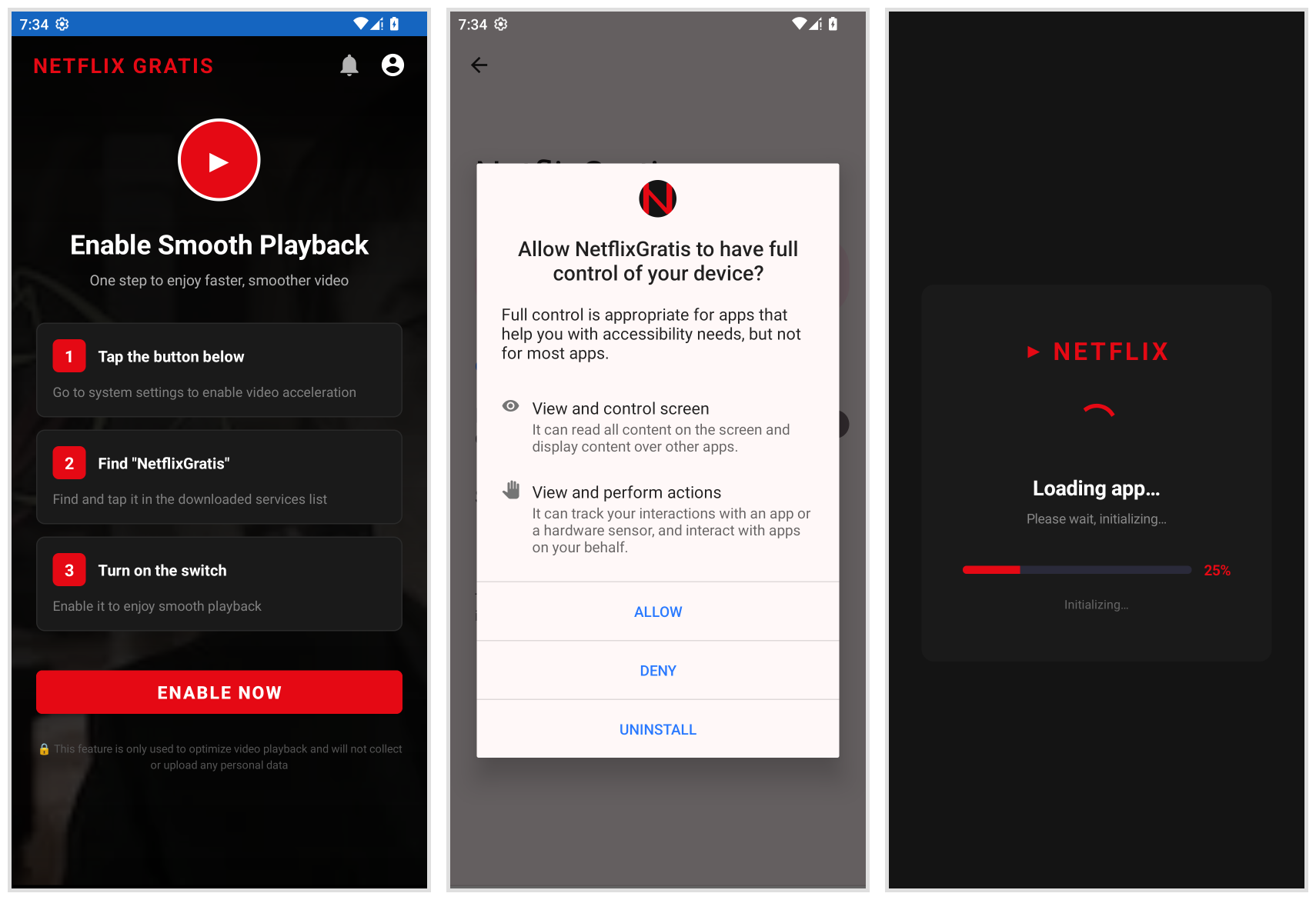
- A playback prompt hides a permission request. The fake app presents Accessibility as a way to “enable smooth playback.” Android’s own confirmation screen says the service can have full control.
- PanDa gains remote-control capabilities. The RAT supports screen streaming, hidden virtual-network-computing control, keylogging, screen-lock capture, and changes to device settings.
In one campaign week beginning July 2, Intel 471 measured more than 350,000 landing-page visits, 200,000 unique visitors, and nearly 15,000 APK downloads. Those numbers measure exposure and downloads, not confirmed installations or victims. The researchers also found at least 22 phishing domains. The captured configuration listed 62 financial institutions in Mexico and Nigeria, but that does not mean every listed bank or every customer was compromised.
What PanDa can expose on an Android phone
Accessibility is the pivotal permission because it can let malware observe screen content and perform actions as the user. Combined with screen streaming, keylogging, and remote control, that access can expose login details, one-time codes shown on screen, messages, and banking activity. A successful theft still depends on what the person did while the RAT was active; the capabilities alone do not prove every data type was taken.
Warning signs can include an unfamiliar streaming app, an Accessibility service you did not intentionally enable, screens opening or closing by themselves, changed security settings, excessive data use, or unexpected banking and account alerts. The absence of obvious symptoms is not proof that a sideloaded app was harmless.
PanDa is not StreamRat or ToxicPanda
Three recent names can be easy to mix up. PanDa is the RAT described by Intel 471 in this Mexico-focused fake-streaming campaign. ToxicPanda is a different Android banking trojan. StreamRat is also distinct: ThreatFabric documented it in a separate fake-streaming campaign aimed at Spain and spread through Meta and TikTok ads [2]. Similar lures and permission abuse do not make the malware families aliases.
How to remove a fake Netflix APK and recover safely
- Isolate the phone. Turn on airplane mode, then switch off Wi-Fi and Bluetooth. Do not open email, banking, crypto, or password-manager apps on it.
- Use a clean device for urgent calls. Contact your bank immediately if you used its app, entered a PIN or password, approved a prompt, or noticed an unauthorized transaction after granting Accessibility.
- Revoke powerful access before uninstalling. In Android Settings, inspect downloaded Accessibility services, Device Admin apps, VPN profiles, notification access, and display-over-other-apps permission. Disable anything tied to the fake streaming app. Menu names vary by manufacturer.
- Remove the sideloading path. Turn off “Install unknown apps” for the browser, Facebook, Messenger, file manager, or other app that opened the APK. Delete the APK from Downloads.
- Check the installed apps and remove unwanted items. In Trojan Scanner for Android, update the threat database, tap Start, and review the findings. Open the app details and the reason for each warning, then confirm Android’s uninstall prompt for unwanted apps. Because the campaign uses a loader and a later payload, check beyond the fake player’s icon. Restart normally and scan again. Keep Play Protect enabled and install Android and Google Play system updates; Google recommends removing untrusted apps and reviewing security updates when malware is suspected [3].
- Use Safe Mode if removal is blocked. Follow your phone maker’s instructions to start Safe Mode, remove the suspicious app, and restart. If settings still change, the app returns, or you cannot verify control, factory-reset the phone.
- Recover accounts from a clean device. Change passwords for Google, email, banking, social, and other accounts used during the exposure window. Revoke unknown sessions, replace reused passwords, and enable phishing-resistant authentication where available.
- Restore cautiously. Back up photos and documents, but do not restore the downloaded APK or an untrusted full-device/app backup that could bring the threat back.
Our Android malware removal guide illustrates the scan controls and explains how to check a retained APK without installing it. Device cleanup does not reverse stolen credentials or fraudulent transactions. Handle account and bank recovery separately.
The lure is also a reminder that a familiar brand does not make a sideloaded app safe. The same permission-first response applies to fake Indeed interview apps that request powerful Android access: verify the service through its official store listing, and reject unexpected APKs delivered through ads or messages.
A separate Android investigation shows why removal sometimes needs more than deleting an app: RatHat can use a separate running process to reinstall its visible app. This is a different malware family, not a capability established for PanDa RAT.
How to avoid fake streaming APKs
- Install streaming apps from Google Play or the provider’s official website link, not an ad’s download button.
- Treat “free premium,” unlocked subscriptions, and region-bypass APKs as high-risk lures.
- A video player should not need Accessibility, Device Admin, SMS, or notification access.
- Read Android’s system permission screen, not the explanation drawn by the app behind it.
- Keep Play Protect enabled and unknown-app installation disabled for browsers and social apps.
References
- Intel 471. “Chinese-speaking threat actors targeting Mexican Android users with remote access trojan.” September 1, 2026. Intel 471 research.
- ThreatFabric. “From Meta Ads to Full Device Takeover: Uncovering StreamRat.” Accessed September 3, 2026. ThreatFabric research.
- Google. “Remove malware or unsafe software — Android.” Accessed September 3, 2026. Google Account Help.