This ransomware list focuses on famous attacks and families that changed how people think about backups, patching, incident response, and data theft. It is not a ranking by ransom size alone. The most important ransomware events are the ones that changed attacker tactics or exposed a common defensive failure.
If you need a companion list focused on modern groups, affiliates, leak sites, and Ransomware-as-a-Service, read our modern ransomware families list.
What is ransomware?
Ransomware is malware that blocks access to files, systems, or business operations and demands payment. Modern ransomware often adds data theft and leak pressure, so the problem is not only file encryption. Backups, identity security, patching, endpoint monitoring, and user training all matter.
| Ransomware or event | Why it belongs on the list |
|---|---|
| AIDS Trojan / PC Cyborg | Early reminder that extortion malware existed long before modern cryptocurrency. |
| CryptoLocker | Popularized strong encryption plus payment pressure for home and business users. |
| Locky | Showed how malicious email attachments could scale ransomware delivery. |
| WannaCry | Combined ransomware with worm-like spread and unpatched systems. |
| NotPetya | Looked like ransomware but caused destructive global disruption. |
| Ryuk | Helped define targeted enterprise ransomware and high-value victim selection. |
| DarkSide | Made ransomware a public infrastructure and supply-chain concern. |
| Conti | Showed how organized ransomware operations can behave like criminal enterprises. |
| LockBit | Represents the RaaS model, affiliates, and large-scale victim operations. |
| Cl0p | Known for large data-theft extortion campaigns tied to file-transfer vulnerabilities. |
Famous attacks and lessons
CryptoLocker
CryptoLocker made ordinary users understand that ransomware could encrypt personal files and demand payment. Its core lesson still holds: offline or versioned backups are not optional.
WannaCry
WannaCry spread globally by abusing unpatched Windows systems. The lesson was not simply “install antivirus”; it was patch exposed services, remove legacy protocols where possible, and separate critical systems from ordinary workstations.
NotPetya
NotPetya showed that some attacks presenting as ransomware may be destructive operations. Payment is not a recovery plan when the malware’s real purpose is disruption. Our Petya and NotPetya recovery guide explains why variant identification and a preserved disk image must come before MFT repair or decryptor attempts.
Ryuk, Conti, and big-game hunting
Ryuk ransomware recovery requires more than deleting the encryption payload: attackers often gained access first, moved laterally, disabled defenses, and then encrypted systems when pressure was highest. Conti later reinforced the same big-game-hunting lesson.
LockBit and Cl0p
LockBit and Cl0p represent modern ransomware pressure: affiliates, leak sites, stolen-data threats, and exploitation of widely used software. This is why ransomware defense includes identity, patching, monitoring, and data-loss planning.
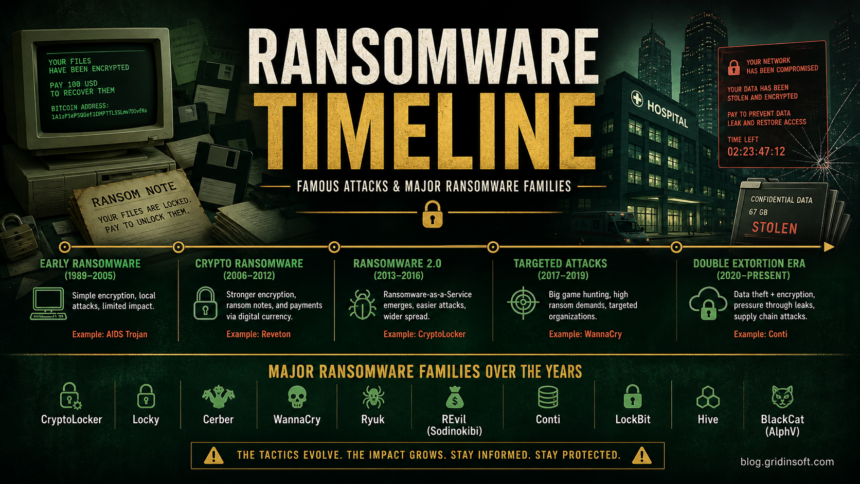
Ransomware timeline by era
| Era | What changed |
|---|---|
| Early extortion malware | Attackers tested the idea that locked access could be monetized. |
| Crypto-ransomware | Strong encryption and cryptocurrency payments made home-user attacks scalable. |
| Worm-like ransomware | Unpatched systems allowed fast spread beyond the first infected machine. |
| Big-game hunting | Attackers focused on organizations that could not tolerate downtime. |
| Double extortion | Data theft and leak threats made backups necessary but not sufficient. |
What the top attacks have in common
Famous ransomware incidents rarely start with encryption. Many start with a stolen password, exposed remote access, a phishing attachment, a vulnerable service, or a loader that gives the attacker time to prepare. By the time the ransom note appears, the attacker may already have mapped the network, disabled backups, or copied data.
This is why a good ransomware list should not be only trivia. Each entry should answer one practical question: what weakness did this attack expose, and how would a defender reduce that risk today?
Prevention checklist from the timeline
- Patch internet-facing systems quickly, especially VPN, file-transfer, and remote-access services.
- Keep backups offline, immutable, or otherwise protected from the same admin account used on endpoints.
- Use MFA for email, remote access, cloud admin panels, and backup consoles.
- Block or monitor script files, macros, and unexpected archive contents from email.
- Practice restoration before an incident; an untested backup is only a hope.
If you suspect ransomware on your PC
- Disconnect the affected device from the network.
- Do not rename encrypted files or run random decryptors.
- Preserve ransom notes and suspicious files for analysis.
- Check whether a trusted decryptor exists for the exact family.
- Scan other devices for loaders, stolen tools, or persistence before restoring from backup.
Gridinsoft Anti-Malware can help check Windows systems for remaining malware, suspicious startup entries, droppers, and bundled threats after an incident. It cannot decrypt ransomware files or guarantee that stolen data was not copied, so backups and account-security review remain essential.
Ransomware examples by victim type
| Victim type | Why attackers care |
|---|---|
| Home users | Photos, documents, and game/crack downloads create emotional pressure and easy infection paths. |
| Small businesses | Limited IT staff and exposed remote access make recovery harder. |
| Healthcare | Downtime affects patient care, which increases pressure to restore quickly. |
| Manufacturing and logistics | Operational downtime can be more costly than the ransom itself. |
| Government and education | Large networks, legacy systems, and public pressure make disruption visible. |
What not to do during ransomware cleanup
- Do not run random decryptors from forums or video descriptions.
- Do not restore backups onto a machine that may still have active malware.
- Do not delete ransom notes before recording family clues and timestamps.
- Do not assume files are safe because encryption stopped; attackers may have stolen data first.
FAQ
What is the most famous ransomware attack?
WannaCry is one of the most famous because it spread globally and affected many organizations. NotPetya, Colonial Pipeline-related DarkSide activity, LockBit, Conti, and Cl0p are also widely discussed.
Should I pay the ransom?
Payment is risky and does not guarantee recovery or data deletion. Preserve evidence, isolate systems, contact qualified incident responders, and check whether a legitimate decryptor exists.
References
- Cybersecurity and Infrastructure Security Agency. “StopRansomware.” CISA, accessed June 13, 2026. https://www.cisa.gov/stopransomware
- CISA. “Indicators Associated With WannaCry Ransomware.” CISA, May 2017, accessed June 13, 2026. https://www.cisa.gov/news-events/alerts/2017/05/12/indicators-associated-wannacry-ransomware
- CISA. “Understanding Ransomware Threat Actors: LockBit.” CISA, June 2023, accessed June 13, 2026. https://www.cisa.gov/news-events/cybersecurity-advisories/aa23-165a