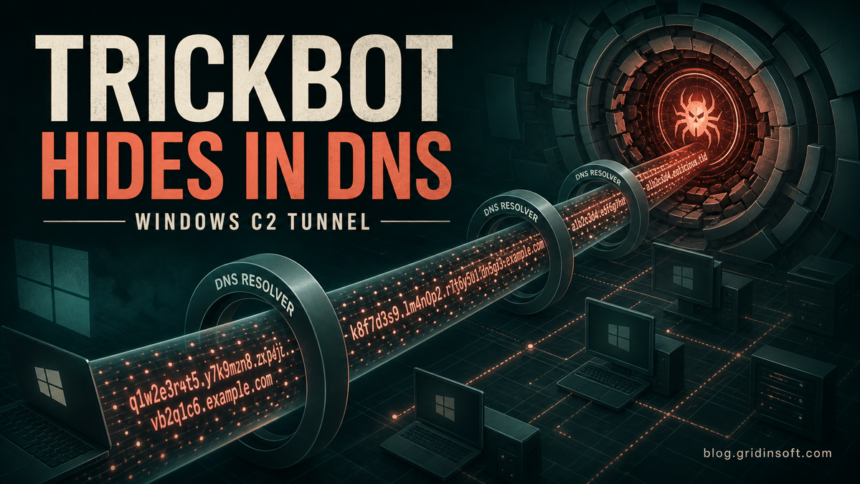
FortiGuard Labs has analyzed a current TrickBot variant that hides command-and-control traffic inside DNS queries and keeps access to an infected Windows system through a disguised scheduled task. The report gives defenders and affected users concrete checks: the domain westurn[.]in, six sample hashes, task names ending in autoupdate #{random}, and two NTFS Alternate Data Streams named $TASK and $FILE.
This is not the first time the TrickBot ecosystem has used DNS tunneling. U.S. agencies documented the related Anchor DNS tool in 2020. The important new signal is that FortiGuard recently captured multiple matching 64-bit samples with a current domain, persistence workflow, and executable hashes. A connection to a public DNS resolver by itself is not evidence of infection.
What the new TrickBot samples do
The analyzed variant can receive commands, download and run EXE or DLL modules, execute PowerShell, inject code into other processes, and run machine code in memory. Instead of using the HTTP channel associated with many earlier TrickBot versions, it encodes command data into long DNS subdomains and sends queries through the public resolver at 8.8.8.8.
FortiGuard found that the malware XORs request data with the byte 0xB9, converts it to hexadecimal text, splits it into DNS-sized labels, and appends westurn.in. Responses can carry payload bytes disguised as IPv4 address records. This lets the traffic pass through infrastructure that may allow DNS while restricting direct outbound connections.
There is an important evidence boundary: the original command server was offline during analysis. The researcher built a simulated DNS server to test the protocol and command handling. The persistence behavior, samples, domain, and DNS packet format came from the captured malware; the demonstrated server responses were reproduced in the lab.
The scheduled task is the clearest Windows clue
When the malware runs without its update flag, it creates a scheduled task that starts at boot and repeats every five minutes. The name combines an existing folder name from %AppData%, the text autoupdate #, and a random number. FortiGuard’s example was Wireshark autoupdate #72784.
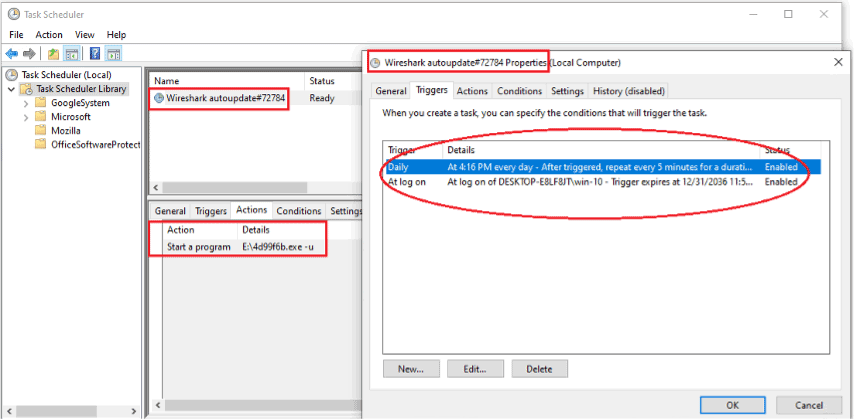
The task name alone is not proof. Check the task’s Actions tab, executable path, digital signature, creation time, and file hash. A legitimate Wireshark installation should not be trusted merely because a task contains the Wireshark name. Conversely, do not delete a legitimate updater based only on a similar-looking label.
TrickBot also saves the Base64-encoded task name and executable path in the $TASK and $FILE Alternate Data Streams. That allows it to recreate the same task instead of leaving many differently named copies.
Indicators to check
| Signal | What to verify |
|---|---|
| DNS domain | westurn[.]in and unusually long encoded subdomains |
| Resolver path | Repeated queries through 8.8.8.8 from the same suspicious process; use of this resolver alone is normal on many systems |
| Scheduled task | A name ending in autoupdate #{random}, running at startup and about every five minutes |
| Task action | An unfamiliar executable, especially from a user-writable or unexpected location |
| NTFS streams | $TASK and $FILE attached to the suspected executable |
| Behavior | rundll32.exe, unexpected PowerShell, process injection, or modules arriving after the DNS activity |
FortiGuard published these SHA-256 hashes for the captured samples:
DF527A5C2FBDE43816CD02F4CD49EEE4 BB82FB4A3C704502 1360888C7D504C98 6C677EB2B3FFD288083C59A13D7BB712 D4754AF61A556387 3F76C440962346F4 105F652E6B8F31C371F2385877E43B67 72AFF5D3168D5D46 35F8A1FCBB321421 33C331EDEDBF8EE9829895424423CE3F D17E359D2E784FCB CE396AACFF458CF5 3B19A82E1354AC14A3DA7C840CBDD0CE 50DB38432D78E767 B36F08E45024C23D BF80245BA792992FBFE24ABAC33F8FD6 6F24CDEB5F0F21CF DF45A29D107C8D3B
What to do if an indicator matches
- Disconnect the device from the network. Do not query the malicious domain or run the file again to “test” it.
- Preserve evidence in an organization. Record the task name, action path, creation time, file hash, DNS log entries, and relevant process tree before deleting anything.
- Block and hunt for the current indicators. Search DNS telemetry for
westurn.inand long high-entropy labels, then correlate them with process creation and scheduled-task events. - Inspect the task action, not only its name. Verify the file path and signature. The same path-and-signature approach is useful when checking a suspicious executable such as tin.exe.
- Run a full malware scan. Remove confirmed detections, reboot, and scan again. A visible file or task can be only one part of a modular infection.
- Reset exposed credentials from a clean device if infection is confirmed. The current report does not prove that every sample stole passwords, but its command set can load additional modules and fully control the host.
If the suspicious task, domain, or file is present, a full Gridinsoft Anti-Malware scan can check for the executable, related modules, scheduled-task persistence, and other detections that a manual task deletion would miss.
DNS-based command channels also appear in other malware families. For comparison, the recent HOLLOWGRAPH analysis uses DNS for credential refresh while hiding its main traffic in Microsoft 365 calendar events. The shared lesson is to correlate DNS activity with endpoint behavior instead of treating one resolver address as a verdict.
FAQ
Does using 8.8.8.8 mean a computer has TrickBot?
No. Google Public DNS is widely used legitimately. The useful signal is a suspicious process repeatedly sending long encoded queries for the reported domain, combined with the task, file, or hash indicators.
Is DNS tunneling new for TrickBot?
No. Anchor DNS activity associated with the TrickBot ecosystem was documented years ago. FortiGuard’s July 2026 report matters because it supplies recently captured samples, a current domain, persistence details, and new hashes.
References
- Xiaopeng Zhang. “Inside a TrickBot Variant Using DNS Tunneling for C2.” FortiGuard Labs, published July 22, 2026, accessed July 23, 2026. Fortinet threat research.
- CISA, FBI, and HHS. “Ransomware Activity Targeting the Healthcare and Public Health Sector.” Joint Cybersecurity Advisory AA20-302A, updated November 2, 2020, accessed July 23, 2026. CISA advisory.