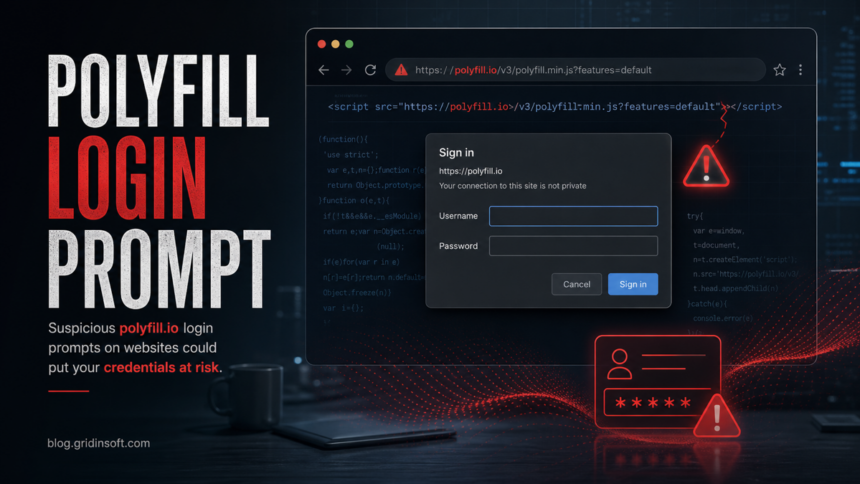
Suspicious browser login prompts tied to polyfill.io have appeared on real websites, including pages reported at MUJI and Toshiba, creating a credential-risk scenario for visitors who may think the prompt belongs to the site they opened. MUJI said some of its pages may have shown a suspicious authentication screen through the external polyfill.io service and advised users who entered a username and password to change that password, including on other services where it was reused [1]. BleepingComputer reported the same pattern on Toshiba and MUJI pages after the domain began responding with authentication requests [2].
The practical rule is simple: if a browser asks you to sign in to polyfill.io, cancel the prompt and do not type any credentials. The dialog is not a normal website login form; it is a browser authentication prompt triggered because the page still loads a third-party script from a domain with a known supply-chain abuse history.
Why the prompt appears
Many older websites embedded a line similar to <script src="https://cdn.polyfill.io/v3/polyfill.min.js"></script> to support legacy browsers. That trust model became unsafe in 2024 after the Polyfill.io service was associated with malicious JavaScript delivery and redirects. Cloudflare’s 2024 mitigation note said the best practice was to remove Polyfill.io from projects and replace it with a secure alternative when a polyfill was still needed [3].
The new login prompt is not proof by itself that the site you visited was hacked, and it is not proof that your password was stolen. It is, however, enough to treat the page as unsafe until the site operator removes the external script and investigates whether visitors interacted with the prompt.
What users should do
- Do not enter anything. Close the prompt, leave the page, and avoid retrying until the site confirms a fix.
- If you entered a password, change it. Change the password on the affected site first, then on any other account where the same password was reused.
- Enable MFA where possible. This is especially important for shopping, email, work, banking, and social accounts.
- Watch for follow-up phishing. If the password was reused, attackers may try related email, marketplace, or payment accounts.
- Scan the device if redirects or downloads followed. A browser prompt alone is not malware, but unexpected downloads, new extensions, or redirects justify a check with Gridinsoft Anti-Malware or another trusted endpoint tool.
If you only saw the prompt and typed nothing, account recovery is the priority. Scan the Windows PC when the incident included a download, new extension, redirect loop, or helper app, because that changes this from a website-login issue into local cleanup.
A login prompt alone is an account issue. Scan the Windows PC if the incident also led to a download, extension, helper app, redirects, or new local symptoms.
Scan before reusing accountsWhat site owners should check
Search templates, CMS themes, tag-manager snippets, old plugins, and bundled JavaScript for these strings:
polyfill.iocdn.polyfill.iopolyfill.min.js
Remove the dependency rather than only hiding the prompt. If a polyfill is still genuinely required, use a maintained source that you can verify, and review whether the script tag came from your own code, an old theme, a third-party widget, or a tag manager. For public-facing sites, also consider a short incident note if visitors may have entered credentials.
How to reduce repeat risk
Third-party JavaScript should be treated as part of the site’s attack surface. Keep an inventory of externally loaded scripts, remove legacy compatibility code that is no longer needed, limit who can edit tag-manager containers, and review Content Security Policy settings so unexpected script sources are easier to spot. If your site accepts logins, add monitoring for sudden credential-reset spikes and support tickets mentioning strange browser sign-in prompts.
FAQ
Is the polyfill.io prompt a real login request?
No. Treat it as suspicious. It is a browser authentication prompt for a third-party domain, not a normal account login page for the website you meant to visit.
Was my account stolen if I saw the prompt?
Seeing the prompt does not mean your account was stolen. Entering credentials into it creates risk, so change the affected password and any reused passwords immediately.
Should website owners just block polyfill.io?
Blocking helps visitors, but the durable fix is to remove the old dependency from code, templates, plugins, or tag-manager snippets and verify that no page still loads it.
References
- Ryohin Keikaku / MUJI. “Notice about display of a suspicious authentication screen,” MUJI, June 2, 2026; updated June 3, 2026, accessed June 6, 2026. https://www.muji.com/jp/ja/notice/1676928
- Bill Toulas. “Suspicious Polyfill login prompts pop up on Toshiba, Muji websites,” BleepingComputer, June 5, 2026, accessed June 6, 2026. https://www.bleepingcomputer.com/news/security/suspicious-polyfill-login-prompts-pop-up-on-toshiba-muji-websites/
- Cloudflare. “Automatically replacing polyfill.io links with Cloudflare’s mirror for a safer Internet,” Cloudflare Blog, June 27, 2024, accessed June 6, 2026. https://blog.cloudflare.com/automatically-replacing-polyfill-io-links-with-cloudflares-mirror-for-a-safer-internet