
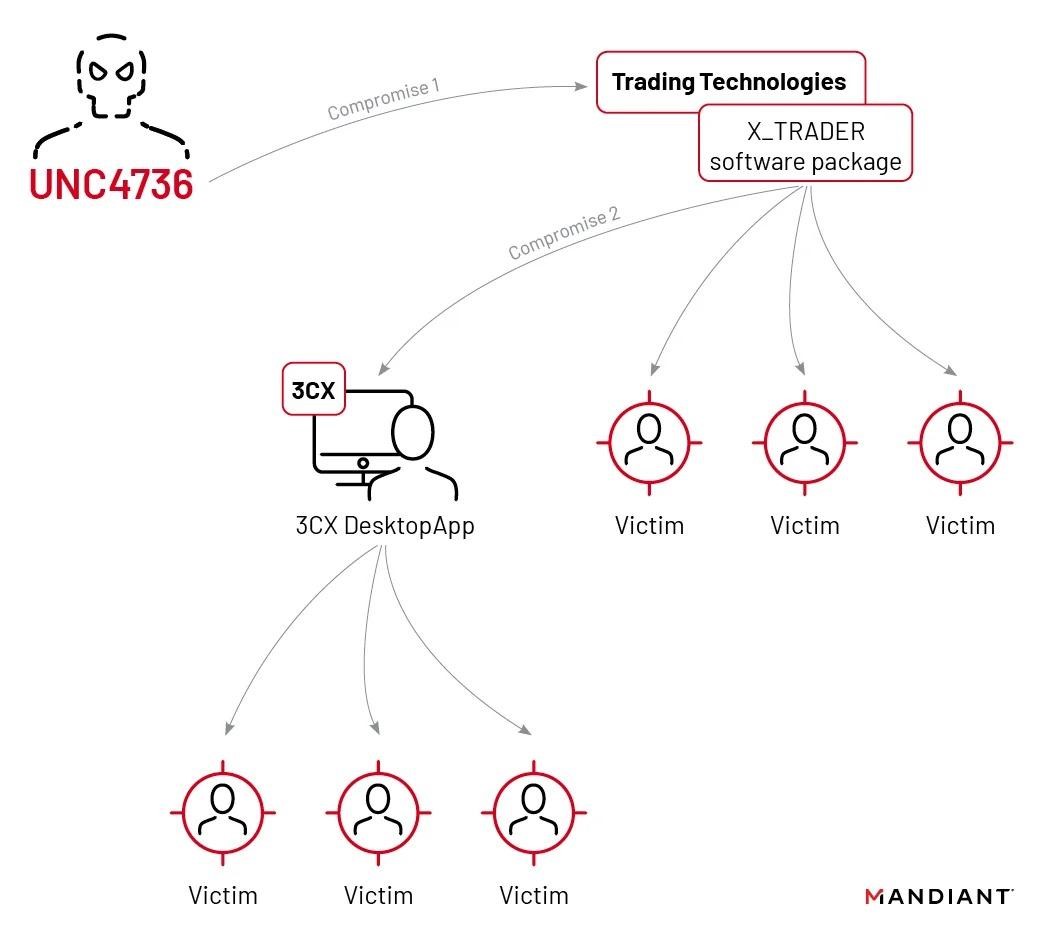
An investigation into the 2023 3CX compromise showed a rare but important pattern: one software supply-chain attack helped enable another. Mandiant reported that a trojanized X_TRADER installer from Trading Technologies infected a 3CX employee system, which later gave attackers a path toward the 3CX build environment.
This matters because supply-chain incidents are not only vendor problems. A trusted updater, desktop client, browser script, or old third-party component can become the delivery path that exposes normal users and organizations.
What Happened in the 3CX Attack
3CX is a VoIP software vendor whose desktop client was compromised in 2023. Customers who installed or updated the affected desktop app could receive a trojanized version through a trusted software channel.
Mandiant later tied the 3CX incident to an earlier compromise involving Trading Technologies software. According to the investigation, a trojanized X_TRADER installer deployed malware on a 3CX employee computer. The attackers then moved from that access toward the company environment used to build and distribute the 3CX desktop application.
Why This Was a Supply-Chain-on-Supply-Chain Case
Most supply-chain attacks abuse trust in one vendor or update channel. The 3CX case was more layered: the first compromised software package helped create the conditions for a second compromised software package.
The practical lesson is straightforward. If a trusted program is flagged after an update, do not assume the alert is harmless just because the software name is familiar. Check the vendor advisory, hash or version details, and whether the vendor recommends uninstalling, updating, or switching to a different client.
What Users and Admins Should Check
- Software source: install updates only from the official vendor site or managed update channel.
- Version and hash: compare suspicious installers against vendor or researcher guidance when available.
- Endpoint alerts: treat detections on recently updated trusted apps as investigation leads, not as automatic false positives.
- Persistence and credentials: check startup entries, services, scheduled tasks, browser sessions, and account activity after a suspected compromise.
- Vendor guidance: follow official remediation steps when a supplier confirms a compromise.
The same risk pattern appears in smaller web incidents too. Old third-party JavaScript can expose visitors, as shown by the recent polyfill.io login prompt issue on websites that still loaded the retired service.
A newer example is the DAEMON Tools Lite supply-chain incident: if Microsoft Defender reports Backdoor:Win64/RogueDaemon.LTSN!MTB, check the DAEMON Tools version and install date before restoring anything.
How to Reduce Supply-Chain Risk
For home users, the best defense is to keep software boring: download from official sources, remove unused utilities, avoid cracked installers, and scan unexpected downloads before running them. For teams, software inventory and fast vendor-advisory review matter just as much as malware scanning.
If you suspect a downloaded app or update was compromised, disconnect the affected machine from sensitive accounts, run a full scan, review recently installed programs, and rotate passwords from a clean device when account theft is possible.
References
- Mandiant. “3CX Software Supply Chain Compromise Initiated by a Prior Software Supply Chain Compromise.” Google Cloud Blog, April 20, 2023, accessed June 6, 2026. https://cloud.google.com/blog/topics/threat-intelligence/3cx-software-supply-chain-compromise/
- Google Threat Analysis Group. “Countering threats from North Korea.” Google Blog, March 29, 2023, accessed June 6, 2026. https://blog.google/threat-analysis-group/countering-threats-north-korea/