Phantom Stealer is being pushed through fake request-for-quote emails that hide Windows script execution behind a normal business attachment. Fortra’s June 16 report says the observed sample arrived as a RAR archive, unpacked a batch file named 2026REQUEST_FOR_QUOTE.bat, launched obfuscated PowerShell, and then moved into in-memory credential theft.
The practical risk is simple: if someone opens the archive and runs the file inside, the visible email may be gone while the stolen browser passwords, cookies, autofill data, screenshots, clipboard content, and crypto-related data are already moving out through attacker-controlled channels. Treat this as a phishing-download incident, not only as a suspicious email.
Who is being targeted?
Fortra describes the campaign as aimed at banks and other high-value organizations, but the lure itself is familiar to any business mailbox: a supplier-style quote request with an archive attachment. That makes the pattern useful for smaller companies too, especially teams that handle procurement, invoices, shipping, or sales requests from unknown senders.
The campaign is not a reason to distrust every RFQ message. It is a reason to verify compressed attachments, unexpected scripts, and files that ask the user to “open” or “enable” something outside the normal document workflow. A separate Zambia Ministry tender scam used static PDFs with no active payload, illustrating why a fraudulent procurement document is not automatically malware even though later files may be dangerous. For a broader recognition checklist, see our guide on how to spot a phishing email.
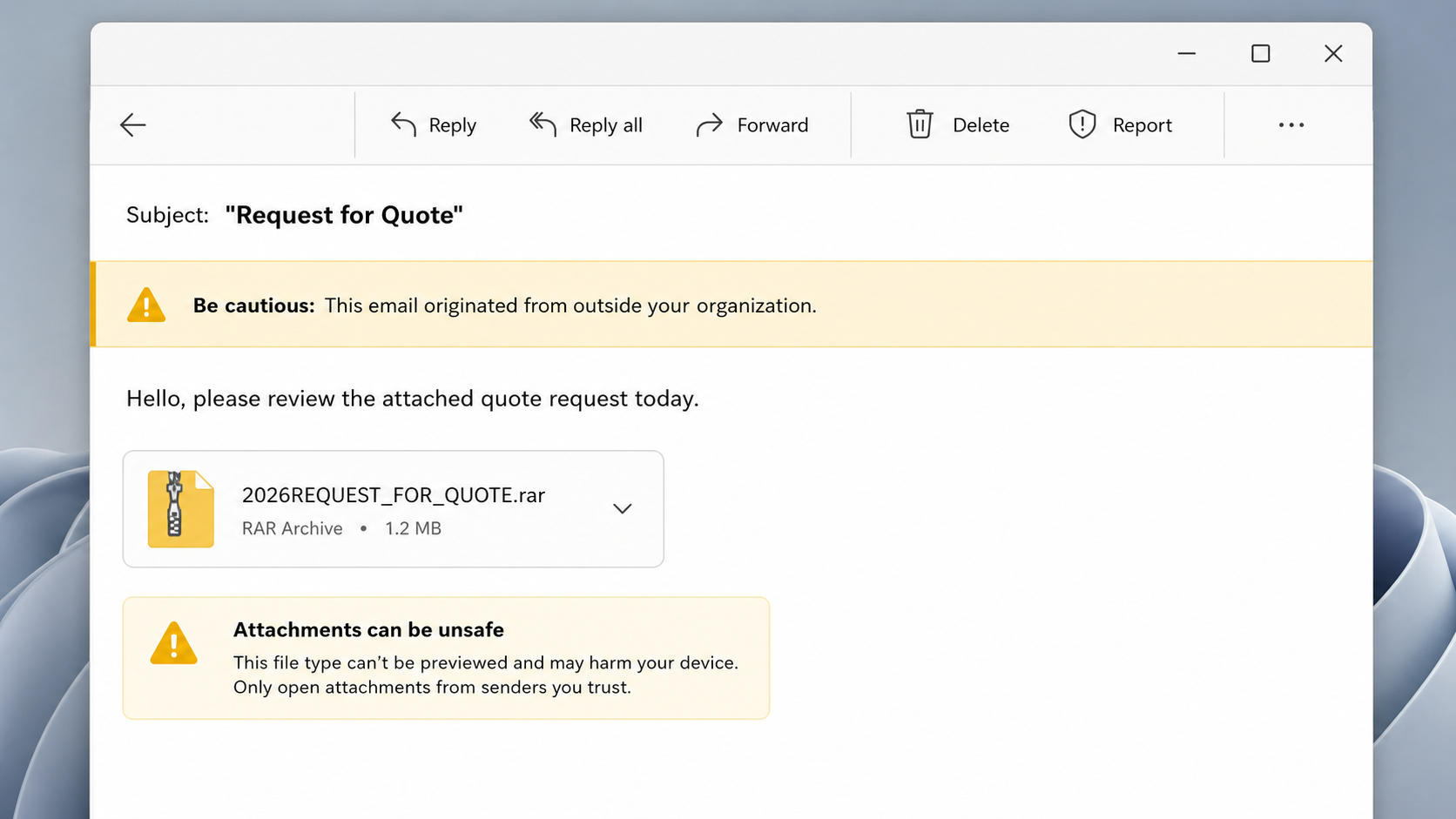
What the fake RFQ email looks like
Fortra’s sample used a request-for-quote theme.
Example:
- Subject: Request for Quote
- Sender style: a new supplier, buyer, or procurement contact the recipient was not expecting
- Body: a short line asking the recipient to review the attached quote request today
- Attachment: a compressed archive such as
2026REQUEST_FOR_QUOTE.rar - Risk sign: the archive contains a script or batch file, not a normal PDF, DOCX, XLSX, or portal link
How Phantom Stealer runs after the archive is opened
The Fortra sample started with a RAR archive and a batch file, then used PowerShell to stage the stealer. The report also notes process behavior that should stand out during triage: browser processes such as Chrome, Firefox, and Edge were spawned without normal user activity, and the chain checked the public IP address through icanhazip.com before later activity.
| Signal | Why it matters |
|---|---|
2026REQUEST_FOR_QUOTE.rar or similar RFQ archive |
The lure starts as a business attachment, not as an obvious installer. |
2026REQUEST_FOR_QUOTE.bat |
A batch file inside a quote archive is a strong malware warning. |
Obfuscated PowerShell, including TERROR.ps1 in the reported chain |
PowerShell is used to decode and execute later payload stages. |
| Unexpected browser processes | Credential stealers often touch browser data stores even when the browser was not opened by the user. |
Injection into explorer.exe |
Running inside a trusted Windows process can make the theft stage less obvious. |
What to do if the attachment was opened
- Disconnect the PC from the network. Use wired/Wi-Fi disconnect first if the file already ran.
- Do not keep testing the archive. Preserve the original email and file for IT/security review, but stop opening it.
- Check for script and persistence artifacts. Look for unusual PowerShell activity, RunOnce entries such as
HKCU\Software\Microsoft\Windows\CurrentVersion\RunOnce, unexpected startup items, and suspicious child processes underexplorer.exe. - Reset exposed credentials from a clean device. Prioritize email, banking, admin, VPN, cloud, browser-synced accounts, and any accounts saved in the affected browser.
- Revoke sessions and tokens. Signing out of all sessions matters because stealers can capture cookies, not only passwords.
- Run a full malware scan. If the file ran, a normal email deletion is not enough.
If a suspicious archive or script ran on Windows, Defender or another security tool may remove the visible file while a script, scheduled task, registry entry, browser change, or injected payload remains. Run a full Gridinsoft Anti-Malware scan, remove detections, reboot, and scan again if browser logins, pop-ups, blocked connections, or security alerts return.
If the page or email made you download an invoice, coupon, tracking app, browser extension, or support tool, scan the PC before opening it again or logging into sensitive accounts.
Scan this PC after a suspicious RFQ attachmentIf the message is about supplier onboarding instead of a quote archive, compare it with the red flags in our Flydubai vendor registration email scam guide before sending company profiles, trade licenses, or customer references.
Questions to ask before opening a quote archive
- Was this supplier, buyer, or procurement contact expected?
- Can the sender confirm the request through a known phone number or existing thread?
- Does the attachment contain a script, BAT, CMD, EXE, JS, VBS, SCR, LNK, or ISO file?
- Does the email pressure the recipient to review the attachment “today” without context?
- Would a safer upload portal or PDF be normal for this business process?
For adjacent cleanup cases, see our guidance on document-themed email malware and crypto clipper behavior.
FAQ
Is Phantom Stealer only a banking threat?
No. The reported campaign focused on banks and high-value organizations, but the RFQ attachment pattern can reach any business mailbox that handles external requests.
Does deleting the email remove Phantom Stealer?
No. Deleting the email only removes the lure. If the archive contents ran, the response should include host isolation, malware scanning, credential resets, and session revocation.
Why is a RAR attachment risky?
RAR files are not malicious by themselves, but they can hide scripts or executables behind a business-looking file name. A quote archive that contains a BAT or PowerShell stage should not be treated like a normal document.
References
- Fortra. “Phishing Campaign Targets Banks with Fileless Phantom Stealer Malware.” Fortra, published June 16, 2026, accessed June 19, 2026. https://www.fortra.com/blog/phishing-campaign-targets-banks-fileless-phantom-stealer-malware