As of our July 18, 2026 review, Gridinsoft’s SpankBang report showed a 10/100 trust score and one provider warning. Its visible scan timestamp was July 9, so treat that result as a current caution signal, not a permanent verdict. Do not run downloads, approve browser permissions, or submit passwords or payment data while the warning remains. A visit alone does not prove infection; the right response depends on what happened next.
What to do now
- Only viewed a page: close it and check whether another tab, download, or permission prompt appeared.
- Redirected or shown a fake alert: do not call a number, install an update, or press an on-page Scan button.
- Allowed notifications: remove that site’s permission in the browser settings.
- Downloaded but did not open: delete or quarantine the file and verify its full extension.
- Ran a file, APK, app, or extension: scan the device and inspect recent apps, extensions, startup items, and account activity.
Why does SpankBang have a malware warning?
The current Gridinsoft SpankBang website reputation report classifies the domain as a Malware Distributor. During our review, the report card displayed one security-provider warning, a low third-party review rating, and a 10/100 trust score. It also recorded positive context such as a long domain history, high traffic, and a valid certificate.
That mix matters. A long-lived HTTPS site is not automatically safe, while one warning does not identify the exact file, advertisement, redirect, or visit that caused it. Reputation systems also update at different times and may disagree. Use the warning to avoid risky actions and to investigate what your browser or device actually did, rather than assuming that every visitor is infected.
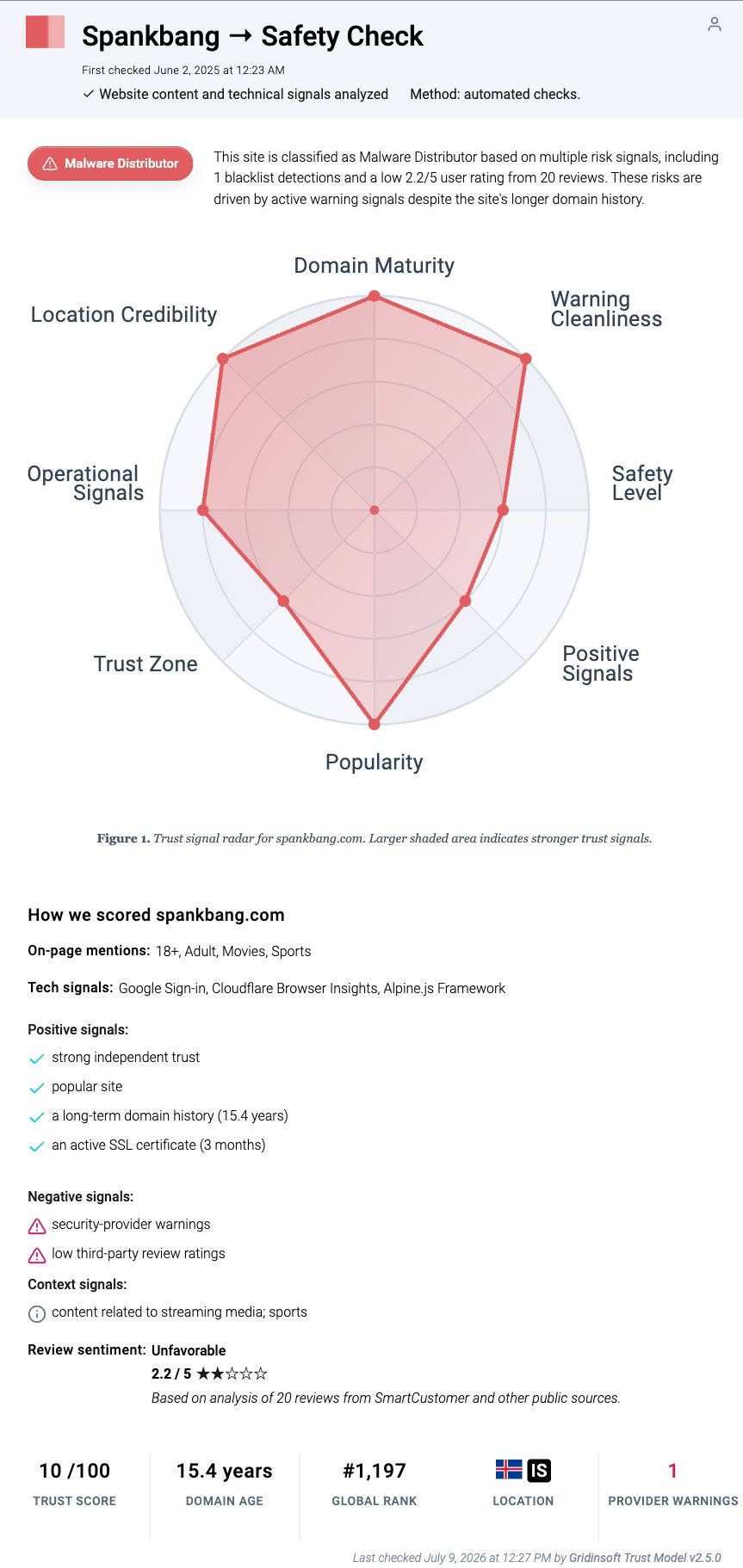
The report is evidence about the domain at one point in time. It does not certify every ad destination, mirror, third-party script, download, or account form that may appear later. It also cannot inspect your device and tell whether a redirect merely opened or whether an installer executed.
Match the response to what happened
| Situation | Risk and what to do |
|---|---|
| Recognized page only | A page view alone is not proof of infection. Close it, then check the browser’s downloads, recent tabs, and site permissions. |
| Redirect or fake virus alert | The destination is a separate security decision. Close the tab without interacting, record the address if it is safe to do so, and inspect downloads and permissions. |
| Notifications allowed | Later alerts may be website notifications rather than antivirus findings. Block the permission and remove unfamiliar allowed sites. |
| File downloaded, not opened | Delete or quarantine it. Reveal the full extension and do not launch it to find out what it does. |
| Installer, APK, script, app, or extension ran | Treat this as possible execution. Scan the device, remove unknown software, and check persistence and account activity. |
| Password or payment data entered | Use a clean device to change reused passwords and revoke sessions. Contact the card issuer or payment provider if financial details were submitted. |
The action is more useful evidence than the brand name. A redirected tab that was closed is a different incident from an extension that was installed or a file that ran.
If you were redirected or saw a fake virus alert
Do not use the warning’s phone number, download button, browser extension, QR code, or on-page cleanup tool. A page cannot reliably diagnose your computer through a dramatic countdown or a list of invented infections. Closing the tab does not authorize a site to keep scanning, and reopening it to take another look only creates another chance to click.
- Close the destination tab. If it traps the browser, close the whole browser from the operating system rather than following its buttons.
- Check the download list. Remove unexpected installers, archives, scripts, shortcuts, DMG files, or APKs without opening them.
- Review site permissions. Look for notification, pop-up, redirect, camera, microphone, and location permissions granted to an unfamiliar address.
- Clear data for the suspicious destination. You do not need to erase every saved password or the entire browser profile because one tab opened.
- Watch for recurrence. New tabs that continue after the original page is closed may point to notification permission, an extension, a changed browser setting, or installed software.
If the alert returns outside the site or new tabs keep opening by themselves, use our guide for a browser that opens multiple tabs. For deceptive full-screen warnings, the fake virus alert cleanup guide explains how to separate a webpage from a real security-tool notification.
Remove unwanted SpankBang notifications
A website notification can appear after the browser is closed and imitate a system or antivirus warning. Its presence does not mean the named website is still open, and clicking it may lead to a different domain.
- Open the browser’s privacy or site settings.
- Find Notifications and review the allowed list.
- Block or remove the unfamiliar domain that sent the alert. Check the address shown on the notification instead of relying on the logo or headline.
- Review pop-up and redirect permissions as a separate setting.
- Dismiss existing notifications without opening their links.
Chrome separates notification permission from its pop-up and redirect control, so changing one setting may not remove the other. Our browser-by-browser guide shows how to disable unwanted push notifications on desktop and mobile.
If a file downloaded but you did not open it
An unopened download is usually a lower-risk incident than an executed file. Delete or quarantine it, then expose the full filename extension. A supposed video should not need an .exe, .msi, .scr, .lnk, .js, .bat, browser extension, DMG installer, or APK from an advertising destination.
Do not disable antivirus protection, add an exclusion, extract a password-protected archive, or restore a quarantined file just to test it. If an alert names a file or detection, record that information before deletion. The downloaded-but-not-opened checklist covers the evidence to preserve and why the risk changes after execution.
If you ran an installer, APK, app, script, or extension
Execution moves the incident beyond browser cleanup. Disconnect from the network if the device is behaving unexpectedly, stop signing in to accounts on that device, and use another clean device for sensitive account recovery.
- Remove unfamiliar apps and browser extensions installed around the same time.
- Run a full security scan and quarantine detections.
- Restart, then check whether redirects, alerts, new tabs, or browser changes return.
- On Windows, review startup apps and scheduled tasks if symptoms survive a reboot. On Android, remove sideloaded apps and make sure unknown-app installation is disabled for the browser or file manager.
- On iPhone or iPad, remove an unfamiliar configuration profile, calendar subscription, or app only if one was actually added; a normal webpage cannot install a Windows executable on iOS.
Deleting the visible download may leave a loader, startup entry, scheduled task, browser change, extension, or bundled module that recreates the warning. Gridinsoft Anti-Malware can check Windows for detections, hidden files, startup entries, scheduled tasks, browser changes, and other persistence after the manual containment steps.
If the page or email made you download an invoice, coupon, tracking app, browser extension, or support tool, scan the PC before opening it again or logging into sensitive accounts.
Scan for malware leftoversIf you entered a password or payment information
Malware scanning cannot undo information already submitted to a deceptive page. From a clean device, change the exposed password and every account that reused it, revoke active sessions, and enable multi-factor authentication. Start with the email account because it can reset many other services.
If card or bank details were entered, contact the issuer using the number on the card or the official app. Ask what monitoring, replacement, or dispute steps apply. Do not call a number from the warning page or a follow-up notification.
How to confirm cleanup
- No unexpected downloads, apps, extensions, profiles, or notification permissions remain.
- The browser opens to the expected homepage and search engine.
- Tabs, redirects, and fake alerts do not return after a restart.
- A repeat full scan does not find active threats.
- Email, social, payment, and other sensitive accounts show no unknown sessions or transactions.
Do not reinstall the operating system because one redirect opened and nothing downloaded. Escalate when there is evidence of execution, persistent browser changes, recurring alerts after restart, unknown software, or account activity. The broader adult-site malware guide explains the common fake-player, notification, redirect, and download paths without requiring visits to any adult site.
FAQ
Does a 10/100 trust score prove every SpankBang visit installed malware?
No. It is a strong caution signal about the domain report at a specific time, not a device diagnosis. Check what opened, downloaded, ran, or received permission on your device.
Can simply visiting SpankBang give my phone or computer a virus?
A page visit alone is not evidence of infection. Risk rises when a malicious destination exploits an unpatched browser or when the user approves a download, app, extension, profile, notification, or credential form. Keep the browser and operating system updated and investigate the actual action taken.
Is a downloaded video safe if it has not been opened?
Do not judge it by the icon or filename. Reveal the full extension, delete or quarantine unexpected files, and do not run an installer, script, shortcut, archive payload, or APK presented as a video. An unopened file generally presents less risk than one that executed.
Does Incognito mode make SpankBang safe?
No. Private browsing mainly limits local history and site data after the session. It does not verify a domain, block every redirect, neutralize downloads, remove notification permissions, or protect information entered into a deceptive form.
References
- Google Chrome Help. “Block or allow pop-ups in Chrome.” Google, accessed July 18, 2026. https://support.google.com/chrome/answer/95472?hl=en
- Google. “Safe Browsing.” Google Safe Browsing, accessed July 18, 2026. https://safebrowsing.google.com/