HackTool:Win32/AutoKMS is a Microsoft Defender detection for unofficial KMS activators that bypass Windows or Office licensing. It is not a normal Windows component or a random Defender bug. Keep the detected file quarantined and use a full Gridinsoft Anti-Malware scan to check the activator and any bundled malware. After cleanup and a restart, investigate specific tasks, services, startup entries or exclusions only if a fresh alert or other symptom remains.
What should you do first?
- Let Defender quarantine or remove the detected AutoKMS file instead of restoring it.
- Install and update Gridinsoft Anti-Malware, run a Full Scan, review detections, apply cleanup, then restart.
- Remove an identified activator package; use manual checks only for leftovers linked to that package or a fresh detection.
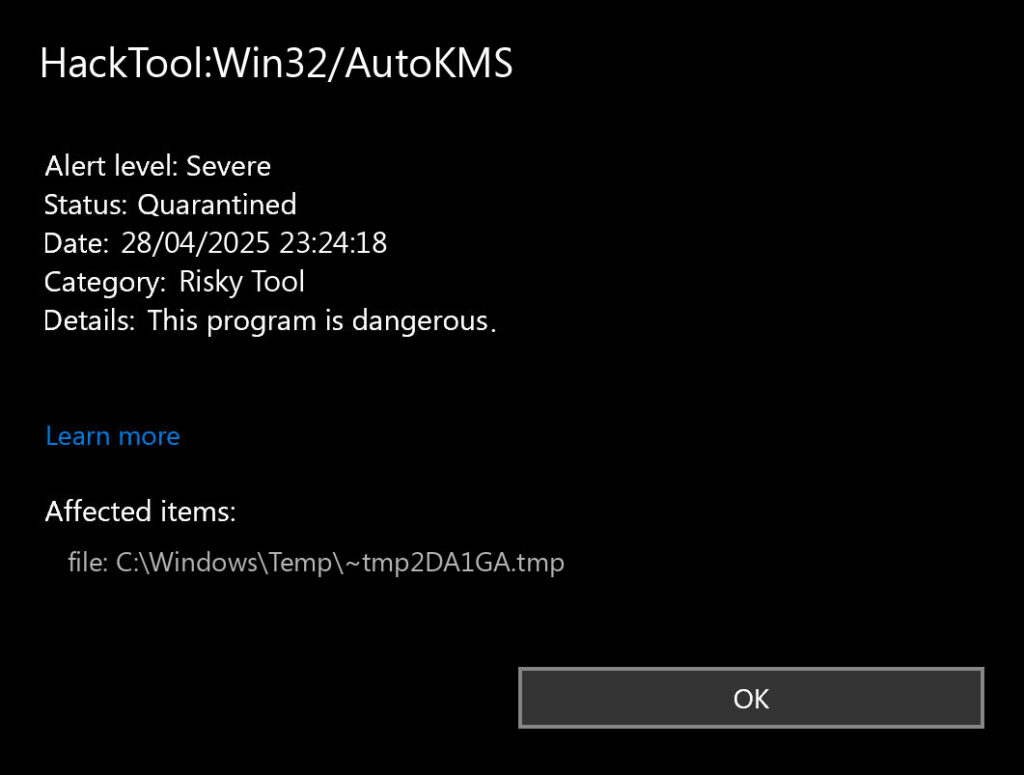
- Compare the newest alert time, status and affected path before treating an old Protection History entry as a returning infection.
For KMSPico-specific cleanup after running an activator, use our KMSPico risks and removal guide. For broader crack-related detections, see HackTool:Win32/Crack.
Defender detection context: This guide is part of our Microsoft Defender detection reference. For HackTool:Win32/AutoKMS, the source of the file matters as much as the detection name.
| Detection | HackTool:Win32/AutoKMS |
| Type | HackTool / KMS activator / license-bypass detection |
| Risk signal | High when installed from cracks, Office/Windows activators, repacks, torrents, or unknown scripts. |
| Best first action | Keep the detection quarantined, run a Full Scan and apply cleanup, restart, then verify legitimate activation. Investigate persistent symptoms if needed. |
AutoKMS scenarios: what to remove and when to worry
| Defender only found AutoKMS in quarantine | Keep it quarantined, remove the activator package, and verify Windows or Office activation through legitimate settings. |
| You knowingly ran a KMS activator | If you approved an administrator prompt, the tool had elevated access. Run a full scan and apply cleanup before resuming sensitive activity. If account theft is suspected, secure accounts and revoke sessions from a separate trusted device while cleaning the PC. |
| The alert returns after reboot | Compare the newest Protection History event time, status and affected path with the earlier detection. A fresh event after cleanup warrants checking what launches that file; an old quarantined entry alone does not establish recurrence. If the exact task name is AutoPico Daily Restart, use the dedicated task-removal checklist. |
| It came with a crack, repack, or torrent | Treat the PC as potentially exposed to stealer, loader, miner, or backdoor payloads and clean it before using passwords or payment accounts. |
Related: If Defender names the file specifically as a key generator, use the dedicated HackTool:Win32/Keygen removal guide.
What exactly is HackTool:Win32/AutoKMS?
AutoKMS tools emulate or abuse Microsoft Key Management Service activation so Windows or Office appears licensed without a legitimate key. Corporate KMS activation is a real Microsoft licensing mechanism [2], but a consumer PC running an unofficial AutoKMS package is a different situation: the tool is usually installed from a crack bundle and often needs elevated permissions to keep activation emulation working.
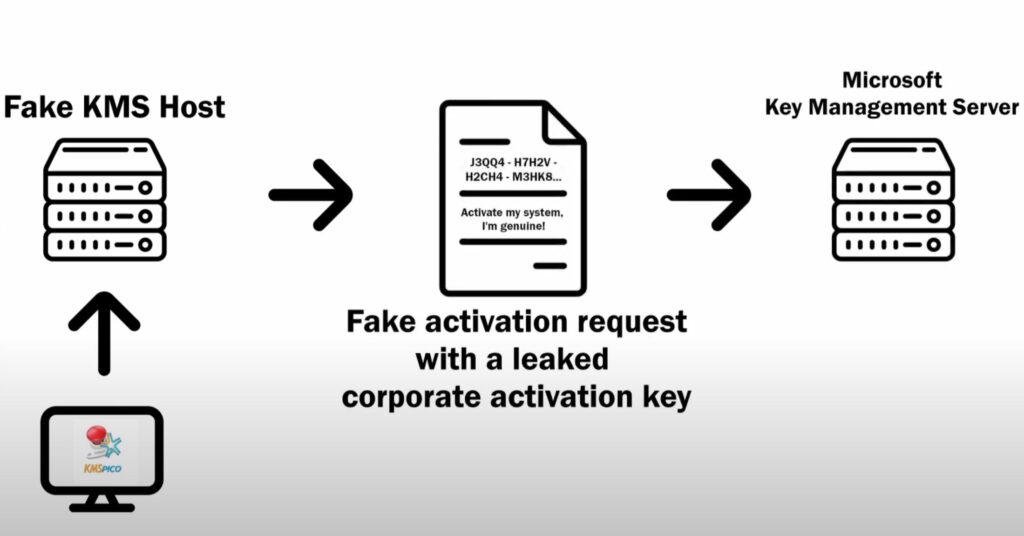
Common names include KMSAuto, AutoKMS, Microsoft Toolkit, and KMSPico. The safety question is not only whether the activator works. The more important question is what else arrived with it, what persistence it created, and whether the same source also delivered a loader, stealer, miner, or unwanted browser component.
Why Defender flags AutoKMS
Security tools flag AutoKMS because it is a hacktool used for license bypass and because its behavior overlaps with malware techniques: protected-system changes, scheduled execution, service creation, script use, and sometimes Defender exclusion changes. That does not mean every copy steals data, but it does mean the file should not be treated like normal freeware.
Microsoft’s own detection family lists HackTool:Win32/AutoKMS as a high-alert hacktool associated with cracking or patching unregistered Microsoft software, and Microsoft warns that malware can be distributed with such tools. That official context is why restoring the detection just to keep Windows or Office activated is a poor tradeoff. [1]
The real risks: activation, persistence, and bundled payloads
AutoKMS typically comes from unofficial download sites, crack packs, repacks, torrent bundles, or repair-shop images. Those sources can add unrelated payloads while still delivering a working activator, so a successful activation does not prove the package was clean.
Persistence matters when a new detection appears after cleanup. Compare its time, status and affected path with the scan log before investigating a service, scheduled task, startup entry or companion script tied to that file. Protection History also records past actions, so a retained quarantine card is not by itself evidence that a file has been recreated. [3]
If activation depended on the unofficial tool, removing it may leave Windows or Office unactivated. The detection does not establish whether the device already has a valid license; check the entitlement before buying another one or changing activation settings.
Signs HackTool:Win32/AutoKMS Might Be on Your System
Besides the obvious antivirus alerts, there are some other signs that might indicate AutoKMS is present on your system:
- Your Windows or Office shows as activated but you don’t remember purchasing a license
- Random connections to unusual IP addresses (the fake KMS server communicating)
- Unexpected system slowdowns or strange behavior
- Finding files with names like “AutoKMS.exe” or folders related to activation tools
- Windows Update errors related to licensing
If you didn’t intentionally install this tool and you’re seeing these signs, it’s possible someone else set it up on your computer or it came bundled with other software. Free software is rarely actually free – you’re usually paying with something else, whether that’s your data, your security, or both.
How to Remove HackTool:Win32/AutoKMS
If you’ve decided that having properly licensed software is better than rolling the malware dice, here’s how to remove AutoKMS from your system:
Step 1: Keep the detection quarantined and run a Full Scan
Do not restore the detected activator or add an exclusion to keep it working. Download and install Gridinsoft Anti-Malware, update its detection database, and run a Full Scan. Review the detected items, apply cleanup, and restart when prompted. A scan can check for detected hidden files, startup entries, scheduled tasks, bundled apps and other persistence beyond the visible AutoKMS file; it cannot prove that every threat is gone or undo stolen account information.
Cracks, repacks, and activators can add Defender exclusions, startup tasks, services, browser changes, stealers, or miners outside the folder you meant to install. Scan for those changes before trusting the PC.
Scan AutoKMS leftoversIf the installer or scanner cannot run, use Safe Mode or offline recovery as a fallback to regain access, then return to the full scan. Do not disable protection or run the activator again to work around a blocked installation.
Step 2: Check the result after restarting
Review the scan log and the original symptom. In Windows Security > Virus & threat protection > Protection history, expand the latest relevant card and compare its time, status and affected path. A new detection after the restart, an incomplete removal or fresh suspicious activity needs follow-up. An older entry marked quarantined or removed can remain in the history; deleting that history is not a cleanup test. [3]
Optional: investigate an identified package or persistent artifact
If an activator package remains installed, use Settings > Apps or Control Panel > Programs and Features to remove the identified package. Names can include “KMSAuto,” “Microsoft Toolkit” or “KMSPico.” Match the package to the detection rather than uninstalling legitimate licensing software merely because its name contains KMS. Ask IT before changing services on a managed work or school PC.
For a fresh detection that survives cleanup, correlate its affected path with a scheduled task’s action, service executable or startup command. Review only exclusions and firewall rules demonstrably added by that activator. Do not delete Windows licensing services, broad folders or registry keys by name alone. These example paths are clues to compare with the detection, not a mandatory deletion list:
- C:\Program Files\AutoKMS
- C:\Program Files (x86)\AutoKMS
- C:\Windows\AutoKMS
- C:\Windows\System32\AutoKMS.exe
- C:\Users\[username]\AppData\Roaming\Microsoft Toolkit
- C:\Users\[username]\AppData\Local\Microsoft Toolkit
After resolving a confirmed leftover, restart and scan again if symptoms return. If removal remains incomplete, retain the detection path and scan log for support instead of repeatedly restoring the file or making blind registry edits.
What About My Activation Status?
After cleanup, check Settings > System > Activation in Windows 11, or Settings > Update & Security > Activation in Windows 10. Windows may already have a digital license or a legitimate product key for the installed edition. The AutoKMS label alone cannot tell you which entitlement you have. Follow the official activation troubleshooting route if a valid license is not being recognized. [4] For a managed Windows or Office installation, ask IT to verify the organization’s KMS or other licensing arrangement; do not replace corporate settings with a public KMS server. If you have no valid entitlement, legitimate options include:
- Purchase a genuine license from Microsoft or an authorized retailer
- Use free alternatives like Linux and LibreOffice
- Check if you qualify for free or discounted versions (students and educators often do)
- Use the limited functionality of the unactivated versions (Windows will still work, just with some limitations)
Yes, paying for software feels painful when “free” options exist, but consider it an investment in both security and karma. Using a legitimate license avoids relying on an unknown activator, but activation status alone does not establish that the PC is clean.
Prevention is Better Than Cure
The best way to avoid dealing with tools like AutoKMS is to never install them in the first place. Be wary of any software promising “free activation” or “genuine Windows/Office for free” – these are classic signs of potentially unwanted programs. If something sounds too good to be true in the software world, it usually comes with strings attached – or worse, malware.
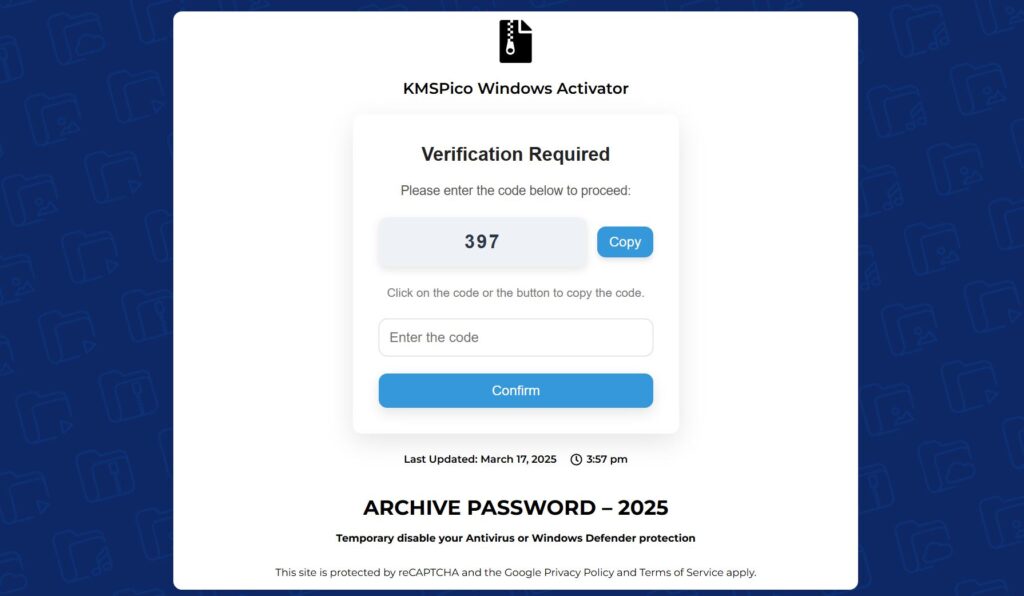
When downloading any software, stick to official sources and authorized resellers. Those random forums and torrent sites might offer tempting free alternatives, but they also offer a free side of security headaches that nobody needs.
The bottom line
HackTool:Win32/AutoKMS is best handled as a risky license-bypass tool, not as a harmless Windows component. If Defender detected it, keep the file quarantined, run a full scan and apply cleanup, then check the original symptom after restarting. Investigate confirmed leftovers only when needed and verify the legitimate activation path afterward.
If you installed AutoKMS intentionally, do not restore it just to keep activation working. If you did not install it, treat the device as untrusted until the activator and any bundled payloads are gone.
References
- Microsoft Security Intelligence. “HackTool:Win32/AutoKMS.” Microsoft, updated September 15, 2017; accessed October 10, 2026. HackTool:Win32/AutoKMS threat description
- Microsoft Learn. “Key Management Services (KMS) client activation and product keys.” Microsoft, accessed June 18, 2026. https://learn.microsoft.com/en-us/windows-server/get-started/kms-client-activation-keys
- Microsoft Support. “Protection History in the Windows Security App.” Accessed October 10, 2026. Protection History
- Microsoft Support. “Activate Windows.” Accessed October 10, 2026. Activate Windows
Related Microsoft Defender guides