A secret removed from a public commit in May was still valid in October—and LiteLLM says it became the first step toward a poisoned software release. Its October 23 investigation traces the compromise of LiteLLM 1.107.0 through an unrevoked platform key and three stolen GitHub identities. A separate Microsoft analysis explains the consequence for users: starting Python in an affected environment could launch a credential collector even when the application never imported LiteLLM. [1][2]
If you may have installed the affected release, do not use that environment’s Python or pip to check it. Isolate it and inspect its files and deployment records using trusted tools from outside the environment. The same interpreter you want to question can activate the payload.
A deleted commit left a working key
According to LiteLLM, a May 27 configuration commit exposed the master key of an experimental Agent Platform. The commit was overwritten, but the key was not revoked. On October 10, an attacker used it to retrieve agent configuration containing an organization owner’s GitHub CLI OAuth token.
That transformed access to one agent service into control over repositories. The attacker ran repository workflows to extract two more maintainers’ tokens. One identity could change the release process, another approve production, and a third delete run records. Separate account names therefore did not mean independent human approval.
The team’s timeline contains a revealing five-second reversal: a maintainer-token push was blocked by branch protection at 10:08:29 UTC on October 21; an owner-token push succeeded at 10:08:34 after protections were disabled. The release workflow was redirected from the legitimate BerriAI/litellm repository to the lookalike Berri-AI/litellm. LiteLLM attributes the entry path to its investigation; Microsoft says it did not independently establish how the upstream credentials were obtained.
The package moved the trigger outside LiteLLM
Microsoft found cook.pth, cook.py, and sitecustomize.py installed in the Python environment’s library directory, outside the ordinary LiteLLM application folder. Python’s normal startup processing could load them. Removing only the litellm directory would miss that execution path.
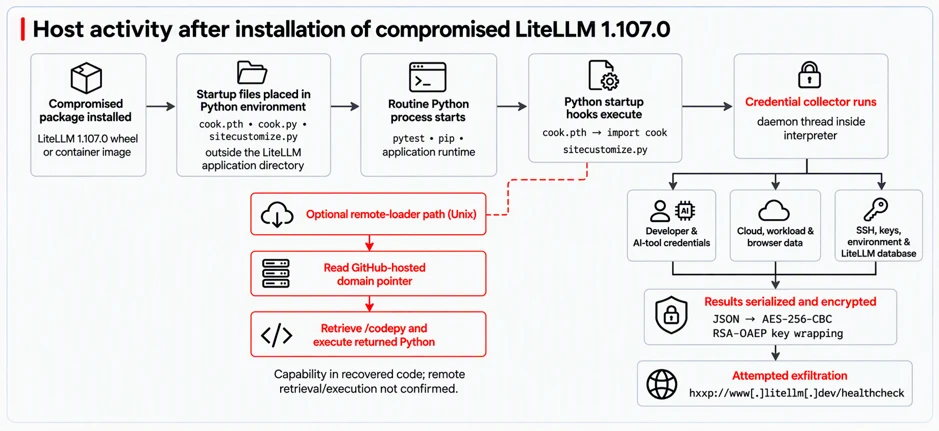
The collector searched for readable developer and AI-tool credentials, cloud configuration, SSH material, browser data, and environment variables. Microsoft observed matching discovery, encryption, and outbound activity on Windows and macOS; in one Windows sequence, installing an unrelated dependency triggered collection.
A second Unix-oriented path could retrieve additional Python code through a changeable remote pointer, but retrieval and execution of that second stage were not confirmed. Likewise, a target listed in the collector does not prove every secret was readable or uploaded. Package presence establishes exposure; completed theft needs corroborating process, file, network, and account evidence.
A clean source tag cannot clear a downloaded image
LiteLLM identifies all seven PyPI wheels of 1.107.0 as affected, published on October 21 between 11:39:51 and 11:40:13 UTC and quarantined by 13:23. Docker Hub images under v1.107.0, latest, main-latest, and main-stable were affected from 11:46:56 until 14:20; affected GHCR tags were unavailable by 13:51. Its private enterprise registry was outside this incident’s scope. [3]
The official GitHub source tag did not contain the malicious startup files. Investigators therefore need the actual installed wheel or image digest and its history, rather than today’s tag contents. A floating tag can now resolve to a clean image while a previously pulled copy remains on a workstation, build agent, or server.
This is a separate October incident from the March LiteLLM attack involving versions 1.82.7 and 1.82.8. The older incident’s exposure figures must not be carried into this case.
Rebuild the environment and revoke its reach
Check retained package metadata, lock files, caches, build outputs, and image digests from a clean system. Contain affected hosts and running processes, then rebuild the Python environment or container from verified artifacts. From a clean machine, revoke reachable provider, cloud, repository, registry, database, and SSH credentials and relevant sessions; review their subsequent use. Removing the package cannot recall copied keys.
On a Windows workstation, a Gridinsoft Anti-Malware Full Scan can help check for additional malicious files and persistence. Review detections, remove threats, and restart as needed. That check complements rebuilding the affected environment; it does not replace credential revocation or prove that no data left the machine.
The failure crossed two boundaries: a supposedly deleted secret still granted access, and a trusted package placed executable hooks outside its own folder. Recovery has to close both the running environment and the account access it could expose.
References
- Oliver Jensen and Mateo Wang. “The attack chain behind the v1.107.0 LiteLLM release.” LiteLLM, October 23, 2026; accessed October 25, 2026. Maintainer investigation.
- Microsoft Security Research. “Inside the LiteLLM 1.107.0 supply chain compromise: Credential theft through Python startup hooks.” Microsoft Security Blog, October 23, 2026; accessed October 25, 2026. Payload analysis and response guidance.
- LiteLLM. “Contained: Oct 21, 2026 LiteLLM release v1.107.0 Compromised.” October 21, 2026, living incident notice; accessed October 25, 2026. Affected artifacts and release windows.