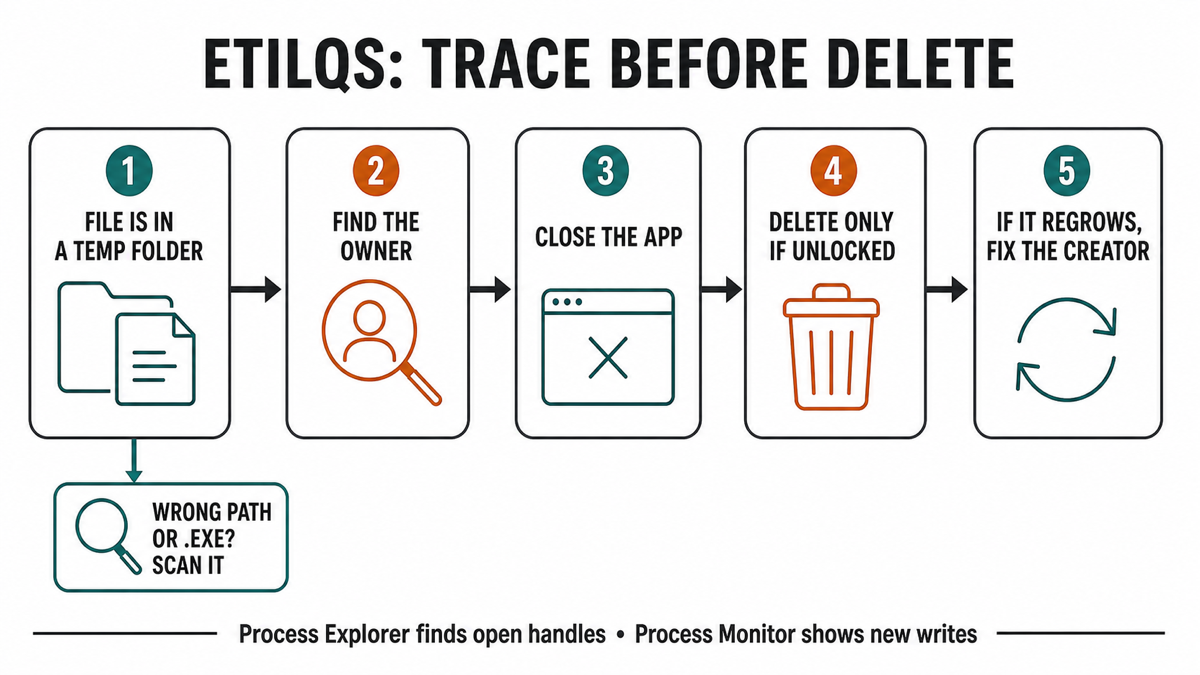
An etilqs file is usually a temporary database created by an application that uses SQLite, not a Windows system file or a malware family. The name is sqlite spelled backward and normally appears as etilqs_ followed by random characters in %TEMP% or C:\Windows\Temp. If one file is consuming gigabytes, save your work, identify the application using it, close that application normally, and delete the file only after it is unlocked. If the file immediately grows again, fix the creator instead of repeating the deletion.
What is an etilqs file?
SQLite is a database engine embedded in browsers, backup tools, monitoring software, media applications, developer tools, and many other programs. SQLite can write temporary databases and transient indexes to disk when work does not fit in memory. Its documentation says these temporary files normally disappear when the related database connection closes.[1]
The random characters after etilqs_ help avoid filename collisions. They do not identify the program that created the file. Firefox is one possible owner, but it is not the only one: a browser, security product, backup job, game overlay, database task, or vendor service may use the same SQLite mechanism.
| What you find | Risk and what to do |
|---|---|
etilqs_{random} in a Temp folder, small and unlocked |
Usually ordinary temporary SQLite data. Windows or the application may remove it automatically; an old unlocked copy can normally be deleted. |
| A Temp file that is tens or hundreds of gigabytes | The name is still not a malware verdict. Find which program is writing it, close that program, recover the space, then repair the cause. |
| Windows says the file is in use | Do not force-delete it or close a handle manually. Identify the owner, save work, and exit or stop that application normally first. |
| The file returns and grows after deletion | An app or service is recreating it. Update, repair, reconfigure, or reinstall that creator; repeated deletion treats only the symptom. |
The same name is outside Temp, ends in .exe, or has a suspicious owner |
That is a separate security question. Preserve the full path and inspect the executable or process before trusting it. |
Why can an etilqs file become huge?
A large file usually means the owning application is spilling a database operation to disk, processing an unusually large set of data, or failing to clean up after a crash or interrupted job. SQLite does not know the business purpose of that work; it only provides the temporary storage requested by the application.
Broadcom’s current support guidance describes etilqs files as SQLite temporary databases and recommends finding open handles when deletion is blocked.[2] Other public cases name very different owners, which is why “close your browser” is only a test, not a universal fix.
If free space is already critically low, pause downloads, backup jobs, game captures, and other disk-heavy work. Do not delete the entire Temp directory, take ownership of protected folders, or install a random cleaner. The broader Windows disk-space checklist covers safe built-in cleanup when more than one category is filling the drive.
Find the program creating or locking the file
- Record the full path and size. A normal example is
C:\Users\{your-name}\AppData\Local\Temp\etilqs_{random}orC:\Windows\Temp\etilqs_{random}. Do not assume two files with different suffixes have the same owner. - Check Task Manager first. Save open work, fully exit likely browser, backup, media, developer, monitoring, or overlay applications one at a time, and watch whether the file unlocks or stops growing.
- Use Microsoft Process Explorer when the owner is unclear. Run it as administrator, choose Find → Find Handle or DLL, and search for
etilqs. The result shows the process holding an open handle. Microsoft documents this exact capability for finding which program has a file or directory open.[3] - Close the owner normally. Save documents or jobs, exit the application, or stop its supported service. Do not use Process Explorer’s “Close Handle” action as a deletion shortcut; forcing a live database handle closed can crash the app or corrupt its current task.
- If no handle remains but a new file appears quickly, use Process Monitor. Filter events so Path contains etilqs_, reproduce the growth briefly, and note the process name and path writing the file. Stop the capture once the creator is clear.
On a protected C:\Windows\Temp item, administrator rights may be required even after the owner closes. That is different from a file still being locked. If Windows reports that another process is using it, return to owner tracing instead of changing folder permissions.
Can you delete an etilqs file safely?
Usually yes, when all three conditions are true: the file is in a genuine temporary folder, the creating application or service has finished, and Windows no longer reports an open handle. Delete the file normally, then empty the Recycle Bin only after confirming that the affected application still opens and your expected work is present.
Do not delete a locked file while a browser profile migration, backup, restore, database maintenance task, software update, or media scan is active. A temporary filename does not mean the current operation can lose it safely. When practical, let the task finish or cancel it through the application’s interface.
If the file is stale but File Explorer still cannot remove it after the owner closes, restart Windows and try once before opening the suspected application again. A restart clears abandoned process handles; it should not become a routine substitute for fixing a program that recreates the file.
Stop an etilqs file from coming back
- Confirm the creator with Process Explorer or Process Monitor rather than guessing from the filename.
- Install current updates for that application and Windows.
- Review the creator’s active jobs: browser profile repair or sync, backup/restore, media indexing, telemetry, database maintenance, recording, or overlay features.
- Cancel or complete a stuck job, then use the application’s repair option or reinstall it from its official source if growth returns.
- Reboot, reproduce the original task once, and watch both the file size and free disk space.
When the writer is a SYSTEM service and the files are under a protected Windows temp location, use the SystemTemp cause-tracing guide. Do not disable an unfamiliar service merely because it embeds SQLite; first identify which installed product owns the service and what job it is performing.
When an etilqs name deserves a security check
A plain data file named etilqs_{random} in Temp is not executable and is not automatically malicious. Investigate further when the item is outside a normal temporary folder, has a double or executable extension such as etilqs_abc.exe, is recreated by an unsigned or unknown executable, arrives with a suspicious download, or appears alongside unexpected startup entries, pop-ups, blocked connections, or disabled security settings.
Preserve the exact creator path, then follow the EXE safety checklist for that program rather than uploading a huge temporary database. If the suspicious creator already ran or keeps returning, a Gridinsoft Anti-Malware scan can check related files, startup entries, scheduled tasks, browser changes, bundled software, and other persistence. A scan evaluates the surrounding activity; it does not make every legitimate SQLite temp file a threat.
If the process path is wrong, the name imitates a Windows component, or high CPU started after an unknown installer, scan for hidden miners, services, startup entries, and bundled components.
Check the process creating this fileFAQ
Is an etilqs file a virus?
Usually not. The common etilqs_{random} item is temporary SQLite data. Judge it by the full path, file type, owner process, and surrounding behavior rather than the reversed name alone.
Why is etilqs spelled backward?
It is the word sqlite reversed and used as a recognizable prefix for temporary files. The characters after the underscore are random and do not identify one browser or product.
Can I delete a 100 GB etilqs file?
Yes, after you identify and normally close the application using it and confirm that the file is unlocked in a Temp folder. If it returns, repair the application or job that creates it rather than repeatedly deleting the symptom.
What if Windows says the etilqs file is open?
Use Process Explorer to search for an open handle containing etilqs, save your work, and close the reported application or supported service normally. Do not force-close the database handle.
Does etilqs always come from Firefox?
No. Firefox can create SQLite temporary files, but so can many browsers, backup tools, monitoring services, developer applications, media programs, and other software that embeds SQLite.
References
- SQLite. “Temporary Files Used By SQLite.” SQLite Documentation, updated June 12, 2025, accessed August 5, 2026. SQLite.
- Broadcom. “ETILQS Files Filling Up Hard Drive on Endpoint Machine.” Broadcom Support, updated June 3, 2026, accessed August 5, 2026. Broadcom Support.
- Russinovich, Mark. “Process Explorer v17.12.” Microsoft Sysinternals, May 7, 2026, accessed August 5, 2026. Microsoft Learn.