Malwarebytes Labs identified 41 deceptive download sites that imitate popular Windows software and games, then steer visitors toward a signed Download Studio installer. Some pages place a real Steam or VideoLAN address in the visible link, so the browser shows a legitimate destination on hover. JavaScript handles the click separately, cancels that navigation, and sends the visitor through an affiliate redirect instead.
The examined file was about 73 MB, identified itself as DS-Setup.exe, and carried a valid signature from Grand Media, TOV. That does not prove the current installer is malware. It does prove that a legitimate-looking link and a valid signature can still deliver a different program than the user intended to download.
Who could encounter the fake download sites?
The campaign uses familiar search targets: VLC, 7-Zip, Paint.NET, VMware, Total Commander, Foxit PDF, AIMP, Recuva, Counter-Strike, Roblox, Fallout, PUBG, The Witcher, and other software or games. One lure even claimed to provide a PC build of Grand Theft Auto VI. The branding changes, but the destination observed by the researchers stays the same: Download Studio.
| What happened | Risk and what to do |
|---|---|
| You only opened the page | Close it and open the developer’s site from a fresh tab or trusted bookmark. Viewing the page alone does not install Download Studio. |
| You clicked but cancelled before saving | Check the final address and browser download list. Do not return to the same page for another attempt. |
You downloaded DS-Setup.exe but did not run it |
Keep it closed, inspect Properties, then delete or quarantine it. Download the intended program from its official publisher. |
| You ran the installer | Remove unexpected Download Studio components, review torrent and magnet associations plus updater settings, then run a full security scan. |
| Alerts, unknown tasks, extensions, or outbound traffic continue | Disconnect the PC, preserve the installer and browser history, and investigate a possible broader compromise. |
How the real-looking link is swapped
A normal HTML link has a destination that the browser can preview. A page can also attach a click handler that prevents the normal link from opening and launches a different URL. In this campaign, the legitimate address acts as reassurance while the click handler controls the real route. Hovering remains useful, but it is not final proof.
The same distinction applies to code signing. Windows Authenticode helps identify the signer and detect changes made after signing. It does not certify that the file is the product named on the web page, that the publisher is the one the user expected, or that the program’s behavior is desirable.
Check what DS-Setup.exe actually is
Right-click the downloaded file, choose Properties, and compare both the Details and Digital Signatures tabs. The sample documented in the research lists Download Studio as the file description and product name, Grand Media as the copyright holder, and DS-Setup.exe as the original filename. Its reported SHA-256 is 9a3f6e69c12cb814c45862219ecb17e9ab7744877c9da1c49f3ea046437f8fca.
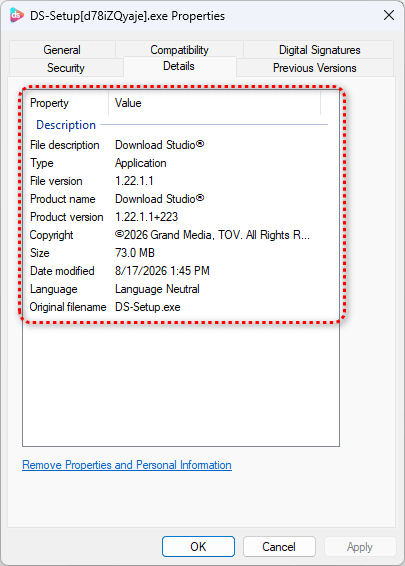
Those fields expose the bait-and-switch when the page promised VLC, 7-Zip, or another program. They are not a universal safety verdict: a software publisher controls the Details values, and a malicious file can use convincing names. Verify the whole chain—official domain, expected publisher, product name, filename, and installer behavior.
What the current installer does—and does not prove
The observed installer launched Download Studio, included torrent components, offered to register torrent and magnet links, and enabled an automatic updater. The redirect carried affiliate tracking, which supports a commercial distribution motive. Malwarebytes did not establish that this current sample was malware, so calling every Download Studio installation an infection would go beyond the evidence.
Unexpected installation still matters. A user who asked for VLC or a game did not consent to a different torrent client and updater. Download Studio’s updater was abused in a separate 2020 incident to distribute a backdoor, but that historical event is not proof that the same attack is happening now.
Remove an unexpected Download Studio installation
- Stop new downloads and launches. Do not test the same installer again or use the deceptive page to fetch another copy.
- Preserve the facts first. Record the page URL, download time, filename, hash, signer, and whether the installer actually ran.
- Uninstall the program you did not request. Use Settings > Apps, then check whether torrent or magnet links still open in Download Studio.
- Review updater and startup behavior. Look for an unexpected updater, startup entry, service, scheduled task, browser extension, or changed default app.
- Run a full scan. Removing the visible app does not by itself prove that an updater, bundled module, scheduled task, browser change, or separate payload is absent. Run a full Gridinsoft Anti-Malware scan, remove confirmed detections, reboot, and scan again if alerts or unwanted behavior return.
- Escalate only when the evidence supports it. If the PC shows remote access, stolen sessions, new accounts, security-tool exclusions, or unknown outbound connections, isolate it and follow a broader post-malware Windows audit. Rotate important sessions from a clean device when account exposure is plausible.
If the page or email made you download an invoice, coupon, tracking app, browser extension, or support tool, scan the PC before opening it again or logging into sensitive accounts.
Scan for hidden leftoversHow to avoid the signed-but-wrong installer trap
- Open the developer’s official domain or a trusted store directly. For VLC, use VideoLAN’s own site.
- Do not rely on the hover preview alone. After clicking, verify the address bar and the file that actually arrived.
- Compare the signer with the publisher you expected. A valid signature from an unrelated company is a mismatch, not reassurance.
- Reject pages that require a separate download manager for a program normally delivered directly by its publisher.
- If a sponsored result or lookalike domain started the chain, use the Google search malvertising response guide to separate page-only, download, run, and credential-exposure actions.
A different fake-download campaign used malicious DLL loading to install ScreenConnect and AsyncRAT. The ScreenConnect and AsyncRAT guide covers that proven malware chain; this Download Studio case requires a separate boundary because the current sample was not established as malware.
FAQ
Is Download Studio malware?
The August 2026 research did not establish that the examined Download Studio installer was malware. The confirmed problem is deceptive distribution: people requesting other software were redirected to Download Studio. Remove it if it was installed without your informed choice, and scan the PC if the file ran or symptoms continue.
Does a valid digital signature make DS-Setup.exe safe?
No. A valid signature helps identify the signer and verify file integrity after signing. It does not prove that Download Studio is the program the page promised or that you intended to install it.
References
- Malwarebytes Labs. “41 deceptive download sites show a real link, then send you somewhere else,” published August 19, 2026. Campaign analysis and indicators.
- Microsoft. “Authenticode,” Microsoft Learn, accessed August 19, 2026. Code-signing purpose and trust boundary.
- VideoLAN. “VLC media player,” accessed August 19, 2026. Official VLC download path.