A remote-support connection can become the route back into the technician’s computer. CISA added ScreenConnect flaw CVE-2026-84869 to its Known Exploited Vulnerabilities catalog on September 11. The immediate task is to verify updated clients as well as the installation: ConnectWise’s fix is 26.6.5, and its bulletin explicitly calls for reinstalling host clients and updating access agents. [1] [2]
The support session carried the scripts
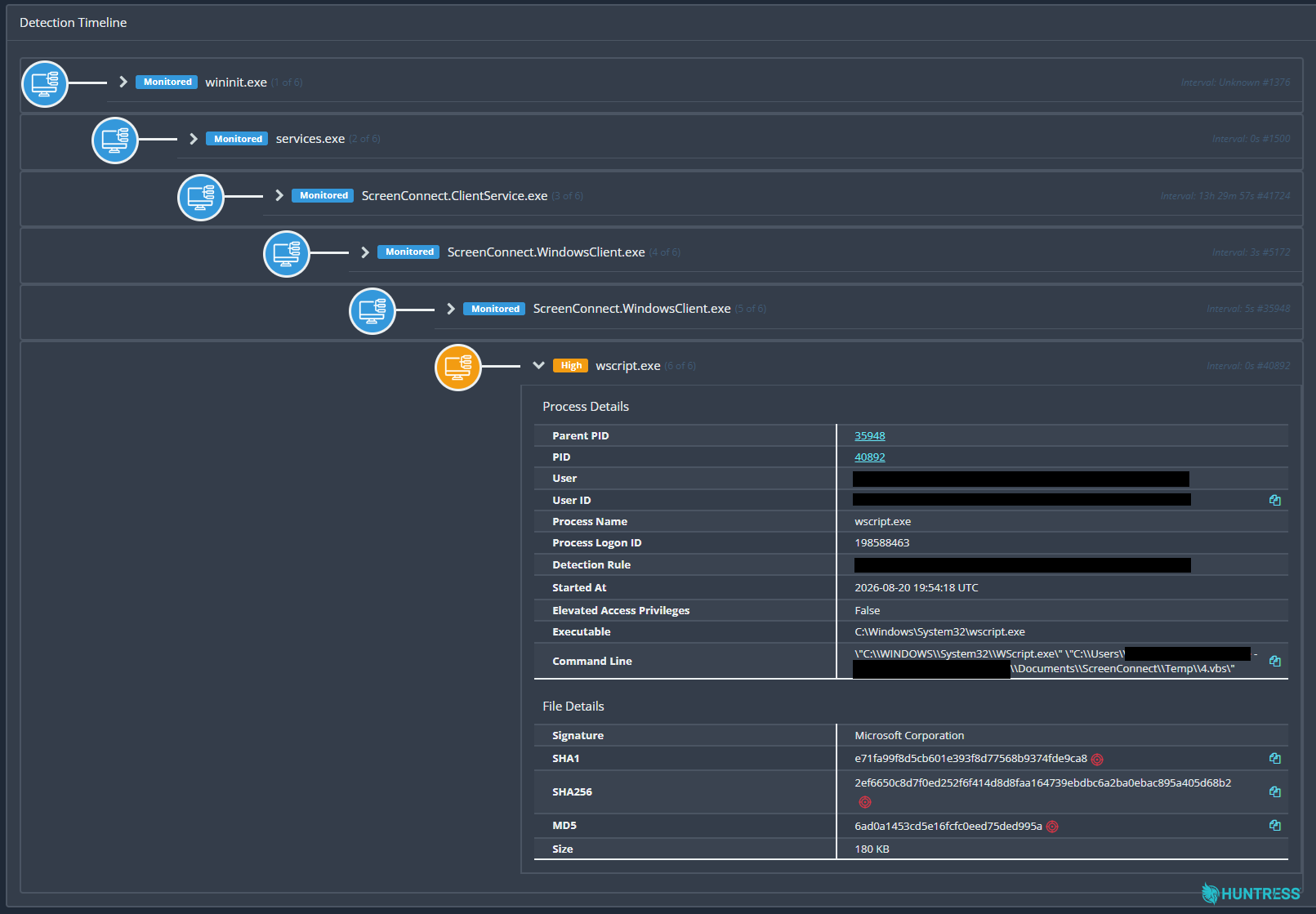
The background is a Huntress investigation into separate August incidents that shared an unusual pattern. After social engineering put unauthorized ScreenConnect clients on victims’ PCs, the clients repeatedly launched wscript.exe to run four files: 1.vbs through 4.vbs. Researchers found modified clients that could pass this script chain to another endpoint when a ScreenConnect connection was established. That is the basis for their description of “worm-like” behavior; it does not mean every reachable computer was infected. [3]
The important boundary is inside an active support session. ConnectWise says the client flaw could allow file transfer and execution without the required authorization or host confirmation in some circumstances. Its bulletin says ScreenConnect servers are not affected by this vulnerability. A support server’s version still matters for distributing the corrected software, but it is not the same thing as checking the software running on each endpoint.
Huntress’s process tree above shows why investigators looked beyond an installed-app name: a remote-support client became the parent of Windows Script Host. Its report also identifies a WindowsServiceHost Run entry pointing to a script in the user’s AppData directory. These are observations from that investigation, not a claim of a newly discovered September infection wave.
What an updated deployment must include
ConnectWise lists versions before 26.6.5 as affected. Cloud instances were updated automatically; on-premises administrators must install the fixed release through the supported upgrade path. The bulletin’s instruction to reinstall host clients and update access agents applies after the upgrade. [2]
For a support team, that creates three separate checks: the instance version, the technician’s host client, and the access agents on managed devices. Recording only the first leaves the endpoint question unanswered. Confirm the installed client versions through your management inventory and the vendor’s update procedures before closing the remediation task.
If a maintenance window prevents an immediate update, ConnectWise documents a temporary reduction in exposure: open Administration → Security → Roles, review assigned session groups, and deselect TransferFiles for every role. Older versions may call it TransferFilesInSession. This is an interim measure, not a replacement for the patch. [2]
An unexpected client needs a different response
A legitimate managed installation that needs an update and an attacker-installed support client are different problems. Ask the support team to identify the owner of a managed client; do not uninstall an employer’s tool just because its product name appears in this advisory. If it arrived through an unsolicited support call or fake document, follow the unexpected ScreenConnect access checks.
For investigators, Huntress highlights audit events named RunFiles or RanFiles involving the suspect scripts and Process: Guest. Correlate those events with endpoint activity; a filename alone is not a complete diagnosis. Huntress recommended rebuilding affected hosts from known-good media because of the complexity of the observed chain. [3]
Where an unauthorized installer has already run, removing the visible client may leave another service, script or startup entry behind. A full Gridinsoft Anti-Malware scan can help identify malware leftovers during containment and investigation. It does not replace a required rebuild or recover exposed credentials. Our fake-download case explains a separate route by which remote-access software reaches a PC.
The KEV addition makes this an exploitation-response task. The useful completion point is a verified client rollout and an investigation of suspicious sessions—not simply a new version number on the server.
References
- CISA. Known Exploited Vulnerabilities Catalog: CVE-2026-84869. Added September 11, 2026; accessed September 13, 2026.
- ConnectWise. CVE-2026-84869: description and resolution. September 8, 2026; accessed September 13, 2026.
- Huntress. Rogue ScreenConnect Installations Across Unrelated Hosts Suggest Worm-Like Activity. Updated September 8, 2026; accessed September 13, 2026.