Gridinsoft Web Protection for Android is now available to download directly from Gridinsoft. The new app helps block connections to known phishing, scam and malicious websites, with one-tap control and explanations when a domain is blocked. Android users can start with a free 14-day trial for up to three devices, without a payment card.
A link to a tempting deal can lead to a fake shop. A familiar-looking sign-in page can be a password trap. Web Protection adds an automatic check at the connection stage, helping you avoid known dangerous domains while you shop, browse and open links on your phone.
Explore Gridinsoft Web Protection for Android
From checking a website to keeping protection on
Many people first encounter Gridinsoft while checking whether a shop, exchange or unfamiliar website deserves their trust. A website report helps with that individual decision. Web Protection brings domain filtering into everyday phone use, so you do not have to remember to look up every link yourself.
Once connected to your Gridinsoft account and enabled, the app checks domain requests against Gridinsoft’s protection policy. When a requested domain is covered by a blocking rule, the connection is blocked. The purpose is practical: help keep known fake login pages, scam shops and malicious sites out of your browsing.
That extra layer works alongside good habits. For a purchase involving an unfamiliar seller, you should still verify the business and payment details before sending money.
One clear switch, with an explanation when it matters
The main screen centers on the protection control. Tap Turn on to enable it; the screen shows Protection is ON when the connection is established. Tap Turn off when you want to stop it. The visible status tells you which state the app is actually in.
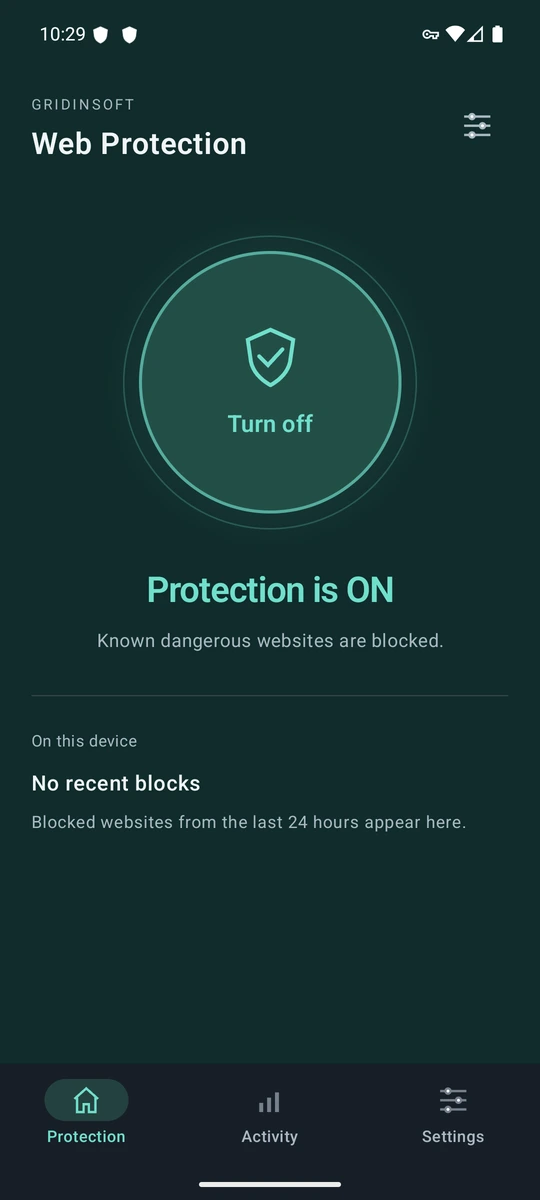
When a dangerous domain is blocked, Web Protection can show an Android notification. Tap it to open the app’s explanation, see the category behind the block and follow the View security report button for more context. Repeated requests to the same site are grouped to reduce notification noise.
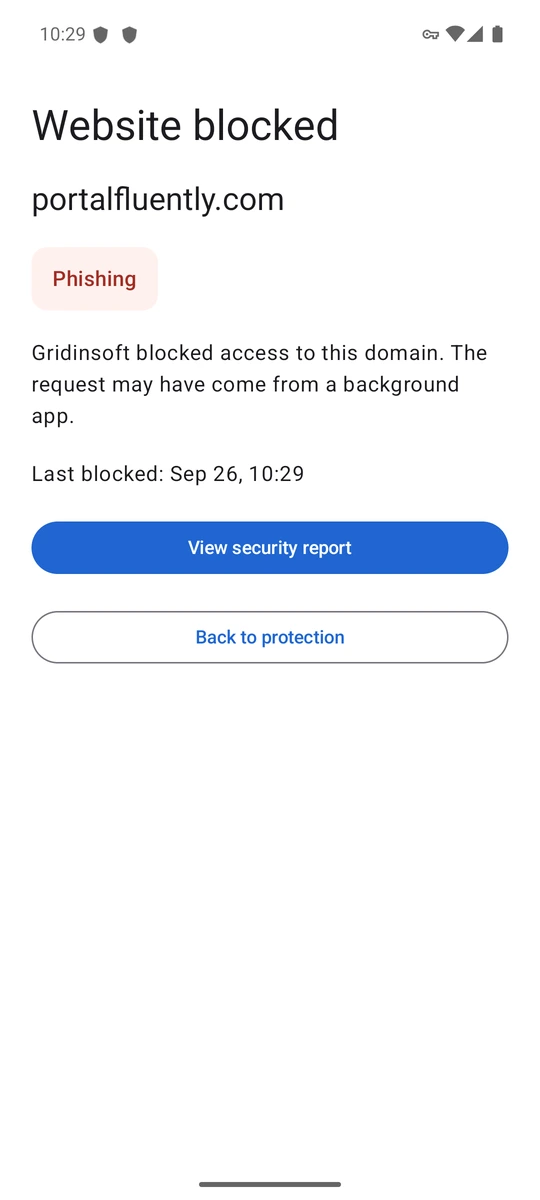
The example above comes from a controlled check of the released app: a domain request for portalfluently[.]com was blocked and labeled Phishing by the active policy. It demonstrates the notification-to-explanation flow; it is not a customer’s browsing history. A blocked request can also originate from an app running in the background.
Try it free, then choose a yearly plan
The free trial lasts 14 days and covers up to three Android devices linked to your account. No card is required, and the trial does not automatically charge you. After trying the product, you can choose an annual license to continue using protection:
- One Android device: US$29.99 per year. For the phone you use every day.
- Up to three Android devices: US$49.99 per year. For multiple devices connected to one Gridinsoft account.
Paid plans are billed annually and renew automatically until canceled. Taxes may apply; the final total and renewal terms are shown at checkout. Payments are processed by PayPro Global. There is no monthly purchase option at launch.
Available today from the Gridinsoft website
The first public release supports Android 10 or later. You can install the signed APK directly from the official product page. At the time of this announcement, the Google Play release is still under review.
- Create your Gridinsoft account and start the free trial, then confirm your email. If you already have Web Protection access, use your existing account.
- Open the official download and installation guide on your Android phone, download the APK and open it. If prompted, allow installation from that browser. You can turn that permission off after installation.
- Open the app, tap Setup and sign in. Tap Turn on, read the explanation and approve Android’s VPN connection request. Check that the app shows Protection is ON.
Updates to the directly downloaded app are installed manually from the same product page. Protection policy updates are provided by the service.
What to know before switching it on
Web Protection uses Android’s VPN connection to send domain lookups securely to Gridinsoft for filtering. It does not hide your IP address or change your location. Android allows one active VPN at a time, so another VPN cannot run alongside it in the same profile. Apps using their own encrypted DNS may bypass this protection.
Domain filtering covers known dangerous domains; a site that is not blocked is not guaranteed safe. It does not scan installed apps or remove viruses. For an on-demand check of Android apps, Gridinsoft offers Trojan Scanner for Android. This launch does not include a public Mac or iPhone version.
Domain requests travel over an encrypted connection and are linked to the registered device. The service retains limited block events and aggregate statistics rather than a complete browsing history. Details are in the Web Protection privacy notice.
Ready to make your next click safer? Start with the free trial, connect your phone and keep protection on while you browse.