A Carnival Cruise Line booking email carried Daniel Jones’s real reservation details and passed all three email-authentication checks. Following a link still took him to a page pushing a fake security download. The weak point was further down the journey: a promotional domain Carnival no longer controlled.
In a report published September 10, the Tuxxin researcher describes how he traced that link through a system that showed different destinations to scanners and ordinary visitors. Carnival recovered the domain on August 26, and Jones verified the malicious route had stopped on August 27. This is a newly disclosed investigation of an earlier exposure, not evidence of a new Carnival attack this week.
The booking was real. Ownership of the destination had changed.
Jones began with a June 13 Players Club booking confirmation. His own computer reached a fake-security page; a second computer and another booked guest’s email reproduced the behavior. That made an isolated problem with his account a poor explanation.
The destination, cclpromos[.]com, had once served Carnival’s casino marketing. Jones’s historical checks placed its transfer out of Carnival’s control in November 2024. The old email journey continued to point there after somebody else could decide what the domain served.
SPF, DKIM and DMARC address the authenticity of the sending domain and message. They do not establish that every linked destination still belongs to the sender. The envelope can be genuine while a stop further along the route has changed hands. That is a different failure from the impersonation in a fake Trip.com booking-confirmation email.
One link gave the scanner a parking page and the guest a download
The behavior changed when Jones changed his vantage point. Automated checks and datacenter connections received an innocuous parking page. Ordinary browsers on home or mobile connections reached installers, fake warnings or other deceptive pages. The site inspected visitor characteristics before choosing where to send them — a technique known as cloaking.
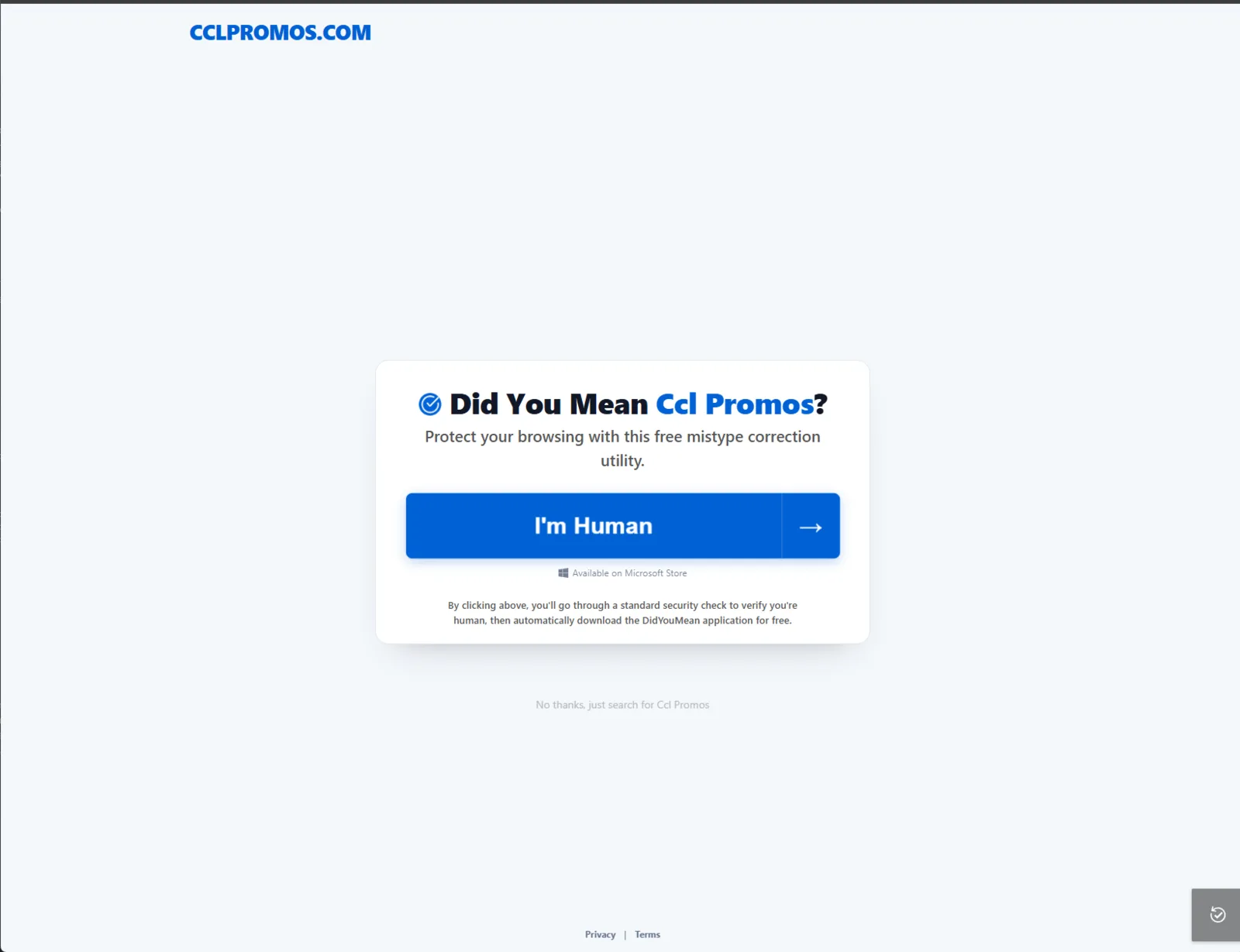
The captured page’s large “I’m Human” button framed the next step as a security check. Smaller wording disclosed an automatic application download. A traveler trying to continue from a booking email could therefore be nudged into accepting unrelated software without ever seeing a misspelled sender address.
A clean reputation result did not contradict the bad page Jones saw: the two checks could have received different content. His report documents that split; it does not establish that every security service uses the same checks or that all scanners were bypassed.
Three installers in 13 minutes, then another advertiser
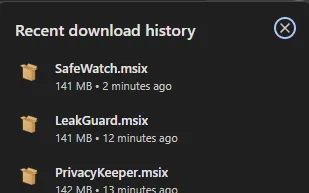
The Windows downloads rotated through names including SafeWatch, LeakGuard and PrivacyKeeper. The download-history capture is unusually revealing: the same entry route produced three differently named MSIX packages within 13 minutes, each roughly 141–142 MB as displayed by the browser.
Jones connects the delivery machinery to PseudoTDS and the PhantomJack browser-hijacker family previously analyzed by Trinity Cyber. In that separate research, launched apps could read browsing history and bookmarks, install unwanted extensions and replace default search engines. Jones did not execute his captured packages; that account of installed behavior comes from Trinity’s analysis, not a new detonation of the Carnival samples.
Other visits produced scareware or a full-screen browser locker with a spoken warning and a scam support number. A frightening page is not itself proof that Windows has been locked or that an app was installed. The response to that branch starts with closing the page and refusing its phone number, as in our fake security-warning guide.
Reporting individual advertisers brought temporary removals. But replacements appeared while the entry domain remained available. That explains why the intervention that finally mattered was recovering the domain, rather than removing one more downstream page.
A captured update setting raised a separate question
Two June 20 .appinstaller manifests, for PrivacyKeeper and SecuredWeb, specified launch-time checks with no waiting interval, background update checks and acceptance of updates from any version, including downgrades. Jones calls these builds PseudoJack to distinguish their configured update channel.
The files show an avenue for later package changes. They do not prove that a second-stage payload was delivered. Jones explicitly says he did not observe one. That distinction matters when deciding what happened on an individual PC: the application’s actual installation and activity need checking, not assumptions based on its filename.
The fix closed this route, not every question about past exposure
After unsuccessful early contacts and a certified letter, Carnival engaged with the report and reacquired the domain. Jones’s August 27 checks found the old malicious routing stopped across his test locations.
The evidence also limits the story’s scale. Jones reports no infection or victim total. His broader archive review found no additional bad destinations among 541 deduplicated casino tracker links and 241 emails sent after the domain takeover. Expired tracking tokens prevented a verdict on older booking messages. He found no evidence linking this case to Carnival’s separately reported April 2026 breach.
If you followed a link like this
For booking details, open the travel company’s official site or app independently. Receiving or reading this email is not the same as installing one of the offered packages.
- Only opened a warning page: close it, decline notifications and do not call its support number. Check whether a file downloaded or a permission was granted.
- Downloaded a file but did not open it: keep it closed and quarantine or remove it. Do not install it to see whether it is genuine.
- Installed the offered app or see changes returning: stop using sensitive accounts on that PC until it is checked. Review the installation time, installed apps and browser extensions. A security tool may remove a visible file while a related app, extension, task or service remains. Run a full Gridinsoft Anti-Malware scan, address detections, reboot and recheck recurring symptoms. Our returning-extension guide explains why deleting an extension alone can be insufficient.
If the page or email made you download an invoice, coupon, tracking app, browser extension, or support tool, scan the PC before opening it again or logging into sensitive accounts.
Scan downloads from this scamThis case exposes a gap between trusting the sender and trusting the whole journey. Email authentication held; the lifecycle of a linked promotional domain did not.
References
- Daniel Jones, Tuxxin LLC. “A real Carnival Cruise Line email was serving customers malware.” September 10, 2026; updated September 11. Original investigation and evidence. Source screenshots reproduced unchanged with attribution; report published under CC BY-ND 4.0.
- Tanner Piliego and Jared Grumbein, Trinity Cyber. “Blurred Lines: AdTech Abuse Delivers Browser Hijackers Through the Microsoft Store.” November 2025; accessed September 13, 2026. PseudoTDS and PhantomJack analysis.