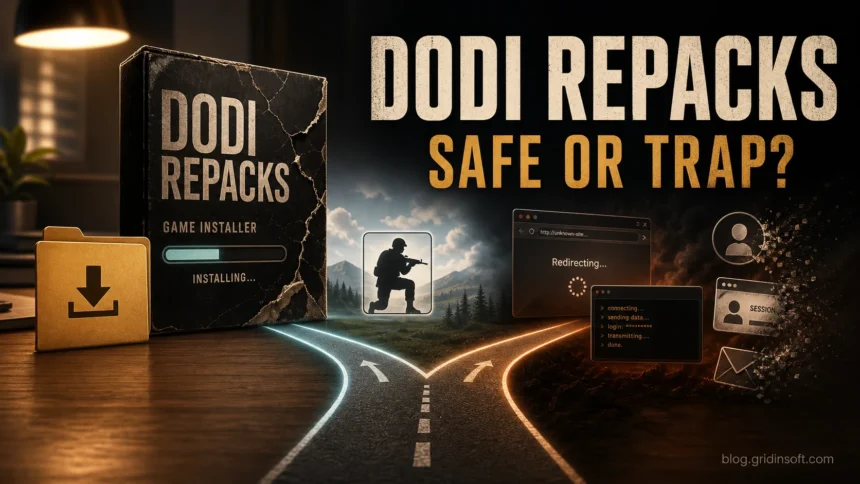
DODI Repacks are not automatically safe just because the name is familiar. The risk depends on the exact site, redirect, file host, archive, and setup file that reached your PC. A crack-related alert can be a false positive, but fake mirrors and malicious redirects can also deliver real malware. If you only visited a page, close it and deny prompts. If you downloaded or ran setup, keep detections quarantined, scan the file and system, check startup tasks and security exclusions, and change sensitive passwords from a clean device if account alerts appeared.
A working game, a familiar DODI name, or a forum vote cannot verify the file you received. Cracked-game delivery is a chain: search result, mirror, redirect, file host, archive, setup program, crack DLL, and post-install changes. Judge the exact file and exposure level, not the brand name alone.
Check Windows before continuing
Only visited the page or removed an unopened archive? Follow the source checks below. If you ran the setup, a crack DLL, or a download wrapper, stop using the package and keep detected files quarantined before checking the rest of Windows.
A working game tells you little about what its installer added elsewhere. Scan with Gridinsoft Anti-Malware for bundled malware and unwanted startup components outside the game folder.
Download Anti-Malware for WindowsAfter downloading: install Gridinsoft Anti-Malware, activate the trial if eligible, update its database, and run a Full Scan. Review detections, clean the items you confirm, then restart Windows. If the same symptom returns, use the source and persistence checks below.
DODI Repack: Real Site, Fake Link, or Infected File?
Do not reduce the decision to “DODI is safe” or “DODI is a virus.” That wording misses the part that matters for your PC. A repack name can be copied by fake mirrors, a download button can lead through unrelated ad pages, and a file host can serve an archive that is not the same thing other users discussed.
The useful split is this:
- The DODI name tells you what users were trying to find, not what file reached your computer.
- The site or mirror matters because copycats, typos, and redirect chains can replace the expected download with a different installer.
- The archive and setup file decide the actual risk. A password-protected archive, unexpected small EXE, huge DLL, or “disable antivirus” instruction should change your response.
- Post-install behavior matters more than forum reputation. Browser prompts, startup entries, scheduled tasks, Defender exclusions, and login alerts are cleanup signals.
For nearby comparison, our FitGirl Repack safety guide uses the same real-site versus fake-mirror split, while the Repack-Games.com safety guide focuses on an exact cracked-game domain. This DODI page is for the branded DODI safety question and what to check after contact with a DODI-named repack.
If Defender names the downloaded game file as Trojan:Win32/Tiggre!rfn or Tiggre!plock, keep it quarantined and follow the path/source checks before restoring any crack DLL or installer.
Why DODI Safety Advice Conflicts
Forum posts usually judge a specific download or repeat the reputation of the DODI name. That is why one result says “safe,” another reports malware, and another calls an alert a false positive. Those answers may describe different mirrors, redirects, archives, or setup files.
The useful decision is based on your exposure: which page you opened, what file you received, whether it ran, what security alert appeared, and whether Windows, the browser, or an account changed afterward. The checks below follow that sequence.
DODI Repack: What To Check First
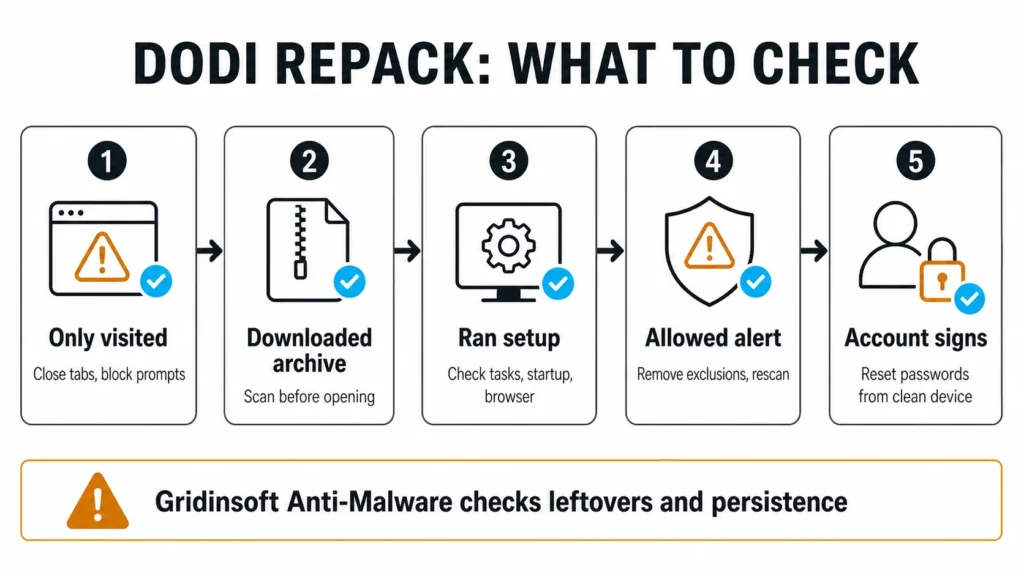
Start with the highest-risk action you actually took. Do not panic if you only opened a page, but do not restore a quarantined crack or continue gaming if you ran a setup file and then saw account or browser symptoms.
| What happened | Risk level | What to do now |
|---|---|---|
| You only visited a DODI-looking page | Low to medium | Close the tab, deny notifications, clear suspicious downloads, and avoid “allow” prompts from file hosts or short-link pages. |
| You downloaded an archive but did not open it | Medium | Do not extract it. Scan the archive, check the source path, and delete it if it came from a redirect, chat link, mirror, or unknown file host. |
| You extracted or ran setup | High | Check startup apps, Task Scheduler, installed services, browser extensions, and recent items in Downloads, Temp, AppData, and ProgramData. |
| You allowed a security alert or disabled protection | High | Remove exclusions, turn protection back on, quarantine detections, and run a full scan before restoring any file. |
| You saw login alerts, stolen sessions, crypto activity, or unknown browser sync | Critical | Use a clean device to change passwords, revoke sessions, check Steam/Discord/email/crypto accounts, then clean the PC before logging in again. |
Why Antivirus May Flag a DODI Repack
Security tools can flag repacks for several different reasons. Some alerts point to the crack or patching behavior itself, while others point to a loader, stealer, miner, PUA bundle, fake installer, or browser/adware module. Treat the alert wording and the file path as clues, not as a permission slip to click “allow.”
- HackTool or GameHack alerts often appear when a crack modifies licensing, memory, or game files. That does not make the file safe; it means you are outside normal trusted software behavior.
- Trojan, stealer, loader, or miner alerts deserve immediate quarantine. Do not restore these because a forum post says repacks are commonly flagged.
- PUA or adware alerts can follow installers, download wrappers, browser prompts, and bundled tools. Microsoft notes that PUA can slow the machine, show unexpected ads, or install other unwanted software.
- Repeated alerts after reboot suggest a task, startup entry, service, browser extension, or exclusion is recreating the visible detection.
If the archive came from a file host after several redirects, the warning may describe the final payload, not the DODI name. The safest move is to keep the file quarantined until the system is checked.
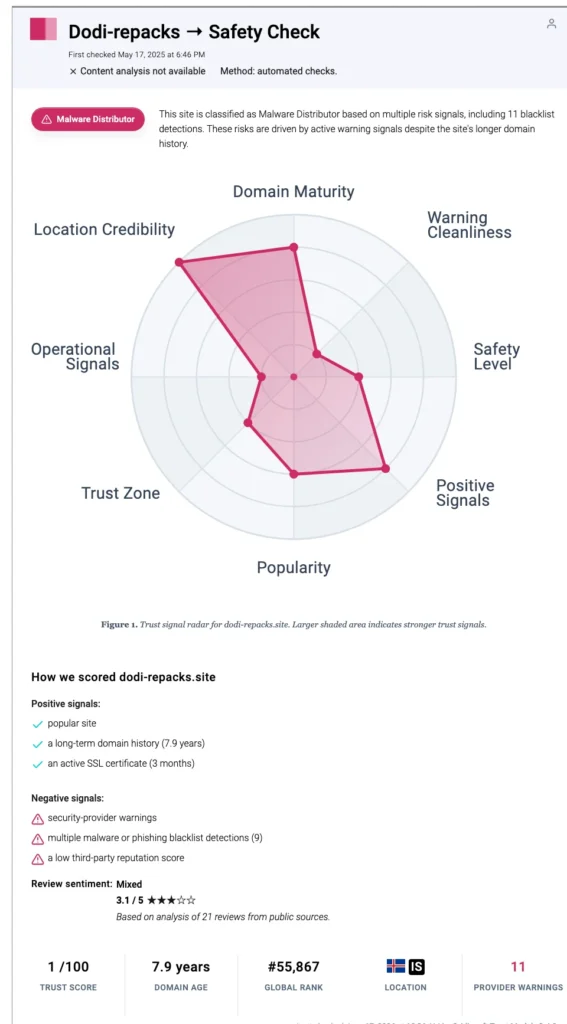
Gridinsoft Scanner Signal for dodi-repacks.site
The Gridinsoft Website Reputation Checker report for dodi-repacks.site is not a replacement for scanning your downloaded file, but it gives useful domain-level context. The current report marks the domain as a Malware Distributor risk and shows blacklist and reputation warning signals. Use that as a reason to slow down and verify what reached your PC, not as an invitation to test downloads manually.
How To Check Windows After Running a DODI Repack
- Stop using sensitive accounts on that PC. If the installer already ran, do not log into email, banking, crypto, Steam, Discord, or admin panels until you finish the first cleanup pass.
- Turn protections back on. Re-enable Windows Security or your security tool if the installer told you to disable it. Remove any exclusions you added for the game folder, setup file, crack DLL, or download directory.
- Delete the risky source files. Remove the archive, extracted setup folder, leftover password text file, and suspicious download wrappers. Do not keep a quarantined crack just because the game launched.
- Check common persistence spots. Review Startup Apps, Task Scheduler, Services, Installed Apps, browser extensions, and recently modified folders under %USERPROFILE%\Downloads, %TEMP%, %APPDATA%, %LOCALAPPDATA%, and C:\ProgramData.
- Run a full Gridinsoft Anti-Malware scan. A repack can leave more than one obvious EXE: scheduled tasks, startup entries, bundled apps, hidden files, browser changes, exclusions, and persistence can remain after you delete the game folder. Gridinsoft Anti-Malware gives you a structured way to check those leftovers instead of guessing file by file.
- Reboot and scan again if symptoms return. A second pass after reboot is useful when a task, service, or extension recreates the warning.
- Reset accounts from a clean device when needed. If you saw password-stealer signs, login alerts, missing Steam items, Discord spam, crypto activity, or unknown sessions, change passwords and revoke sessions from a phone or clean PC. A malware scan can clean the machine, but it cannot undo credentials that were already stolen.
If you are trying to decide whether to keep a cracked game, make the system safety decision first. If the file came from a repack, crack, fake mirror, or file-host redirect and you already ran it, the practical question is whether anything changed outside the game folder.
Warning Signs That Need a Deeper Cleanup
A single forum comment cannot prove your local file is safe. Escalate from “check the download” to “clean the system” when you see any of these signs:
- a tiny EXE or script downloaded when you expected a large archive;
- a password-protected RAR/ZIP/7z archive from a redirect chain;
- a huge DLL or file that cannot be uploaded to normal scanners because of size;
- instructions to disable antivirus, SmartScreen, browser protections, or reputation checks;
- new startup items, scheduled tasks, services, or unknown apps after the install;
- browser homepage/search changes, push notifications, or extensions you did not install deliberately;
- Windows Security exclusions you added for the crack, setup folder, or Downloads folder;
- Steam, Discord, email, browser, or crypto login alerts after the install.
For archive-specific decisions, use the Gridinsoft guide on RAR and ZIP virus risk. For broader game-download account compromise, use the infostealer-after-game/mod recovery guide.
How DODI Compares With Other Repack Risks
DODI, FitGirl, Repack-Games, GameDrive, and other cracked-game names create similar reader confusion: reputation threads discuss a brand, but malware risk happens through the exact download path and local file. That is why a useful safety article must cover fake mirrors, file hosts, browser redirects, HackTool alerts, PUA bundles, and account recovery.
If you want the wider context, read Are Cracked Games Safe?. If your concern is a different exact domain, compare this page with GameDrive.org safety or Gogunlocked safety. If your security tool names a crack specifically, the HackTool:Win32/Crack guide explains why “crack behavior” and “safe file” are not the same thing.
FAQ
Is DODI Repacks safe?
Treat DODI Repacks as high-risk, not trusted software. The DODI name alone does not prove every file is malware, but cracked-game repacks, redirects, fake mirrors, crack DLLs, and security-tool alerts mean you should verify the exact file and scan the system if anything ran.
Can a DODI repack be a false positive?
Some crack-related detections can be triggered by patching or licensing behavior, but that does not make the file safe. Do not restore or allow a DODI-named file until you check its source, path, alert name, and whether any startup, browser, task, or account symptoms appeared.
What should I do if Windows Defender removed a DODI crack?
Leave it quarantined, remove any exclusions you added, delete the original archive, and scan the PC. Restore only if you can prove the file came from a trusted source and the detection is a confirmed false positive, which is difficult with cracked-game repacks.
Is an ad blocker enough for DODI downloads?
No. An ad blocker can reduce some unwanted pages, but it cannot prove that the final archive, file host, mirror, or setup file is safe. Trellix documented a DODI-related download chain that still reached a malicious archive while uBlock Origin was enabled.
Should I change passwords after running a DODI repack?
Change passwords from a clean device if you saw login alerts, browser session changes, Discord or Steam account issues, crypto wallet warnings, or any stealer/loader detection. Clean the PC first before signing back into sensitive accounts.
References
- Tushar Subhra Dutta. “Threat Actors Weaponized Pirated Games to Bypass Microsoft Defender SmartScreen and Adblockers.” Cybersecurity News, August 19, 2025. Accessed June 25, 2026. https://cybersecuritynews.com/threat-actors-weaponized-pirated-games/
- Pieter Arntz. “Pirated PC games are delivering password-stealing malware.” Malwarebytes Labs, June 8, 2026. Accessed June 25, 2026. https://www.malwarebytes.com/blog/threat-intel/2026/06/pirated-pc-games-are-delivering-password-stealing-malware
- Microsoft Support. “Protect your PC from potentially unwanted applications.” Microsoft, accessed June 25, 2026. https://support.microsoft.com/en-US/security/protect-your-pc-from-potentially-unwanted-applications