A QuickBooks renewal email says a payment failed and urges the recipient to call support before service is interrupted. The phone call is the trap. In an investigation published October 29, Infoblox traced a campaign using more than 350 QuickBooks-lookalike domains to callers seeking account credentials—and found that an invisible email image also identifies recipients to a tracking service.
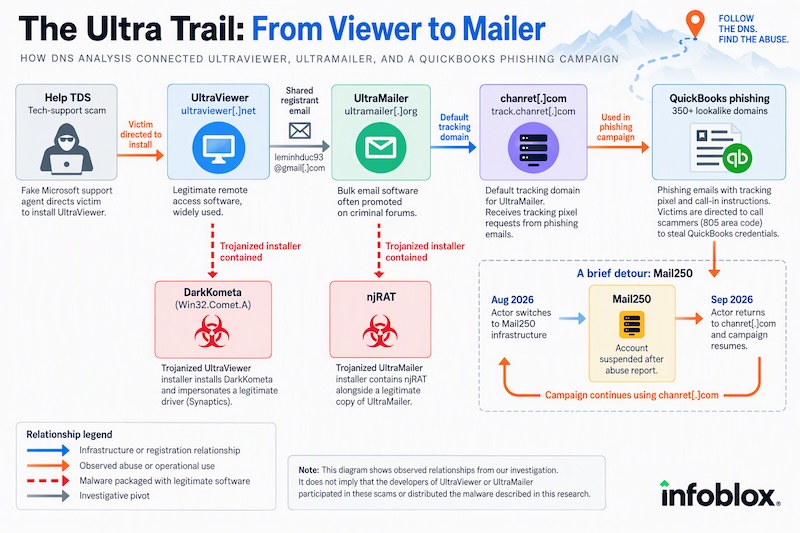
The investigation began with a different scam: fake Microsoft support agents asking people to install UltraViewer. Following the software’s domain records led researchers to bulk-email software UltraMailer, a tracking domain, and the QuickBooks messages. Infoblox found no evidence that either software’s developers participated in the scams or distributed the malicious installers it examined.
A failed-payment notice that moves the conversation to the phone
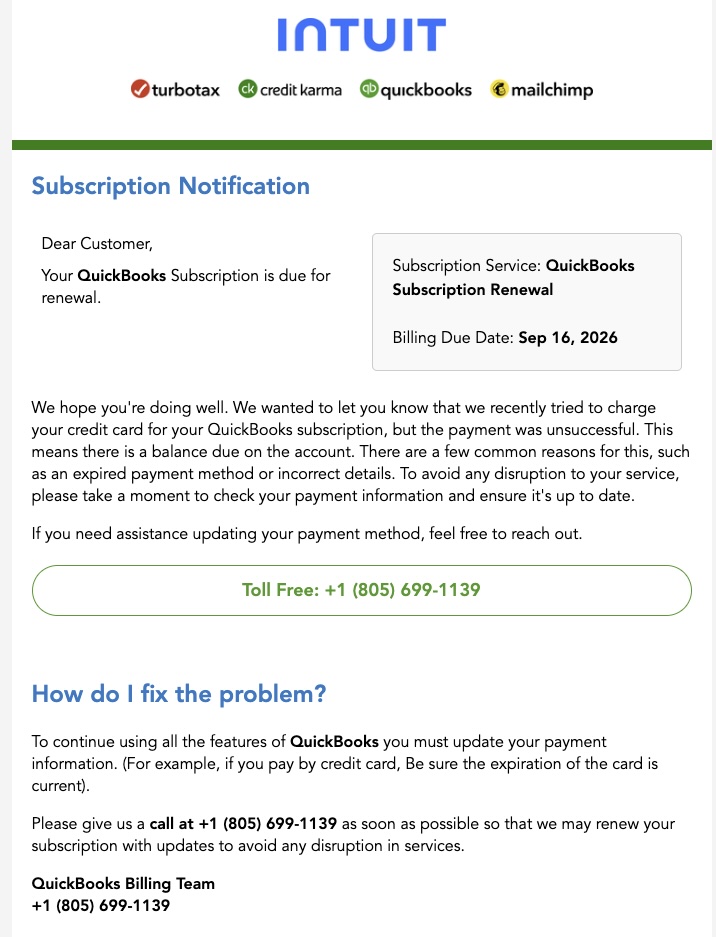
The captured email borrows Intuit and QuickBooks branding, presents a subscription-renewal notice and claims an unsuccessful card charge. It asks the reader to call to update payment details. The screenshot labels an 805-area-code number as toll-free: that label is part of the lure, not a reason to trust the number.
Infoblox says the operators attempt to steal QuickBooks credentials during these calls. The report does not establish how many recipients called, how many accounts were accessed, or how much money was lost. Its count of more than 350 lookalike domains describes the campaign’s infrastructure, not 350 victims. Most of the domains were registered between June 29 and July 5, 2026; today’s development is the newly published investigation of an ongoing campaign.
The image that gives away who opened the email
The researchers followed a registrant email associated with UltraViewer’s official domain to UltraMailer and chanret[.]com. Searching their spam collection then connected that last domain to the QuickBooks lure. UltraMailer uses it as a default tracking domain.
Each examined message includes a one-pixel image loaded from track.chanret[.]com. Its path contains a campaign identifier and a filename encoding the recipient’s email address in Base64. Base64 is reversible encoding, not encryption: the request tells the tracking service which address’s message was opened when the mail client loads that remote image.
That is a privacy signal, not proof that simply viewing the email installs malware. Blocking remote images can stop this particular fetch, but cannot authenticate the message or make calling its number safe. The tracking connection also does not establish that UltraMailer’s developers sent the phishing.
A suspension stopped one route; the campaign returned through another
In August, the actor moved from chanret[.]com to a tracking subdomain of qbcares[.]com. DNS records connected it to infrastructure associated with bulk-mail provider Mail250. Infoblox reported the activity on August 25; Mail250 said it suspended the account, and researchers verified that the observed campaign stopped.
On September 8, the actor returned to chanret[.]com and resumed the QuickBooks campaign. Infoblox found no abuse-reporting mechanism on UltraMailer’s website. The contrast explains why disabling one sending account did not end the operation: the actor could change the service used for the same impersonation. The report describes this specific interruption and return, not a global shutdown of QuickBooks phishing.
A legitimate signed app inside an unsigned malicious installer
A separate branch of the investigation found trojanized installers containing genuine software. An unsigned UltraMailer installer bundled an authentic signed copy of the application with njRAT. An unsigned UltraViewer installer, submitted to VirusTotal on September 4, carried malware identified as DarkKometa and placed it under a Synaptics-looking directory in ProgramData.
The important boundary is the outer package: a legitimate signature on one embedded application does not authenticate everything an installer runs. Infoblox could not independently confirm another researcher’s claim that a signing key had been stolen. These samples are separate findings; the report does not prove that the QuickBooks email campaign delivered either installer.
The starting investigation, Help TDS and its fake Microsoft support calls, shows the related danger of granting remote access to someone whose identity comes only from a warning or call.
Respond to what actually happened
If you only received or opened the message, do not call its number or reply with payment information. Open QuickBooks through your own bookmark or the product’s Help menu and check the subscription there. Intuit’s fraud guidance describes lookalike domains, urgent payment demands and requests for passwords or verification codes as warning signs.
If you shared credentials, change them through the real account from a trusted device and review account activity; contact official support about unauthorized changes. If you granted remote control, end the session and have the device and account access reviewed. A genuine remote-support application can still be used by a scammer.
If you ran a suspicious Windows installer, removing the visible application may leave a loader, task, service or other bundled component behind. Download Gridinsoft Anti-Malware, install it, update it and run a Full Scan. Review the detections, apply cleanup, restart and check the original symptom. Manual persistence checks are an optional follow-up if problems remain. A scan cannot reverse a stolen password or prove that no access occurred; account recovery remains a separate step.
References
- Infoblox Threat Intel. The Ultra Trail: From Viewer to Mailer. October 29, 2026.
- Intuit. Identify suspicious activity and phishing scams. Accessed October 29, 2026.