
A tampered Claude Code extension distributed through Cursor’s marketplace tried to give an attacker lasting SSH access to developers’ computers. The affected builds were anthropic.claude-code 2.1.312 and 2.1.313 for Windows and macOS, served on October 29 between approximately 2:27 a.m. and 1:35 p.m. Pacific time. Cursor’s updated notice and Microsoft’s new analysis explain why simply uninstalling the extension leaves part of the problem behind.
The distribution source matters. Microsoft says the malicious packages were not distributed through the Microsoft Visual Studio Marketplace or the official Claude Code npm package. Anthropic told Microsoft its systems were not compromised. This was a malicious copy carrying the familiar extension identity in Cursor’s marketplace, rather than evidence that every installation of Claude Code was infected.
The genuine extension still worked after the loader ran
OpenSourceMalware found a 66-line JavaScript loader inserted before the normal extension bundle. It ran when the extension module loaded: a developer did not have to start a Claude conversation. The expected extension code followed it, and suppressed errors helped conceal failed malicious operations. A working editor therefore offered little reassurance.
The loader used ordinary system tools and embedded material to attempt the backdoor, without fetching another executable. That makes this different from a fake download that immediately replaces the advertised application. We previously covered Solidity Pro extensions targeting developer secrets; here, the critical trust decision was loading a modified package from an IDE’s own marketplace.
Two keys turned an outbound connection into attempted access
The code planted an SSH public key marked svc-telemetry in an authorization file. Anyone holding the matching private key could use that entry if the workstation’s SSH service allowed login. A separate embedded private key authenticated the workstation’s outbound tunnel connection. These keys served different purposes: permission to enter the computer and permission to connect to the tunnel server.
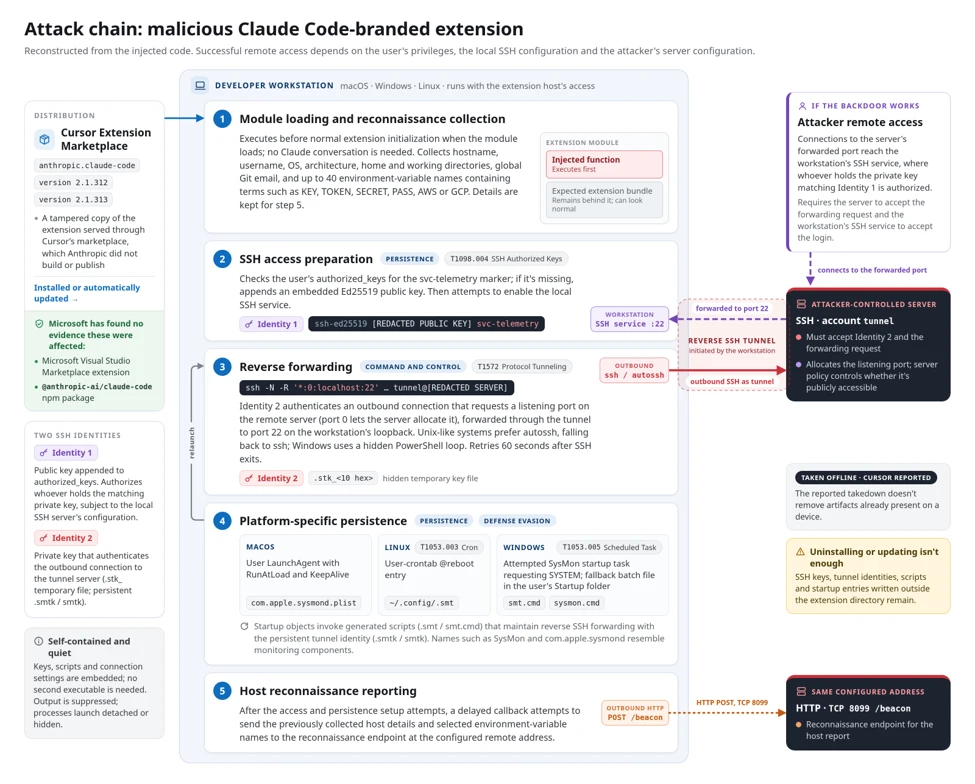
Reverse forwarding was intended to carry connections from the attacker’s server back to the workstation’s local SSH service on port 22. Starting the connection outward avoided relying on a direct inbound route to the computer. But configuration and privileges still mattered: Cursor says code errors and the need for administrator rights prevented SSH access on most Windows and macOS hosts. A planted key or an SSH process alone does not establish a successful attacker login.
The reconnaissance step also needs careful reading. The initial report collected host details and selected environment-variable names, not their stored values. It could reveal which credential types were configured; it did not, by itself, demonstrate that those secrets were stolen.
Uninstalling the package leaves a separate cleanup job
Cursor says it removed the malicious builds, rebuilt the marketplace and worked with the hosting provider to take the attacker’s server offline. Those steps stop the reported distribution and server connection; they do not remove files already written to a workstation.
The loader attempted persistence outside its own installation folder. On macOS it used a LaunchAgent named com.apple.sysmond. On Windows it attempted a scheduled task named SysMon, with a Startup-folder script fallback. The monitoring-like names disguise what the configured actions actually launch.
- Establish exposure. Check extension installation or automatic-update records for the affected versions, marketplace and October 29 window. Preserve the package and relevant endpoint records before cleanup.
- Investigate the remaining artifacts. Check unauthorized SSH keys, generated scripts, startup actions and tunnel processes against Cursor’s indicators. Preserve legitimate keys and administration tools. A missing
svc-telemetrymarker alone should not override other evidence. - Remove the confirmed backdoor, then verify. Isolate a host showing payload execution or installed access. Review Cursor’s platform-specific remediation scripts and their permissions before use; confirm that malicious processes and startup artifacts do not return after restart. Review device activity and rotate accessible credentials from a trusted system when exposure or lost device trust warrants it.
On an affected Windows computer, removing the visible extension or one antivirus detection can leave a key, scheduled task or Startup script behind. Once evidence is preserved and the host is contained, Gridinsoft Anti-Malware provides a local malware check: install it, update the database, run a Full Scan, review and remove detected threats, then restart. That scan complements the incident-specific SSH and persistence review; it cannot recover stolen credentials or prove that no remote session occurred.
If the process path is wrong, the name imitates a Windows component, or high CPU started after an unknown installer, scan for hidden miners, services, startup entries, and bundled components.
Run a Full ScanThe decisive question is whether the malicious package ran and what it left behind. Updating the extension is useful, but restoring trust in the workstation requires checking the independent access and startup changes too.
References
- Cursor. Security notice: malicious Anthropic.claude-code versions in the Cursor marketplace. October 29, 2026; updated October 30. Accessed October 31, 2026.
- Microsoft Security Research. Inside a malicious Claude Code-branded extension and its persistent SSH backdoor. October 30, 2026. Accessed October 31, 2026.
- OpenSourceMalware. Trojanized Claude Code Extension Plants an SSH Backdoor. October 30, 2026; corrected distribution scope. Accessed October 31, 2026.