

A remote-support connection can become a trap for the person answering it. Microsoft has detailed SCKit, a malicious toolkit deployed through compromised ScreenConnect environments that installs unauthorized remote-access clients and prepares an attack against a technician who connects to an affected computer. A fresh November 13 wave reported by Huntress makes the immediate task broader than removing one unwanted support program: providers need to examine customer endpoints, technician workstations and management sessions separately. [1] [2]
The distinction between observed activity and intended spread matters. Huntress confirmed rogue-client deployments, but says the console-takeover attempt failed in every recovered host log it had checked. SCKit’s design should be investigated without treating every connecting technician as a confirmed victim.
One support platform, two different entry points
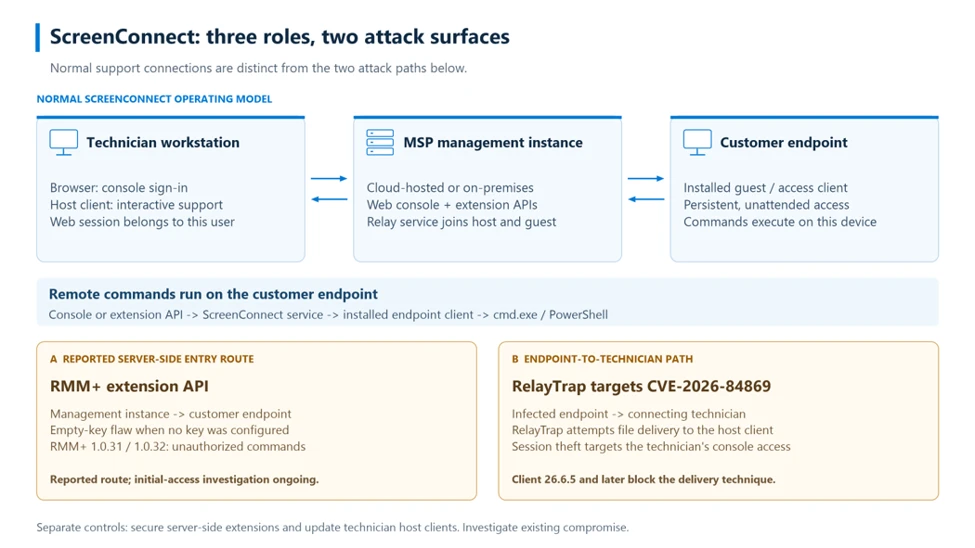
ScreenConnect has three roles: the provider’s management server, a technician’s workstation and the customer computer running an access client. The server can issue commands directly to the customer endpoint. A technician’s PC does not have to relay those commands.
That creates separate security questions. How did someone gain command access through the management instance? And can an already infected customer computer attack the client used by a technician joining a support session?
Huntress linked the first question to RMM+, an independently developed server extension. In versions 1.0.31 and 1.0.32, its analysis found that an installation with no configured access key accepted an empty value. The extension’s separate shared-secret authentication meant a normal technician login and its MFA checks were not the gate being tested. ConnectWise’s disclosure describes the risk as retaining a default API secret and says to disable RMM+ pending further guidance; it has not announced a fixed extension version. This is an extension issue, distinct from the ScreenConnect client flaw. [2] [3]
The extra client keeps a separate door open
Microsoft traced commands delivered through ScreenConnect that downloaded an MSI and silently installed another ScreenConnect client. That additional client enrolled with attacker-controlled infrastructure. Restoring control of the approved console therefore does not close the new connection. [1]
SCKit then stages scripts and RelayTrap, its replacement endpoint client. Look for related evidence such as C:\ProgramData\RelayTrap, the RelayTrapLiteAlert Run value and suspicious scheduled tasks together with client enrollment destinations and command history. These are investigation leads, not a reason to delete every legitimate ScreenConnect installation.
The memorable reversal is that the customer device becomes bait for support. RelayTrap is designed to reuse its connection details and send a launcher toward a technician joining with a vulnerable client. ScreenConnect’s September client fix, version 26.6.5, addresses that transfer-and-execution path. Updating the cloud console alone does not establish which client is installed on each technician’s workstation. The earlier ScreenConnect client-update report explains that separate requirement. [4]
A November 13 wave does not prove every stage succeeded
Huntress’s original November 11 cohort involved at least 288 endpoints across 48 organizations in its visibility. Its November 13 update describes an additional wave affecting 205 hosts across 41 organizations, beginning at 16:12 UTC. Those are source-specific observations, not a global victim total.
In the later wave, Huntress saw rogue clients and attempts to run a decoder, but no follow-on execution from those attempts. One observed environment used a self-hosted RMM+ installation. A service masquerading as “Windows Update Agent” illustrates why responders should verify its executable and enrollment destination instead of trusting its display name. [2]
ConnectWise’s November 13 advisory also urges on-premises operators to disable the identified third-party extensions and to verify technician client versions. A provider-managed cloud change cannot disable an extension on someone else’s self-hosted server.
Cleanup must cover devices and sessions
The other route in Microsoft’s analysis targets authenticated browser sessions. SCKit searches for ScreenConnect authentication cookies, and its console-distribution component is designed to use that access to reach other managed devices. The account’s permissions limit what it could reach. This explains why an endpoint investigation and revoking management sessions solve different parts of the problem. [1]
Investigate suspected machines through trusted response tooling outside ScreenConnect. Preserve console, Run Command and Toolbox evidence; isolate affected devices; check unauthorized clients and persistence; revoke exposed ScreenConnect and identity-provider sessions from a clean device. Follow the vendor’s extension-disabling guidance and verify every technician client is updated. Neither action cleans an already compromised endpoint.
If an unauthorized client or payload ran on a Windows PC, removing the visible program can leave a task, service, exclusion or another module behind. After containment and evidence preservation, a full Gridinsoft Anti-Malware scan can help check for malware leftovers: update the database, run Full Scan, review and remove detections, then restart and check for recurring activity. Coordinate this with the provider’s response; scanning does not revoke sessions or establish that no compromise occurred. The unexpected ScreenConnect access guide covers the individual-PC response.
Do not run a “cleanup” script recovered from SCKit. Microsoft found that its cleanup mode can start deployment again unless rearming is explicitly suppressed. The useful recovery test is independent verification of approved clients, clean persistence settings and revoked exposed sessions—not the disappearance of one installer.
References
- Microsoft Security Research, Sagar Patil and Jeremiah Jasmin. “SCKit abuses ScreenConnect to deploy remote access and target technician sessions.” Microsoft, November 13, 2026. Technical investigation.
- Huntress. “SCKit Worm Installs Rogue ScreenConnect Clients and Session Cookie Relays Across Hundreds of Endpoints.” November 11, updated November 13, 2026; accessed November 14, 2026. Incident observations and update.
- ConnectWise Advisories. “CVE-2026-127063.” November 12, 2026; accessed November 14, 2026. RMM+ extension disclosure.
- ConnectWise Advisories. “CVE-2026-84869.” September 8, 2026; accessed November 14, 2026. ScreenConnect client disclosure.