A genuine software signature helped a fake AI installer look trustworthy while the file beside it did the damage. In an October 27 report, Check Point Research traced Yoba, a Windows malware campaign that packages malicious DLLs with legitimate OpenAI and Anthropic executables, then uses a second signed program to keep the infection running after reboot. The researchers observed an XMRig miner at the end of the chain. [1]
The new development is the detailed investigation, not a claim that the campaign began today. Check Point describes releases from August and September and an earlier variant from June. Its findings explain why checking the signature of Setup.exe alone cannot establish that an entire downloaded ZIP is safe.
A familiar AI name, an unfamiliar distributor
The lure starts with GitHub repositories and GitHub Pages sites presenting themselves as desktop applications for GPT-5.6 Sol, GPT-6 Astra and Claude Opus. Their download buttons lead to ZIP files in GitHub releases. The hosting platform is real; the project’s apparent relationship with the AI provider is the deception.
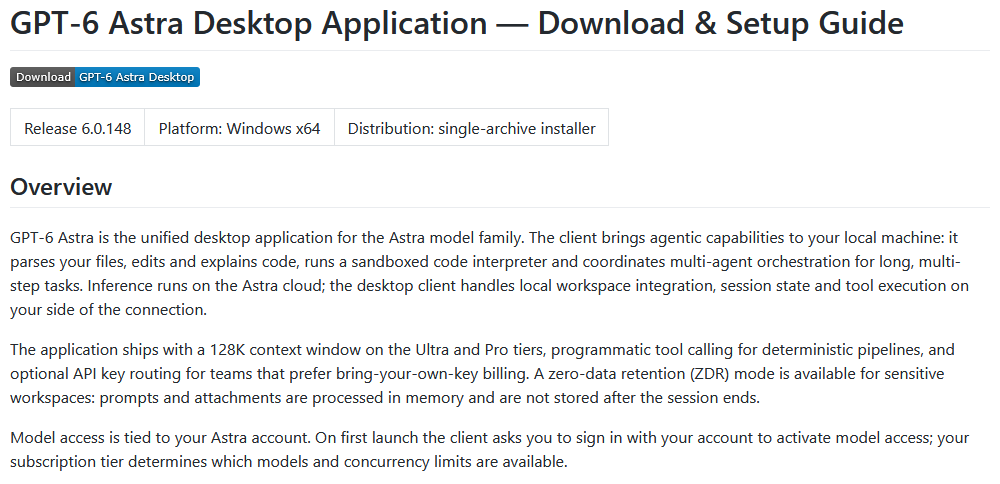
Check Point found no artificially inflated stars or forks on these repositories. The researchers instead observed their pages appearing in Google results and assessed search optimization as a likely route to victims. That is their observation about this campaign, not a guarantee that the same pages remain online or rank today.
Inside the archive, most files help the package resemble a normal application. The decisive neighbor is winmm.dll. A genuine, signed Setup.exe loads this attacker-supplied library from beside it: DLL sideloading. The signature identifies the executable’s publisher; it does not extend that publisher’s approval to a separate library supplied by someone else. Microsoft documents this broader risk when applications load DLLs from directories an attacker can influence. [3]
The installer hands the job to a Windows component
Yoba’s first stage checks that its host is named Setup.exe. Run the library in the wrong context, as an analysis system might, and it enters a long sleep loop. It also checks keyboard languages. In the analyzed newer version, Ukrainian is explicitly outside the regional exclusion list; keyboard settings are not a dependable protection strategy.
The dropper requires administrator privileges. Without them, it asks the user to rerun the program as administrator and exits. That request is a consequential step: elevation gives it the access needed to install persistent components, rather than simply making an AI app work.
It creates %ProgramData%\WMProcess, copies the legitimate Windows executable WMPDMC.exe there and places a malicious wmpdui.dll beside it. A scheduled task then starts the copied program as Local System three minutes after boot. The task uses a Microsoft Corporation author field and a description about collecting Windows Media Player device metadata. Those editable labels disguise the task; they do not authenticate it.
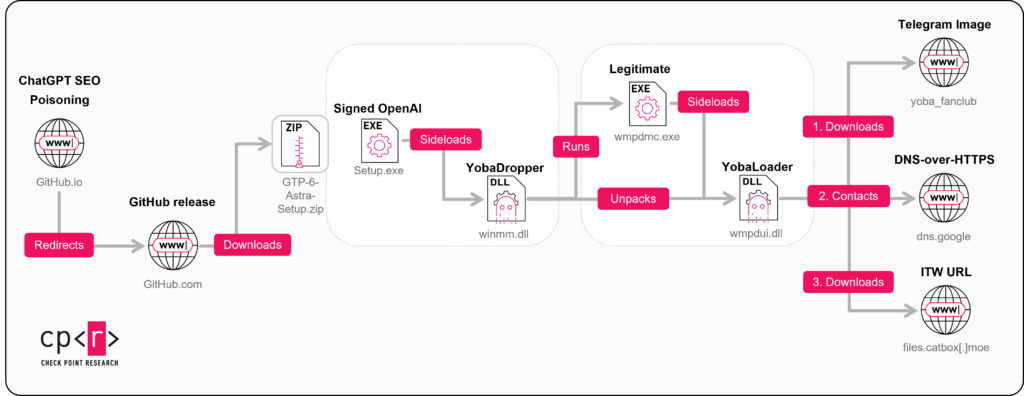
The same trick has now happened twice: a signed AI executable loads the dropper, and a copied Windows executable loads the persistent loader. The relevant question is which library each program actually loaded and from which folder, rather than whether its filename sounds familiar.
A Telegram avatar becomes a moving address book
The next stage does not begin with a fixed server address. YobaLoader fetches a Telegram channel’s profile image and uses its last 50 bytes to derive a domain name. Changing the avatar changes the generated domain. The picture is a lookup input, not something that infects a person merely for viewing it.
The loader asks Google’s DNS-over-HTTPS service for that domain’s TXT record. It verifies and decrypts the returned instructions, then retrieves an encrypted payload from a file-hosting service. Telegram, encrypted DNS and ordinary hosting each carry a piece of the chain; the report does not establish that these services were themselves compromised.
Check Point observed XMRig running through this mechanism, using Tor for its mining connection and pausing around user activity. Quiet periods or a normal-looking desktop therefore do not settle whether the loader is present. Equally, the observed miner is not the limit of its capabilities: the loader can receive other executable or PowerShell payloads. The report does not provide a campaign-wide victim count.
This is a different operation from Aokigahara’s collection of AI sessions and developer keys. Interest in AI tools connects the audience, but the reports establish different malware and mechanisms; Yoba’s observed miner does not establish Aokigahara-style credential theft.
What the earlier incident shows—and what to check now
Simvay had documented a related fake Astra installer incident on October 13. In that case, the malicious package was installed on October 8, and the next day’s reboot activated the task. The responder reported stopping the subsequent activity and finding no evidence of data leaving that host. That outcome belongs to one investigated endpoint, not every Yoba installation. [2]
If you only downloaded a suspicious archive, leave it unopened and remove it; a download alone does not demonstrate that this execution chain ran. If you launched the installer, especially with administrator approval, disconnect the affected PC from the network and arrange a malware review. A working genuine AI application installed afterward does not remove a separate loader.
A security tool may quarantine the visible installer while the copied program, DLL or scheduled task remains. For a home Windows PC, use Gridinsoft Anti-Malware: install it, update the database, run a Full Scan, review detected threats and apply cleanup, then restart and check again if symptoms return. If the installer or scanner cannot run, use Safe Mode as a recovery fallback and return to the scan when access is restored. A scan cannot prove that no earlier exposure occurred.
If you ran an unfamiliar AI installer, deleting its ZIP may leave the copied program, DLL and startup task behind. Scan this Windows PC for malicious components; investigate account exposure separately if evidence requires it.
Scan this Windows PCFor administrators, the combination of the WMProcess folder, the copied executable and adjacent DLL, plus a boot-triggered SYSTEM task, is more useful than any one filename. Check Point’s report provides hashes and detection rules. Do not delete genuine Windows libraries elsewhere just because their names match. Treat manual task and file inspection as optional follow-up or an organizational investigation, rather than a prerequisite to scanning.
Yoba turns two trust shortcuts into an infection chain: a familiar hosting site and a valid signature on one file. Verify the distributor of the whole package, and investigate what the signed program loads when the package’s origin is wrong.
References
- Check Point Research. “Tricks from the Past deployed via signed ChatGPT and Claude binaries.” October 27, 2026. Campaign analysis and indicators.
- Ryan Patrick. “How a fake GPT-6 Astra setup abused signed binaries to reach SYSTEM.” Simvay, October 13, 2026. Earlier endpoint investigation.
- Microsoft. “Dynamic-Link Library Security.” Microsoft Learn, accessed October 27, 2026. DLL loading security.