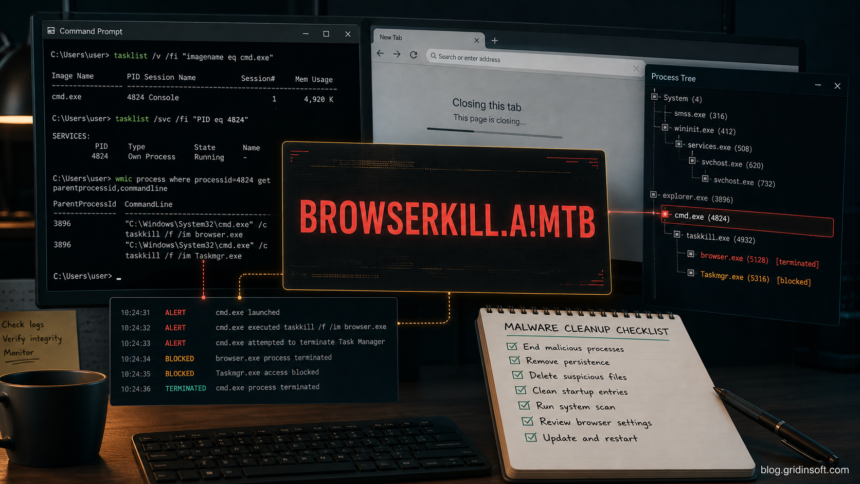
Behavior:Win32/BrowserKill.A!MTB is a Microsoft Defender behavior detection for suspicious activity that can interfere with browsers, Task Manager, or process inspection. Treat the alert as real until you can prove it is tied to a known harmless app bug, especially when the local alert details point to C:\Windows\System32\cmd.exe, browser process termination, or a severe suspicious-behavior category.
The important point is not that cmd.exe exists. Command Prompt is a normal Windows component. The warning matters when a script, startup entry, scheduled task, or parent process uses cmd.exe to close browser windows, hide Task Manager, run a chain of commands, or re-create suspicious files after removal.
Quick answer
If Defender reports Behavior:Win32/BrowserKill.A!MTB, do not whitelist it immediately. Save the detection details, update security intelligence, run a full scan, then check what launched C:\Windows\System32\cmd.exe. If Task Manager closes, crashes, or cannot stay open, use Windows Security, Event Viewer, Autoruns-style startup review, or a second trusted scanner from a clean state instead of relying only on Task Manager.
What the detection usually means
Microsoft lists Behavior:Win32/BrowserKill.A!MTB as a Defender Antivirus detection and says this threat can perform actions chosen by a malicious actor on the device. The public encyclopedia page also notes that technical details are not currently available, so the practical signal comes from the alert context: affected item, parent process, process path, timestamp, and whether the same behavior repeats after quarantine [1].
| Field to check | Why it matters |
|---|---|
| Name | It should match Behavior:Win32/BrowserKill.A!MTB. Similar names can indicate a different rule or variant. |
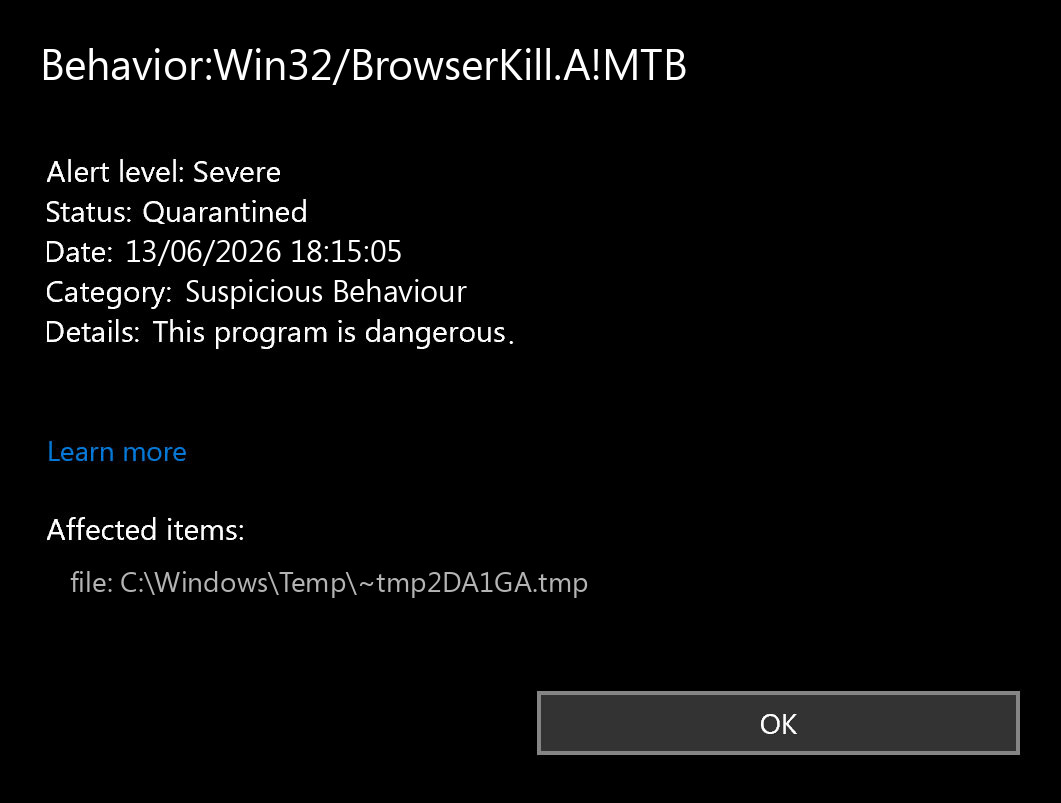
| Severity and category | Public examples show Severe and Suspicious Behaviour, which means the alert should not be dismissed as a browser annoyance. |
| Affected item | Look for behavior:_process: C:\Windows\System32\cmd.exe, scripts, user-profile paths, Temp files, or unsigned executables. |
| Repeat count | The same alert returning after quarantine suggests persistence: startup items, scheduled tasks, services, browser policy, or a loader. |
Why Task Manager may close
Task Manager can close for ordinary Windows issues, a broken startup entry, a third-party utility, or malware. With BrowserKill.A!MTB, the suspicious pattern is different when your own system also records Defender detections, cmd.exe activity, browser process termination, or errors around C:\Windows\System32\taskmgr.exe.
If the symptom appeared right after installing Claude Desktop on Windows, compare it with our separate guide on Task Manager closing after installing Claude. That case is usually a malformed startup command, not a confirmed malware incident. If Defender explicitly names Behavior:Win32/BrowserKill.A!MTB, use this page instead and investigate as a security alert first.
First steps after the alert
- Do not click Allow on the detection. Leave Defender’s quarantine/removal action in place unless you are submitting a file for analysis.
- Disconnect from risky sessions. Close banking, email, crypto wallets, admin panels, and password managers on the affected PC until the scan is clean.
- Update definitions. In Windows Security, update Microsoft Defender security intelligence before running a full scan.
- Run a full scan, not only a quick scan. Quick scans can miss dormant files, alternate startup paths, or browser policy changes.
- Save the detection details. Keep the timestamp, threat name, affected item, and process path. They are useful if the alert returns.
Check the command chain
Most useful triage is about the parent and child process chain. C:\Windows\System32\cmd.exe is legitimate, but it should not be launched by a random file in AppData, Temp, Downloads, a browser cache folder, or a startup entry you do not recognize.
- Open Windows Security history and expand the Behavior:Win32/BrowserKill.A!MTB alert.
- Note whether the affected item is
cmd.exe, a temporary file, a script, or a process started from the user profile. - Review Startup apps, Task Scheduler, and the Run keys:
HKCU\Software\Microsoft\Windows\CurrentVersion\RunandHKLM\Software\Microsoft\Windows\CurrentVersion\Run. - Look for command lines that call
taskkill,powershell.exe,wscript.exe,mshta.exe, browser executables, or files with random names. - If Task Manager will not stay open, use
eventvwr.msc, Windows Security, or Safe Mode with Networking only when you understand the tradeoff. Some Defender real-time features do not run normally in Safe Mode.
Where Gridinsoft helps
Defender can remove the detected behavior, but Microsoft also warns that infections can leave remnant files and system changes after removal [1]. This is the point where a second cleanup pass is useful. Gridinsoft Anti-Malware can scan for leftover startup entries, suspicious scripts, browser policy changes, unwanted extensions, modified shortcuts, and files that keep restoring the same command chain.
After uninstalling the suspicious app or deleting the visible threat, use Gridinsoft Anti-Malware to check hidden files, startup entries, scheduled tasks, bundled apps, browser changes, and other persistence points that can restore malware.
Download Anti-MalwareUse Gridinsoft after the initial Defender action, not as a reason to ignore the Defender alert. If the same Behavior:Win32/BrowserKill.A!MTB event returns after both scans, collect the detection history and consider restoring from a known-clean backup or doing an in-place Windows repair after your files are backed up.
What not to do
- Do not whitelist the detection just because the affected file is
cmd.exe. Malware often uses legitimate Windows binaries. - Do not delete broad registry branches. If you find a suspicious Run value, export the parent key first and remove only the exact malicious value. Our broken registry after malware guide explains the safer workflow.
- Do not install several real-time antiviruses at once. Use one real-time engine and one on-demand second-opinion scan if needed.
- Do not assume every Task Manager crash is BrowserKill. Use our PC infection warning signs checklist to compare the alert with other symptoms.
When to change passwords
Change passwords from a clean device if BrowserKill.A!MTB appeared after running an unknown installer, crack, script, browser extension, fake update, or attachment. Prioritize email, bank, work, social, and password-manager accounts. If the alert came from a clear app bug and no malware traces remain, password rotation may be unnecessary, but keep MFA enabled and watch sign-in history.
If the warning is not BrowserKill but names cmd.exe[PID] with Win32:Malware-gen or Other:Malware-gen, use the Malware-gen cmd.exe alert guide to decide whether the blocked command was a false positive or a persistence symptom.
FAQ
Is Behavior:Win32/BrowserKill.A!MTB definitely malware?
It is a severe Defender behavior detection, so treat it as malware until the context proves otherwise. The exact file or process chain matters more than the name alone.
Can cmd.exe be the infected file?
Usually no. C:\Windows\System32\cmd.exe is a normal Windows file. The problem is often what launched it and what commands it ran.
Why does Task Manager close immediately?
It can be a Windows/app bug, but with this detection it may also indicate a command or process trying to block inspection. Check Defender history, Event Viewer, startup entries, and scheduled tasks.
Should I remove Microsoft Defender?
No. Keep Defender or another trusted real-time protection enabled. The better response is to update definitions, run a full scan, and use a second cleanup pass for remnants.
Can Gridinsoft Anti-Malware remove BrowserKill.A!MTB leftovers?
Gridinsoft can help find and remove leftover files, startup entries, unwanted browser changes, and persistence traces after Defender reports or quarantines the behavior.
References
- Microsoft Security Intelligence. “Behavior:Win32/BrowserKill.A!MTB threat description.” Published and updated May 20, 2025. Microsoft WDSI.