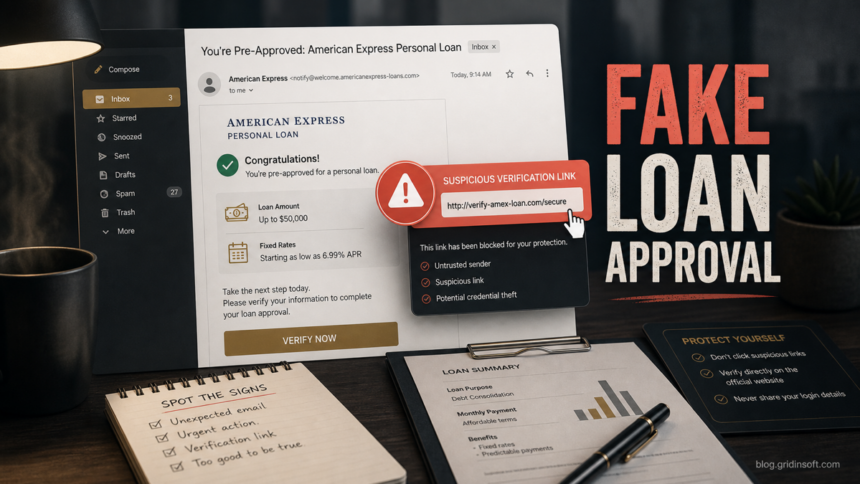
The American Express Personal Loan Approved email is a phishing lure, not a safe loan notice. The message says a personal loan has already been approved, then pushes you toward a verification link or account-confirmation step. Do not click the button, enter your American Express login, or share bank details from that email. Open the American Express website or app yourself, or call the number printed on the back of your card if you are an existing card member.
This scam works because it mixes good news with a security warning. A recent version pretends to come from an AMEX loan team, claims a loan approval around $18,940, mentions a suspicious sign-in or location detail, and asks the recipient to verify information before the offer is completed. That combination is designed to make you act before checking the sender, link, and account status.
What the fake AmEx loan email claims
The exact wording can change, but the core pattern is usually the same: a loan has supposedly been approved, the recipient must confirm information, and the link appears urgent or security-related. Treat these details as red flags when they appear together:
- Unexpected loan approval: you did not apply for an American Express personal loan, or the email arrives without any normal application context.
- Fake loan-center branding: wording such as AMEX Loan Center, loan protection, or a generic loan team instead of a normal signed-in account workflow.
- Security-pressure language: a suspicious IP address, unusual location, account review, or bank-account verification step that makes the message feel urgent.
- Verification link: the button leads to a domain that is not the official American Express website, or the sender address does not match the brand.
- Too much personal detail requested: login credentials, Social Security number, bank account, card details, one-time codes, or uploads of identity documents.
Why this phishing email is dangerous
A fake loan approval can steal more than an email password. If the landing page asks for your American Express login, the attacker may try account takeover. If it asks for bank verification, identity details, or card information, the risk shifts toward payment fraud and identity theft. American Express warns customers not to share account numbers, login credentials, Social Security numbers, or one-time passcodes through suspicious calls or messages, and recommends contacting the official number on the card when in doubt.1
The loan angle also gives scammers an excuse to ask for documents or a processing fee. A real lender should not require you to pay a surprise fee through gift cards, crypto, wire transfer, or an unrelated payment app before you can receive funds. If a page combines a loan approval with pressure to pay or verify immediately, close it and verify through official channels.
What to do if you received the email
- Do not click the link. Hovering over a button may reveal a non-American Express domain, but do not open it just to test.
- Do not reply. A reply confirms that your mailbox is active and can bring more phishing attempts.
- Verify from a clean route. Type the American Express address yourself, use the official app, or call the number on the back of your card.
- Mark the email as phishing or spam. This helps your mail provider block related messages.
- Check the URL before sharing anything. If you already copied the link, scan the domain with the Gridinsoft URL Scanner before deciding whether it is safe to open.
If you clicked the verification link
What you do next depends on how far you went. If you only opened the page and closed it, clear the tab and avoid entering anything. If you typed credentials, bank information, or identity details, treat it as a real compromise attempt:
- Change the affected password from a different trusted device, especially if you reused the same password elsewhere.
- Turn on multi-factor authentication and revoke suspicious sessions where the account settings allow it.
- Contact American Express through the official app or phone number if you entered card, account, or login information.
- Watch bank and credit-card activity for small test charges, new payees, loan inquiries, or account-profile changes.
- Report the scam to the FTC if you are in the United States, and use IdentityTheft.gov if personal identity data was exposed.23
- Scan downloads before opening them. If the phishing page made you download a PDF, form, archive, or support tool, check the file with the Gridinsoft Online Virus Scanner or scan the computer before running it.
How to tell a real loan message from a scam
A real financial message should survive independent verification. You should be able to sign in from the official website or app and see the same loan, account, or security notice there. A phishing message usually breaks when you remove the email link from the process.
| Check | What to look for |
|---|---|
| Sender and reply path | Unexpected domains, lookalike spellings, free-mail senders, or reply-to addresses that do not match American Express. |
| Link destination | Short links, misspelled domains, unrelated hosting, or a page asking for credentials before you can see details. |
| Account context | A loan approval you never requested, a bank account you do not recognize, or a claim that conflicts with your real account dashboard. |
| Pressure | Urgent verification, suspicious-login language, threats of losing the loan, or requests for one-time codes. |
Related phishing lures to watch for
This fake loan approval belongs to the same family of branded financial phishing as Capital One phishing emails and PayPal unauthorized transaction email scams. The brand changes, but the decision path is similar: ignore the embedded link, verify from the official account route, and secure any account where you entered credentials.
If you want a broader checklist for messages that impersonate banks, delivery services, employers, or cloud accounts, use our guide on how to spot a phishing email. If you already shared personal data, the next step is closer to identity-risk cleanup than simple email filtering; our guide on protecting personal data from scams and account takeover covers that path.
FAQ
Is the American Express Personal Loan Approved email real?
Treat it as a scam if it arrived unexpectedly and asks you to verify through an email link. Verify by opening American Express directly or calling the number on the back of your card, not by using the message button.
Can a phishing email approve a real loan?
No. The email can imitate a loan approval, but it cannot prove that a real loan exists. A legitimate loan or account notice should appear in your official account route.
What if I entered my American Express login?
Change the password from a trusted device, enable multi-factor authentication if available, check recent account activity, and contact American Express through official support. If you reused that password elsewhere, change those accounts too.
Should I scan my computer after clicking?
If you only opened the page and did not download anything, account-security steps matter most. If the page asked you to install a file, open a form, or run a support tool, scan the file and the device before using it further.
Where should I report the scam?
Report the message through your email provider, notify American Express through official support if card or account details were involved, and file a report with the FTC or IdentityTheft.gov when personal information was exposed.
References
- American Express. “Phishing Scam Awareness & Protection.” American Express, accessed June 15, 2026. https://www.americanexpress.com/en-us/security/phishing-scam-awareness/
- Federal Trade Commission. “ReportFraud.ftc.gov.” FTC, accessed June 15, 2026. https://reportfraud.ftc.gov/
- Federal Trade Commission. “IdentityTheft.gov.” FTC, accessed June 15, 2026. https://www.identitytheft.gov/