What is Almoristics Application?
Almoristics Application is not a normal Windows component. Users usually investigate it because CPU usage, fan noise, or background processes become abnormal. Treat it as unwanted or malicious unless you can clearly connect it to trusted software you installed.
- Open Task Manager and check CPU/GPU usage first.
- Look for AlmoristicsService, AlmaruricsApp.exe, or related startup entries.
- Remove recently installed bundles or unknown tools from the same date.
- Run a full scan if the process returns after uninstalling.
Almoristics Application is a devious crypto miner that’s causing headaches for countless Windows users. It’s definitely not a legitimate Windows process – just a parasite designed to mine cryptocurrency while you wonder why your computer’s fans sound like they’re preparing for takeoff. You’ll typically spot it in Task Manager with a suspicious heart-shaped icon, looking deceptively innocent while it drains your system resources.
Almoristics Application (AlmoritsticsService) Overview
This freeloader (also called Almoristics Service) belongs to the family of crypto-mining Trojans that have been making the rounds lately. Think of it as an unwelcome roommate who moved in without permission and is now running a bitcoin mining operation from your living room.
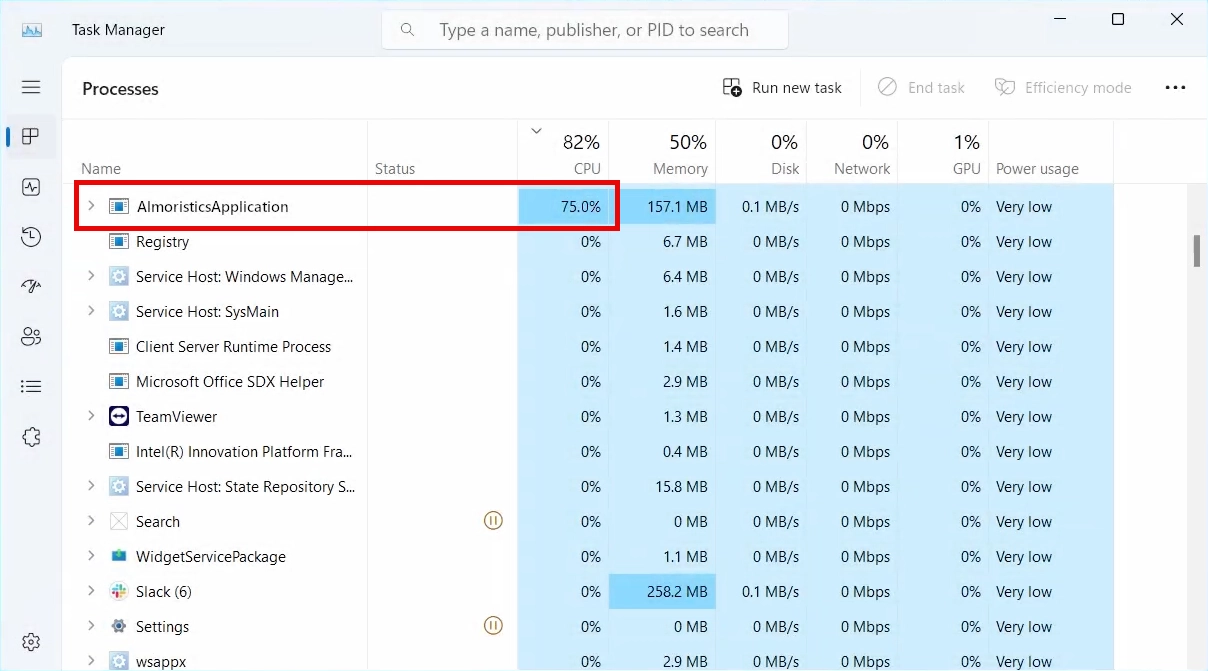
Your first clue that something’s wrong? Your CPU usage shoots through the roof, and your computer starts moving like it’s wading through molasses. The fan noise alone might make you think your laptop is planning to achieve liftoff. Meanwhile, your electricity bill climbs while this uninvited guest mines Monero or other cryptocurrencies for someone else’s wallet.
Technical Details
Almoristics Application is essentially the new kid on the block in a family of similar threats like Altruistics or Alrustiq App. These application hijack your computer’s processing power to mine cryptocurrencies like Monero or Zcash. The attackers pocket the profits while you’re left with the computing equivalent of a car running on fumes.
This malware typically sneaks in disguised within software from sketchy sources – that “free” version of expensive software from a dubious website probably wasn’t such a bargain after all. Once it makes itself at home, the cryptojacking begins, with CPU usage often spiking to a system-crippling 80%.
Beyond just mining, this virus might also modify system settings and create backdoors for even more unwelcome visitors. To avoid detection, it may appear under nearby names such as Alrisit, Altisik, AltrsikApplication, or AlmaruricsApplication, so use the folder path, service name, startup entry, and file behavior rather than the spelling alone.
AlmaruricsApplication and AlmaruricsApp.exe Variant
If the visible name is AlmaruricsApplication, treat it as the same service-miner cleanup lane instead of creating a separate guess. Check the folder and file list for AlmaruricsApp.exe, AlmaruricsUninstaller.exe, AlmaruricsHelper.dll, and settingsCl.cfg, then compare the install date with recent bundles, browser changes, and startup entries.
Do not delete random similarly named files from Windows folders. First open the file location from Task Manager or the Services console, confirm it sits in a suspicious application folder, uninstall the related app if Windows allows it, and then scan after reboot. If the same machine also shows AlsulicsApplication or AlsulicsService.exe, follow that guide for the overlapping service, scheduled-task, browser-extension, and Altruistik detection checks.
Almafurics: Identify the App Before Choosing a Cleanup Path
If Windows lists Almafurics, keep that exact spelling when checking the app. EnigmaSoft’s file-version records for Adware.AltrusicaApplication.A include the product name Almafurics, the internal/original filename AlmafuricsUnist.exe, and the description Almafurics Uninstaller. These are aggregated vendor records, not an analysis of the file on your PC. The name or a heart-shaped icon alone does not establish that your app is Almoristics, that it mines cryptocurrency, or which payload it contains.
Before changing anything, note the app’s installation date and displayed publisher. If it is running, use Task Manager’s Open file location to record the executable and folder; check the file’s Properties for its publisher or digital signature, where available. Compare those details with software installed at the same time and the exact detection from a current scan. An unfamiliar or unsigned file needs context, not a verdict based on its spelling.
- Uninstall does nothing: record the error or lack of response, then use the Gridinsoft Anti-Malware scan steps below. Do not keep launching an unfamiliar uninstaller or delete every registry entry containing the name.
- The app disappears: restart and check whether the same app or process returns. Review the scan result alongside that original symptom.
- It returns, or CPU/GPU use stays high: note the returning process’s file location and service name, if present. Follow the service-miner diagnosis and cleanup guide for the matching behavior; do not substitute another app’s path or service command.
How Did I Get Infected?
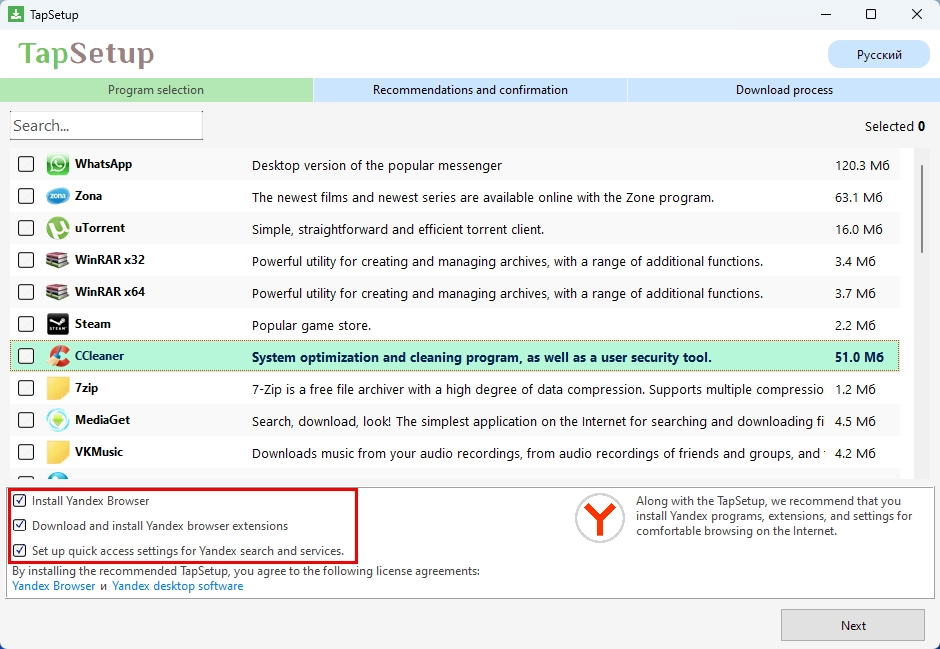
Let’s be honest – Almoristics doesn’t teleport onto your system by magic. The most common infection route is through bundled downloads – it hitchhikes alongside “free” software, game mods, or key generators from questionable websites. That moment when you rapidly clicked “Next” during installation without reading the fine print? That’s when you likely invited this resource vampire inside.
Other common infection vectors include spam emails with malicious attachments or deceptive links. Those suspicious “YOU WON’T BELIEVE WHAT HAPPENED NEXT” ads on sketchy websites can also trigger automatic downloads. Outdated software with unpatched vulnerabilities makes infection even easier, which is why Windows 7 and 8 users are particularly vulnerable targets.
How To Remove It?
To clean up a suspicious Almoristics or Almafurics installation, download and install Gridinsoft Anti-Malware, update its detection database, and run a Full Scan. Review the detections, apply the recommended removal or quarantine actions, and restart Windows. Check whether the original app, process, and high-resource symptom return. A scan can identify detected components and leftovers; it cannot guarantee that every symptom has the same cause.
If the app returns after uninstalling, a service, startup entry, scheduled task, or bundled component may still be launching it. Scanning is the main cleanup path; you do not need to delete registry keys manually first. If the installer or scanner cannot run, use Safe Mode recovery as a fallback, then return to the scan when access is restored.
After uninstalling the suspicious app or deleting the visible threat, use Gridinsoft Anti-Malware to check hidden files, startup entries, scheduled tasks, bundled apps, browser changes, and other persistence points that can restore malware.
Download Anti-MalwareReal-World Encounters with Almoristics
The surviving comments in the r/computers discussion cited below describe a range of experiences. One commenter reported poor game performance and a process using too much CPU; another reported 76% CPU use, while a different commenter saw 0%. Another described usage above 80% at times after an emulation-game download. These are individual reports, not controlled measurements of one verified sample, so there is no single CPU percentage that identifies the app.
Removal also varied. Some commenters reported success through Windows Settings, while others encountered a file-in-use or permission error. One described an Almoristics service entry remaining after the application folder was removed. That distinction matters: ending a process, uninstalling an app, and removing its remaining startup mechanism are different actions. If it returns after reboot, record the executable path and scan result before following the service-cleanup branch.
The original Reddit post has been removed by moderators; the comments remain available. This summary relies on those surviving comments; earlier numerical and quoted anecdotes that could not be verified have been omitted.
For your own checks, compare CPU/GPU use, fan noise, and responsiveness under the same workload before and after cleanup. If resource use changes when Task Manager opens, record the process and timing rather than assuming a particular evasion technique. Persistent heat, crashes, or short battery life after the suspect process is gone need further diagnosis; removal does not guarantee an immediate return to normal performance.
Want to stay protected from future infections? Keep your operating system and software updated, be cautious about what you download and from where, and maintain a healthy suspicion of “too good to be true” offers for free premium software. Remember, in the modern world as in life, if you’re not paying for the product, you might be the product – or in this case, your computer’s processing power might be.
Related service-miner cleanup: If you see similar high CPU behavior, compare it with Altisik Service removal. If the visible app name is AlsulicsApplication or the service is AlsulicsService.exe, use the AlsulicsApplication cleanup guide and check for unwanted services, startup entries, browser extensions, and scheduled tasks.
References
- EnigmaSoft. “Adware.AltrusicaApplication.A,” file-version metadata. Accessed October 6, 2026. Detection metadata record.
- r/computers contributors. Comments on the Almoristics Service discussion; original post removed by moderators. Reddit, accessed October 6, 2026. User reports and removal difficulties.