WhatsApp scams use trust: a familiar contact, a group chat, a delivery notice, a job offer, a prize, or a romantic conversation. End-to-end encryption protects messages in transit, but it does not stop a scammer from tricking you inside the chat.
What Is a WhatsApp Scam?
A WhatsApp scam is a social engineering attack delivered through WhatsApp messages, calls, groups, or links. The scammer may pretend to be a friend, family member, employer, bank, delivery company, support agent, investor, romantic partner, or buyer.
The goal is usually one of these:
- steal your WhatsApp account using a verification code;
- make you send money to a scammer;
- steal banking, card, or identity details;
- move you into a fake investment or crypto platform;
- make you open a phishing link or install malware.
Common WhatsApp Scams
- Verification code scam: Someone says a 6-digit code was sent to you by mistake. Never share it; the code can be used to take over your WhatsApp account.
- Friend or family emergency: A message claims to be from a relative with a new number who needs money. Call the old number or verify through another channel.
- Job or task scam: You are offered easy remote work, then asked for deposits or fees. Do not pay to get paid, and treat crypto/task jobs as high risk.
- Romance scam: A relationship builds quickly, then money problems appear. Do not send money to someone you have not met and verified.
- Crypto investment: A friendly contact pushes a fake exchange or “guaranteed” return. Do not move funds to platforms recommended by strangers.
- Prize or giveaway: You won something and must click a link or pay a fee. Ignore unsolicited prizes and do not enter card details.
Celebrity or Politician Giveaway Messages
Celebrity and politician names can make a forwarded prize message feel credible. In August 2026, fact-checkers documented a false WhatsApp claim offering free data and airtime in Davido’s name [1] and a separate ₦15,000 claim tied to Governor Ademola Adeleke’s election victory [2]. A familiar name, celebration, or election result does not authenticate the link.
If a WhatsApp message promises cash, airtime, data, or a gift for answering a quiz or sharing the link, use this decision path:
- Do not forward it. Sharing requirements help the lure reach trusted family and group chats.
- Do not enter a phone number, password, card detail, or verification code. Do not pay a release, processing, delivery, or activation fee.
- Verify independently. Open the person’s verified public account or the organization’s official website yourself instead of using the message link.
- If you entered only your phone number, stop there, block and report the sender, and expect follow-up phishing. A phone number alone does not give someone your WhatsApp account.
- If you shared the six-digit WhatsApp code, re-register your phone number in WhatsApp, review linked devices, enable two-step verification, and warn contacts. Follow WhatsApp’s official compromised-account steps [3].
- If you paid or installed anything, contact the payment provider immediately or remove the app and scan the device, then continue with the recovery checklist below.
WhatsApp Verification Code Scam
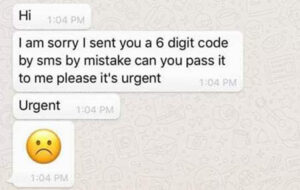
This is one of the most dangerous WhatsApp scams because it can hijack your account. The attacker tries to register your phone number on another device. WhatsApp sends you a 6-digit code. Then the attacker messages you, often pretending to be a friend, and asks you to forward the code because it was “sent by mistake.”
If you share it, the attacker may take control of your WhatsApp account and message your contacts as you.
Friend or Family Emergency Scam
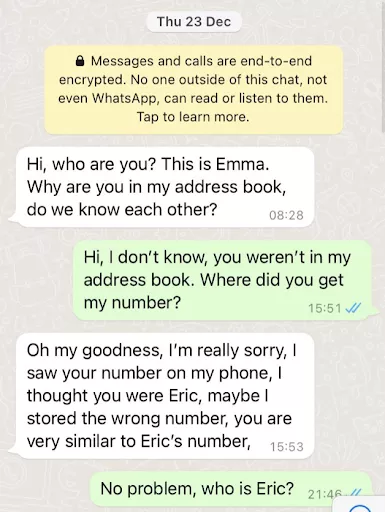
The message may say: “Hi mom, I lost my phone. This is my new number.” After a short conversation, the scammer asks for urgent money, a bill payment, or a transfer to a friend. The pressure is emotional, not technical.
Always verify through a second channel. Call the original number, ask a question only the real person would know, or contact another family member before sending money.
Romance and Dating Scams
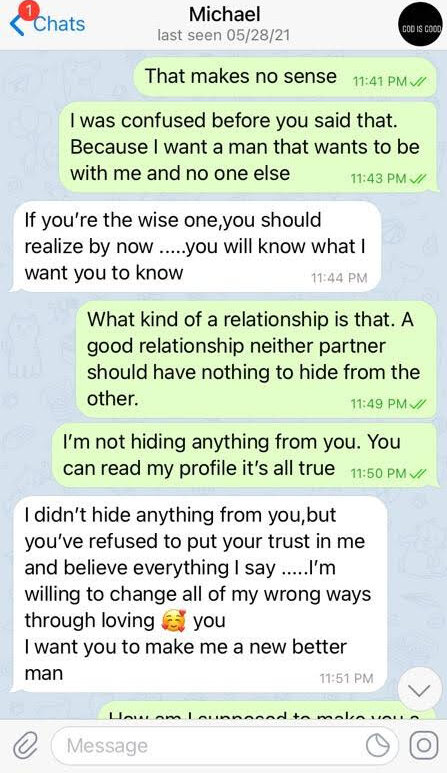
Scammers often move conversations from dating apps to WhatsApp because it feels more private and personal. They build trust, create emotional urgency, and eventually ask for money, travel costs, medical help, investment funds, or gift cards.
If the chat began on a dating app and then moved to WhatsApp, use our online dating romance scam guide to compare the money, secrecy, and verification-code warning signs.
WhatsApp Job and Task Scams
These scams promise easy money for liking posts, reviewing products, rating hotels, testing apps, or completing simple tasks. At first, the victim may receive a small payment. Then the scam asks for a deposit, “upgrade”, tax, verification fee, or crypto transfer to unlock larger earnings.
The rule is simple: if you must pay money to receive wages, it is likely a scam.
WhatsApp Crypto Scams
Crypto scams on WhatsApp usually begin as a friendly chat, romance conversation, investment tip, or group invitation. The scammer shows fake profits on a controlled platform, then encourages the victim to deposit more. When the victim tries to withdraw, new fees appear.
For more on this pattern, see our guide to cryptocurrency scams.
How to Spot a WhatsApp Scam
- The message asks for a 6-digit verification code.
- A familiar person writes from a new number and asks for money.
- The sender creates urgency: account blocked, payment due, emergency, limited offer.
- The link domain does not match the company being impersonated.
- You are asked to pay a fee, deposit, tax, or upgrade before receiving money.
- The conversation moves toward crypto, gift cards, bank transfers, or remote access.
- The person refuses a voice or video call, or the call feels scripted and evasive.
How to Protect Your WhatsApp Account
- Open WhatsApp Settings.
- Go to Account.
- Enable Two-step verification.
- Add a PIN you do not reuse elsewhere.
- Add an email address for recovery.
- Review linked devices and remove anything you do not recognize.
Also keep your phone OS updated, use a screen lock, and avoid installing apps sent through chat links.
Newer WhatsApp malware campaigns can also send script attachments from compromised contacts. If you received a business-looking .vbs file through WhatsApp Desktop or Web, see our WhatsApp VBS malware warning before opening it or continuing to use that PC.
What to Do If You Were Scammed on WhatsApp
- Shared a WhatsApp code: try to re-register your number, enable two-step verification, and warn contacts.
- Sent money: contact your bank or payment provider immediately and report the transaction.
- Entered a password: change it from a clean device and enable MFA.
- Opened a suspicious link: close it, do not enter data, and scan the URL if unsure.
- Installed an app: uninstall it, revoke permissions, and scan the device.
- Someone impersonates you: notify contacts through another channel and report the account to WhatsApp.
You can check a suspicious link or downloaded file with the Gridinsoft Online Virus Scanner before opening it.
Current example: A fake Adidas Copa 2026 reward page shows how WhatsApp prize scams can reuse trusted brand names, short quizzes, and sharing requirements. See the fake Adidas Copa 2026 promotion breakdown for the latest domain cluster and warning signs.
FAQ
Can someone hack my WhatsApp with a code?
Yes. If you share the 6-digit verification code, an attacker may register your WhatsApp number on another device.
Does end-to-end encryption stop WhatsApp scams?
No. Encryption protects message transport, but scams happen through persuasion, fake identity, malicious links, and account takeover tricks.
Should I trust a friend asking for money on WhatsApp?
Verify first through another channel. If the number changed, the wording feels unusual, or the request is urgent, assume it may be impersonation.
Can WhatsApp links contain malware?
Yes. Links can lead to phishing pages, fake APKs, browser notification scams, or malicious downloads.
How do I report a WhatsApp scammer?
Open the chat, tap the contact name or number, then choose Report and Block. Also report financial loss to your bank or payment provider.
References
- FactCheckAfrica. “Viral Message Circulating on WhatsApp Claiming Davido Is Giving Out Free Data and Airtime Is False.” FactCheckAfrica, August 18, 2026. Fact check.
- Olaitan Oye-Adeitan. “Osun Election: Claim That Governor Adeleke Is Giving 15k to People Is False.” Halt Fake, August 17, 2026. Fact check.
- WhatsApp. “How to Recover a Compromised Account.” WhatsApp Help Center, accessed August 19, 2026. Official recovery steps.