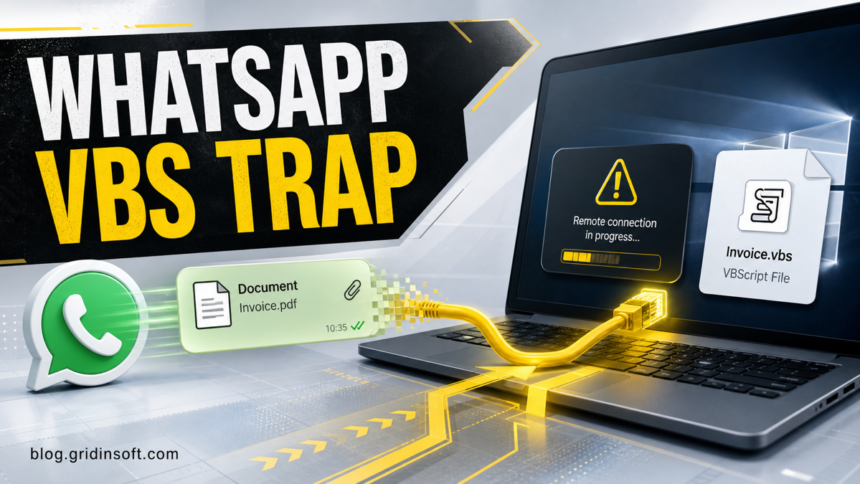
A fresh Securelist malware report describes an active WhatsApp campaign sending malicious Visual Basic Script files that look like invoices, account statements, debt notices, or other business documents. The practical risk is not the chat message itself; it is opening the downloaded .vbs attachment on a Windows PC, where the script can start a multi-stage chain and install a legitimate remote monitoring and management agent for attacker-controlled access [1].
The campaign is especially relevant for people who use WhatsApp Desktop or WhatsApp Web for work. The attachment may arrive from a known contact because the report found evidence that compromised WhatsApp accounts were used to send the same file to multiple contacts. A trusted sender name is therefore not enough to make the file safe.
What The Report Found
The primary report describes victims across Malaysia, Brazil, India, Mexico, Singapore, the United Kingdom, Spain, Taiwan, Australia, Russia, and Vietnam, with the highest observed concentration in Malaysia. The campaign was described as still active when the report was published on June 22, 2026.
| Observed clue | Why it matters |
|---|---|
File names such as invoices, debt notices, account statements, bank statements, or forms ending in .vbs |
The lure borrows normal business language while using a script file type that ordinary document workflows should not require. |
| WhatsApp Desktop or Web download followed by manual opening | The first click downloads the file; the second user action launches it through Windows Script Host. |
WScript.exe running from a WhatsApp attachment storage path |
This is a strong local triage clue after a suspicious chat attachment was opened. |
| Remote monitoring and management software appears unexpectedly | Legitimate RMM tools can become dangerous when installed by malware because they provide remote control. |
Who Should Act
Act now if you opened a WhatsApp attachment with a .vbs, .vbe, .js, .ps1, .bat, .cmd, or .exe extension, especially if the message had no explanation or looked like a financial document. Also treat the situation seriously if a contact says your account sent similar files to other people.
Do not assume the file is safe because the sender is familiar. In this campaign, the delivery path depends on trust in the contact list. WhatsApp’s own safety guidance also warns users to be careful with suspicious files and to review linked devices when account misuse is suspected [2] [3].
What To Check On Windows
- Disconnect from the network if you just ran the script and see remote-access prompts, new support tools, or unusual command windows.
- Look for the downloaded attachment in WhatsApp Desktop transfer folders and in normal download locations. Keep the filename for incident notes, but do not reopen it.
- Check Task Manager and installed apps for unexpected remote support or endpoint management software, including any tool you did not install intentionally.
- Review startup entries, scheduled tasks, and recent files around the time the attachment was opened. A visible RMM agent may not be the only persistence mechanism.
- From your phone, review WhatsApp linked devices and remove any session you do not recognize.
- Warn the contact who sent the file through a different channel. Their WhatsApp account may be abused even if they did not send the attachment manually.
- Change passwords for accounts used on the PC after the machine is clean, starting with email, work, banking, and messaging accounts.
Scan Before You Continue Using The PC
If the .vbs file ran, removing one visible app is not enough to prove the system is clean. A script chain can leave behind startup entries, scheduled tasks, downloaded payloads, browser changes, or remote-access configuration. Run a full security scan, remove detections, reboot, and scan again if warnings or remote-access prompts return.
Gridinsoft Anti-Malware can help check for hidden files, suspicious startup items, bundled payloads, and persistence after a WhatsApp attachment incident.
If the page or email made you download an invoice, coupon, tracking app, browser extension, or support tool, scan the PC before opening it again or logging into sensitive accounts.
Scan this Windows PCHow To Avoid This Variant
- Do not open script files from chats, even if they are named like invoices or bank statements.
- Turn on file extensions in Windows File Explorer so
Invoice.pdf.vbsis not mistaken for a PDF. - Confirm unexpected work documents through a separate channel before opening them.
- Keep WhatsApp Desktop, Windows, browsers, and security tools updated.
- Use WhatsApp’s report/block controls for suspicious messages and review linked devices regularly.
FAQ
Can a WhatsApp message infect my PC by itself?
The message preview is not the main issue in this campaign. The risk starts when the attachment is downloaded and the user opens the .vbs file on Windows.
Why is a .vbs file suspicious?
.vbs is a script file type, not a normal invoice or bank statement format. Business documents should usually arrive as PDF, DOCX, XLSX, or through a known company portal, and even those should be verified when unexpected.
Should I uninstall ManageEngine if I find it?
Do not remove evidence blindly on a work device; contact IT first. On a personal PC, an unexpected remote-management agent after opening a WhatsApp script is suspicious, but scan the system and review startup/persistence entries as well.
What if my WhatsApp sent the file to contacts?
Review linked devices, log out unknown sessions, enable two-step verification, and warn recent contacts through another channel. Then check the Windows PC that was used with WhatsApp Desktop or Web.
References
- Fareed Radzi, “A VBScript campaign distributed through WhatsApp deploying RMM software,” Securelist, published June 22, 2026, accessed June 23, 2026. https://securelist.com/whatsapp-vbs-rmm-campaign/120290/
- WhatsApp Help Center, “About suspicious files,” WhatsApp, accessed June 23, 2026. https://faq.whatsapp.com/667552568038157
- WhatsApp Help Center, “How to unlink a device,” WhatsApp, accessed June 23, 2026. https://faq.whatsapp.com/834124628020911