
Virus:Win32/virut is a Microsoft Defender detection associated with Virut, a family of Windows viruses that can infect other programs. Keep the detected item quarantined, disconnect the affected PC from shared storage, and stop running old installers or portable apps. The next useful question is whether Defender stopped one infected download or whether other executable files have already been modified.
Deleting the first file does not answer that question. Use Gridinsoft Anti-Malware to scan the whole PC and review the affected locations, including other software folders and connected storage. A remaining infected program or additional malware can restart the problem after the original alert is resolved. Scanning helps find those components; it cannot guarantee reconstruction of every damaged program.
What does Virus:Win32/virut mean?
Virut is a file-infecting computer virus: malicious code is added to a host program, so the program itself becomes a carrier. Microsoft’s family description identifies .exe programs and .scr screen savers as targets. It also describes a backdoor that can let an attacker download and run other files. These are documented family characteristics, not proof that every capability was exercised on your computer. [1]
The alert may use lowercase virut, as in Virus:Win32/virut, or show a named variant. Record the complete label and the affected path. The name alone does not reveal how many programs are infected or whether the detected file ran.
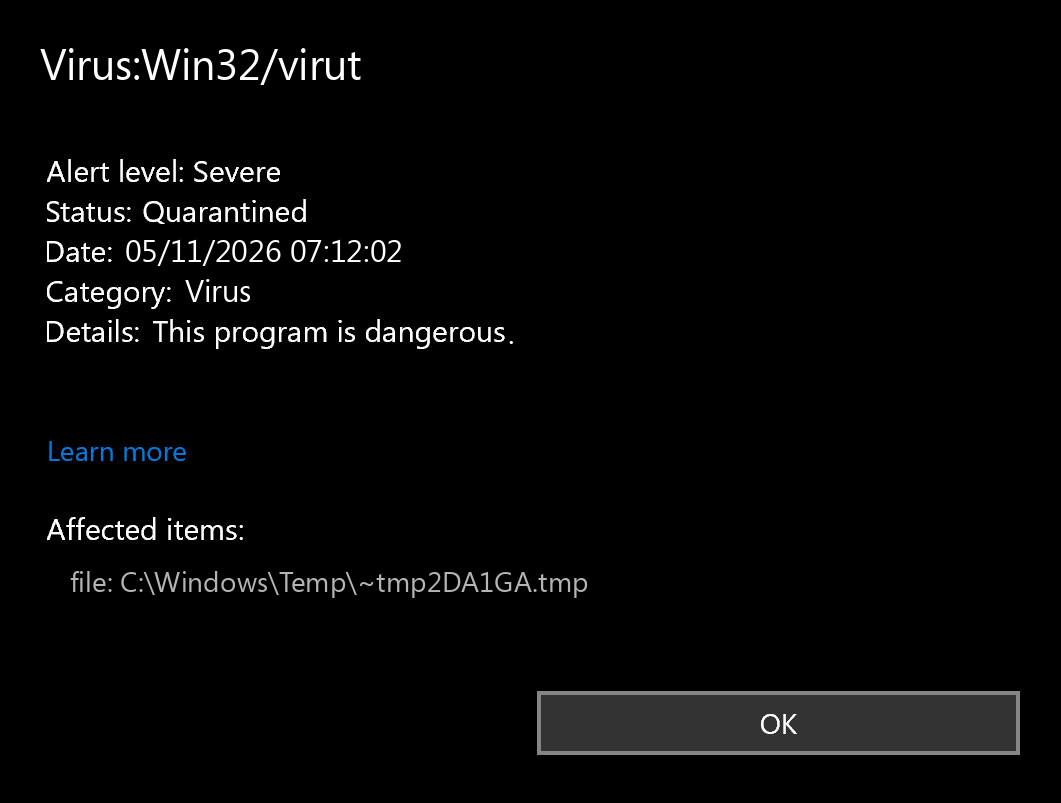
Open Windows Security → Virus & threat protection → Protection history and expand the relevant event. Note the detection time, affected items, and whether the current action is complete. Keep that record before cleaning up. An old quarantined event remaining in the list is different from a newly detected file.
One infected download or an active file infection?
The distribution of detections matters more than how alarming one file name looks. Use the first scan to separate these situations:
- One installer or archive was blocked before you opened it. Keep it isolated, remove the unwanted source package, and run a Full Scan. One blocked download does not establish a system-wide outbreak.
- Unrelated programs or screen savers are detected across several folders. Keep the PC isolated. Treat this as possible spread between host files; do not launch the affected applications to see whether they still work.
- New alerts appear after opening an old installer, portable app, USB drive, or shared software folder. Stop using that source and scan it separately. Replacing Windows alone leaves the contaminated software collection available to bring the problem back.
- The only record is an older event whose action is already complete. Compare timestamps and paths after the new scan. Do not restore the file or erase history just to make the warning disappear.
How to scan and contain Virut
- Isolate the PC. Disconnect Ethernet or Wi-Fi and stop access to writable network shares. Unplug nonessential external drives. If this is a work computer, involve IT before reconnecting it to company storage.
- Keep Defender’s quarantine in place. Complete any pending recommended action. Do not allow the detection or exclude the software folder to make an application launch.
- Install Gridinsoft Anti-Malware from its official download. Update its database, run a Full Scan, review the detected items and their paths, and apply the appropriate removal actions. If you need a connection for installation or updates, keep shared storage disconnected and do not use the machine for accounts or ordinary browsing.
- Review the scope before putting files back. A list concentrated in one unused download folder suggests a different recovery job from detections throughout installed programs. Save the scan report so you can compare any later alerts.
- Restart when cleanup requests it. Check whether genuinely new detections appear. Scan previously attached removable media and shared application locations before using their software again.
If the installer or security tools cannot run, stop launching more programs from the affected disk. Use an offline recovery environment or specialist help to regain access, then return to a full malware assessment. Do not disable protection as a workaround.
Why Virut can return after removal
Imagine that an infected installer ran and another application became a carrier. Removing the installer leaves that second executable behind. Launching it can restart the infection. That is why a single-file cleanup and a whole-PC scan answer different questions.
There are also separate risks: a contaminated USB software collection can reintroduce infected programs, while a payload downloaded through the backdoor may remain after a Virut carrier is removed. Use the new timestamp, exact path, and action that preceded the alert to investigate the source. Recurrence after extracting the same archive points toward the archive; fresh detections across unrelated applications require a broader assessment.
A quarantine result also does not necessarily mean that the original program has been repaired. McAfee Avert Labs documented Virut infections that damaged host executables beyond repair. Repeatedly restoring such files to keep an application working can undo containment. [2]
When scanning should lead to a rebuild
If many unrelated programs are infected, Windows components are affected, or new infections continue after containment, a clean rebuild is the safer recovery plan. A scan is still useful for mapping affected locations and checking storage, but it should not become an endless clean–restore–reinfect cycle.
For the rebuild and data-restoration procedure, follow the Virut containment and recovery guide. Keep personal data separate from application installers and executable collections. Scan data before restoring it; review archives and macro-enabled documents rather than treating everything outside .exe as automatically safe. Reinstall programs from trusted vendor sources.
If a scan instead names Expiro, use the Expiro file-infection guide for that detection. Similar recovery concerns do not make the two names interchangeable.
Could Virus:Win32/virut be a false positive?
A mistaken detection is possible. For an isolated file from a known developer, preserve its release details, source, detection name, and security-intelligence version. Ask the developer to have that exact release reviewed by Microsoft; its submission portal accepts incorrectly classified files. Keep the item quarantined during review. [3]
A familiar program name or an official-looking download page does not settle the matter: a file infector can modify an otherwise legitimate program. Do not restore a quarantined executable merely to calculate its hash, inspect its signature, or run another test. Start with the information already available in the detection record.
What about passwords and accounts?
If an infected program ran, the family’s backdoor capability makes account protection a separate task. From a clean device, change important passwords, revoke unfamiliar sessions, and review recovery settings and multifactor authentication. Prioritize email and financial accounts. A successful malware cleanup does not revoke a session or password that someone else already obtained.
FAQ
Does a Virut alert mean all my files are infected?
No. One quarantined download does not establish widespread infection. The affected paths, execution history, and a full scan help determine the scope. Avoid opening suspected programs while you investigate.
Can I copy my old applications to a clean PC?
Do not transfer applications, portable tools, or installers from the affected machine as your recovery source. Reinstall software from trusted originals and assess personal data separately.
Is a clean scan enough to trust a repaired program?
A scan checks for detectable malicious content. It does not guarantee that a modified executable is structurally sound or identical to the publisher’s original. Replace damaged programs with clean vendor copies.
References
- Microsoft. “Win32/Virut.” Microsoft Security Intelligence, updated September 15, 2017; accessed November 4, 2026. Family behavior and file-infection characteristics.
- Jim Walter. “W32/Virut Family.” McAfee Avert Labs, hosted by Trellix; accessed November 4, 2026. Technical analysis and limits of executable repair.
- Microsoft. “Submit a file for malware analysis.” Microsoft Security Intelligence; accessed November 4, 2026. File classification review.