

An Online Stockroom $29.99 charge may be the recurring VIP Club fee, separate from the product you ordered. The store’s VIP page and Subscription Terms currently describe a payment at enrollment followed by another every 28 days. That is a four-week subscription, not a new product shipment and not a calendar-month schedule. If you want it stopped, use the merchant’s cancellation channels and keep the confirmation; getting an earlier charge refunded is a separate request.
Our review of the public pages on November 16, 2026 found a complication worth checking against your receipt: the refund policy still describes an introductory period, while the dedicated membership pages say payment starts immediately. Here is how to separate those statements, your order and the next renewal.
What the Online Stockroom VIP charge pays for
Online Stockroom sells home and travel products and advertises a paid discount club alongside them. Its VIP page says the membership payment is collected with the order and renews even without another purchase. The advertised benefits include discounts and shipping perks. A delivered product therefore does not, by itself, mean the paid membership has ended.
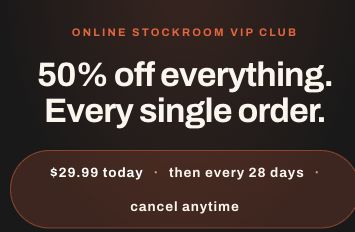
Start with the order confirmation and your card statement. Identify the product price, shipping or handling fees, any membership entry, and the date of each $29.99 payment. An amount alone cannot establish what you agreed to: a product could also cost $29.99, and the bank’s displayed transaction date may differ from the merchant’s billing date. Ask support to identify the membership and renewal date associated with the transaction.
The Subscription Terms describe a consent checkbox at checkout. We did not place an order or test that checkout, so this review cannot establish what a particular buyer saw or accepted.
Every 28 days is earlier than the same date next month
A four-week interval stays on the same weekday but moves through calendar dates. For example, if enrollment were November 16, 2026, an exact 28-day schedule would look like this:
- Enrollment: November 16, 2026.
- First renewal, 28 days later: December 14, 2026.
- Second renewal: January 11, 2027.
- Third renewal: February 8, 2027.
These are calculated dates, not an observed customer’s billing history. Setting a reminder for the 16th of every month would be too late in this example. Confirm your actual next billing date and work backward from it.
Thirteen four-week periods span 364 days. At $29.99 per period, that is $389.87 for those thirteen periods, compared with $359.88 for twelve payments. This comparison describes the cadence; it is not an annual quote or a prediction of the number of transactions on your next statement.
The public pages do not tell one consistent timing story
The VIP page and Subscription Terms say the first $29.99 is due at enrollment. The refund policy still refers to a 28-day introductory period and possible billing two days before it ends. That wording is on the public policy itself, as well as in search extracts. Do not assume you currently have a free trial. Save the offer and receipt you actually received, and ask the merchant to explain any mismatch.
There are two other timing differences. The Subscription Terms promise a notice five to seven days before a transaction, but section 8 says an advance renewal reminder is not required. They also describe cancellation as effective on submission, while the VIP page asks customers to cancel at least three business days before renewal.
The practical response is to act early, retain dated copies, and ask for written confirmation of the effective cancellation date. Do not wait for a reminder email. These inconsistencies are useful evidence to preserve; they do not establish which terms applied to an individual order or prove a legal violation.
How to cancel Online Stockroom membership
- Find the correct membership. Have your order number and the email used at checkout available. Keep a copy of the receipt and the relevant statement entries.
- Use a published cancellation channel. The merchant links to its Online Stockroom cancellation portal. Its pages also list info [at] onlinestockroom [dot] com and +1 (728) 203-5898. The email can be typed normally in your mail app. The VIP page lists telephone hours of 9am–9pm Central, seven days a week; the Subscription Terms list weekdays, so use written contact if a call does not connect.
- Make the request explicit. Ask to end the VIP membership and stop future renewals. If you also want an earlier payment returned, identify that charge and request its refund separately.
- Save the result. Keep the submitted request, date and time, confirmation screen, reply and any case number. For a call, note when it happened and what the representative confirmed. The terms promise a confirmation email within 24 hours; follow up if it does not arrive.
- Check the next statement. Match any later charge to the cancellation date and the billing period. Keep the evidence together if you need the merchant or card issuer to investigate.
During our check, the portal displayed a field asking for an email address. We did not submit one or complete a cancellation. A separate automated page request met an access challenge, so a failed page load should not be treated as a completed cancellation—or as proof that nobody can cancel.
If the portal will not load or finish, capture the error and send the written request promptly using the published address or a verified order-confirmation thread. You do not need to wait for the website to start working before documenting that request.
A concise cancellation request can say:
Please cancel the Online Stockroom VIP Club membership associated with my order [order number] and stop future renewals. Confirm the effective cancellation date in writing. Separately, please review the membership charge of [amount] dated [date] for a refund because [explain the actual issue]. Please confirm the outcome of each request.
Use only information needed to identify the order. Do not email a full card number, security code, password or one-time bank code. Avoid phone numbers from unsolicited refund messages or advertisements; use the store’s published contact details or the number on your card for the issuer.
Cancellation, a refund and a product return are different requests
Cancellation addresses the next renewal. It does not automatically reverse a fee already processed. The merchant’s membership policy generally declines refunds for completed charges but allows individual review, discretionary refunds and applicable legal rights. Describe the real reason for your request: for example, a charge after a documented cancellation or a membership you say you did not authorize. Do not invent a reason.
A product problem belongs to the order. The refund policy generally excludes change-of-mind returns and asks customers to report damaged, incorrect or other qualifying order issues within 15 days of delivery, with the order number and relevant photos. Returning a product should not be assumed to cancel VIP renewal. Ask about both if both are involved; the merchant’s policy does not settle every statutory right.
A card dispute is another process. The US Federal Trade Commission advises keeping cancellation records, monitoring statements and contacting the card issuer when a company continues charging after attempted cancellation. Use the issuer’s official app or the number on the card, explain the facts, and ask which dispute or recurring-payment options apply. Deadlines and procedures vary, so act promptly rather than waiting through another billing cycle. A dispute is not a guaranteed refund.
Replacing the card alone is also unreliable. Online Stockroom’s terms authorize use of issuer account-updater services, which can supply replacement-card details for continuing payments. Ask your issuer specifically about the merchant’s recurring payments as well as any disputed transaction, and retain your cancellation request.
What this review establishes
Public Trustpilot reviews include customers reporting satisfactory products and delivery, alongside concerns about subscription options, item expectations and returns. Those accounts help identify questions to ask; they do not verify your checkout consent or guarantee your refund. Similarly named Stockroom stores and software services are different businesses.
The useful finding is specific: a purchase and a continuing VIP membership are different commitments, and the current public pages contain conflicting timing language. Check the receipt, cancel future billing explicitly, and request any refund separately. For broader checks before another purchase, see our online shopping safety guide.
References
- Online Stockroom. VIP Membership. Accessed November 16, 2026.
- Online Stockroom. Subscription Terms. Page marked updated September 30, 2026; accessed November 16, 2026.
- Online Stockroom. Refund policy. Accessed November 16, 2026.
- Trustpilot. Online Stockroom customer reviews. Accessed November 16, 2026.
- Federal Trade Commission. How to stop subscriptions you never ordered. Consumer Advice, May 2023; accessed November 16, 2026.