

To check a Steam Playtest friend invite, open Steam yourself and look under the notification bell. You can also search for the game in the Steam Store and check your invite status on the main game’s page while signed in. Both routes let you verify an invitation without opening the link your friend sent. A chat message can look convincing even when somebody else controls the sender’s account.
Check the invite domain with Gridinsoft. Copy just the hostname from the chat message to look for reported phishing. Keep the invitation code private. Steam’s own notification tells you whether you have a place in the playtest.
Where a real Steam Playtest invite appears
- Open the Steam client you normally use. Select the notification bell at the upper right on desktop or the lower right in the mobile client. Look for a Playtest invitation and check which friend and game it names.
- Find the main game in the Store. Use Steam’s own search. Valve displays your invite status on the base game’s store page. A Request Access button is a public signup option. It does not by itself mean a friend has invited you or that a spot is reserved.
- Act inside Steam. If the invitation appears there and you want to take part, accept it in the client. If you have no matching invitation or status, leave the chat link alone. Ask your friend through another channel which game they meant.
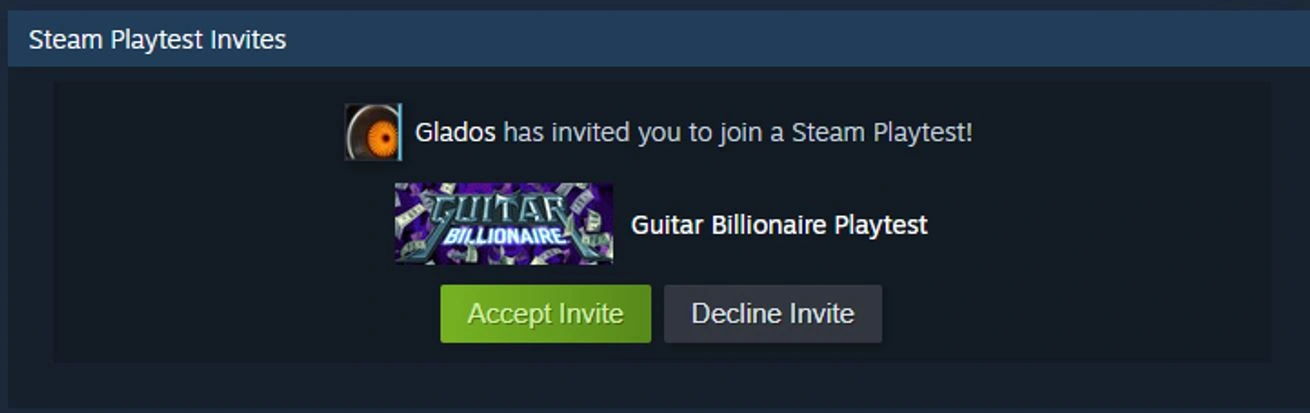
The useful detail in Valve’s example is where you found it. A stranger can copy the words “Accept Invite” and the game’s artwork into a message. They cannot turn that message into a pending invitation in your own Steam client simply by copying its appearance.
Can a real friend send one? What about an email?
Yes. A developer can enable Friend Invites for a Steam Playtest. Valve says players can invite people who have been on their friends list for at least 30 days. A friend you added yesterday therefore cannot use that feature to give you a place today. A longtime friend can send a genuine invite, and someone using their stolen account can also send you a chat link. The notification and store page work as checks in either case.
There is also a separate way in: you may have requested access on the store page yourself. Steam can email you when the developer admits you. Open Steam directly and revisit the game’s store page to see your status. For a private beta offered outside Steam’s Friend Invites system, check the developer’s announcement through a channel you already trust. Steam’s notification check specifically verifies a Steam invitation.
If the invitation asked for Steam Guard approval
An approval in Steam Guard can authorize a sign-in. If you opened a message to accept a game invitation and your phone asks you to approve a login you did not initiate, decline it. An invitation does not require sending the friend your Guard code. A request to pay for a Steam Playtest place is another reason to stop: Valve describes Playtest signups as free.
- Only clicked. Close the page and check the client. If you entered nothing, approved no sign-in and ran no download, the click alone does not establish an account takeover.
- Entered a password, shared a code or approved a login. On a trusted device, secure your account email, change the Steam password and review authorized devices in Steam Guard. Use Sign out everywhere if a device or sign-in looks unfamiliar. If you lost access, go directly to Steam Support’s stolen-account recovery.
- Ran a build sent as a file. Use a different device for account recovery while you check the PC. Our guide to a game-test executable sent through Discord walks through what changes if the file was downloaded, blocked or actually ran.
Ran a playtest build from chat on Windows?
Deleting a fake build can leave behind other files it installed. Run a Full Scan on the Windows PC that ran it and review any detections. Continue account recovery from a trusted device.
References
- Valve. Steam Playtest and Friend Invites. Steamworks Documentation. Accessed November 22, 2026.
- Valve. Account security recommendations. Steam Support. Accessed November 22, 2026.
- Valve. Recover a stolen Steam account. Steam Support. Accessed November 22, 2026.