
A fake help-desk call in Microsoft Teams did more than give intruders control of an employee’s PC: it opened a route to authentication certificates for privileged accounts. In two investigations published on October 30, Microsoft traced how an approved remote-support session became an identity attack. One organization blocked substantial follow-on activity, but an account excluded from automatic containment remained usable—and the attacker used it to steal files.
The report describes social engineering and insecure Active Directory Certificate Services (AD CS) configurations, not a vulnerability in Teams. Its central warning is that removing the first foothold or changing a password does not, by itself, invalidate a certificate already issued to an attacker.
The call that handed over the workstation
Both intrusions started with Teams messages and calls impersonating IT support. The operators persuaded users to approve interactive remote access, primarily through Quick Assist, the legitimate Windows assistance tool. Support-themed display names and organization-themed tenant names helped the caller look familiar.
The important decision was approving the remote session. Once inside, the operator placed an archive in Downloads, extracted it into a newly created folder under the user profile and ran attacker-controlled code with a portable runtime. Across deployments, Microsoft saw Python, Bun or Java. A renamed executable could retain legitimate runtime metadata while executing an attacker’s script.
That makes “Java is installed” a weak clue. The useful sequence is an unexpected support session, a new user-writable staging directory, runtime execution, then discovery of the workstation and domain infrastructure. Similar Teams and Quick Assist lures have delivered Nimbus RAT, but Microsoft’s new report follows different intrusions into certificate abuse and does not attribute them to that campaign.
A certificate turned limited access into privileged identity
AD CS issues certificates that can be used to authenticate users or computers. Think of an authentication certificate as another credential: it is not merely a copy of the account’s password. In the first case, the attacker found a template with the combination of permissions and identity settings known as ESC1. A low-privileged requester could supply another identity and obtain an authentication-capable certificate for a privileged account.
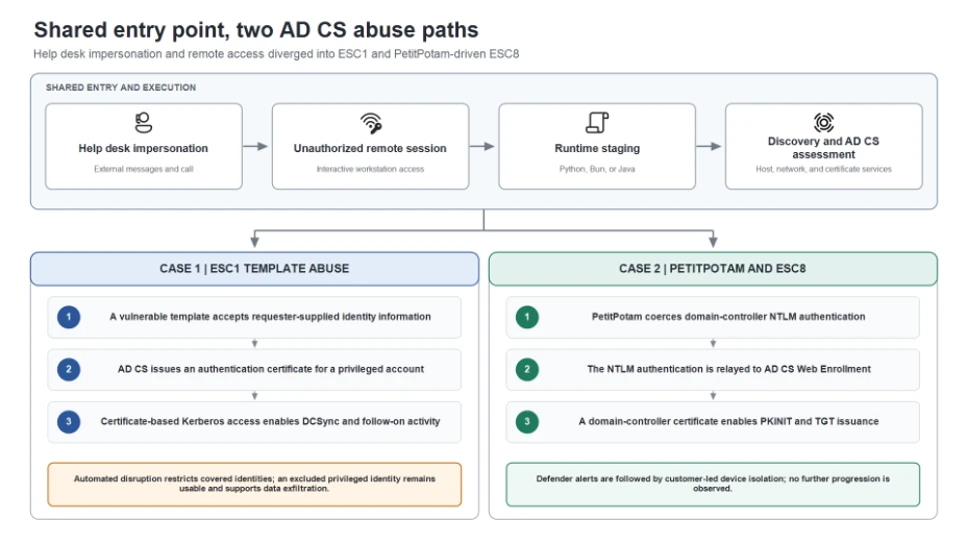
The first phishing wave targeted three accounts and compromised one workstation. The attacker obtained certificates for three highly privileged accounts. Microsoft Defender’s attack disruption restricted covered identities, disconnected sessions and limited access. But one privileged account was excluded from automated response.
About 90 minutes later, a second wave targeted 16 users and compromised another workstation. Certificate abuse produced credentials for eight additional privileged accounts. Microsoft reports that more than 1,000 subsequent SMB file-access attempts and further logons were blocked. Those are blocked attempts, not a count of stolen files or affected organizations.
The exclusion mattered more than the reassuring block count. The attacker performed DCSync—a request for directory credential data using replication privileges—while containment was taking effect. The excluded account also remained available for file-server access. A copy of Rclone renamed SearchApp.exe then transferred files to an external SFTP destination. The transfer command used 20 concurrent transfers and selected files up to three years old; Microsoft does not give a total volume stolen.
A different route impersonated the domain controller
In the second environment, the first case’s ESC1 path was unavailable. The intruder instead used PetitPotam to make a domain controller authenticate to an attacker-controlled system, then relayed that NTLM authentication to AD CS Web Enrollment. This ESC8 path depends on insufficient relay protection at the enrollment endpoint.
The certificate service accepted the domain-controller account’s authentication even though it arrived from another device. The attacker requested a certificate as that machine account, then used certificate-based Kerberos authentication to obtain a ticket-granting ticket. The critical mismatch for investigators is the identity being used versus the device submitting the request—not simply a visit to a certificate-enrollment URL.
Here, Defender generated alerts and the customer isolated the associated workstation. Microsoft observed no further progression after isolation. That is the documented outcome, rather than a claim that an alert automatically revoked every credential.
Why ending the call is only the first response
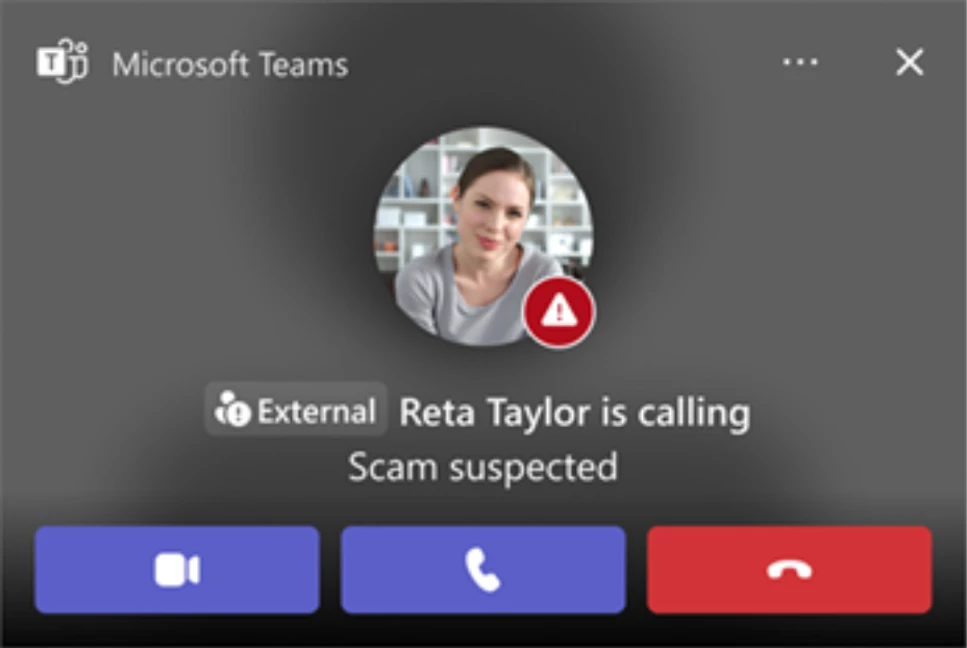
For an employee, the practical boundary comes before remote control: verify unexpected support requests through the organization’s established ticketing system or a separately obtained contact. The “External” and “Scam suspected” indicators shown in Microsoft’s example deserve attention, but a familiar name or absence of a warning is not authentication.
If control has already been granted, report the session and isolate the device through the organization’s response process. If files ran, an updated Gridinsoft Anti-Malware scan can help inspect the Windows endpoint for malicious components and persistence. Endpoint cleanup is a separate task from reviewing issued certificates, privileged identities and Kerberos tickets; a clean scan cannot revoke those credentials.
Administrators should correlate the remote session with runtime execution, certificate requests and subsequent logons; check authentication-capable template permissions and relay protections; and review any exclusions that would prevent containment of a compromised identity. Microsoft’s two cases show why the response has to follow the authority an attacker acquired, beyond the PC on which the conversation began.
References
- Microsoft Security Research; Sagar Patil, Jesse Birch and Tal Tzhori. From help desk impersonation to AD CS abuse: Investigating ESC1 and ESC8 intrusion paths. Microsoft Security Blog, October 30, 2026. Accessed November 1, 2026.