

A Windows invitation can appear to fail while leaving an attacker a way back in. In research published on November 2, FortiGuard Labs described a BITTER-linked campaign in which a file-open error concealed scripts and scheduled tasks. Two other delivery chains installed PapRAT, a remote-access trojan.
The report concerns targeted activity in South Asia, rather than evidence of a worldwide consumer outbreak. Its useful warning travels further: what a document displays is a poor test of what opening it has executed.
The error arrives after the work
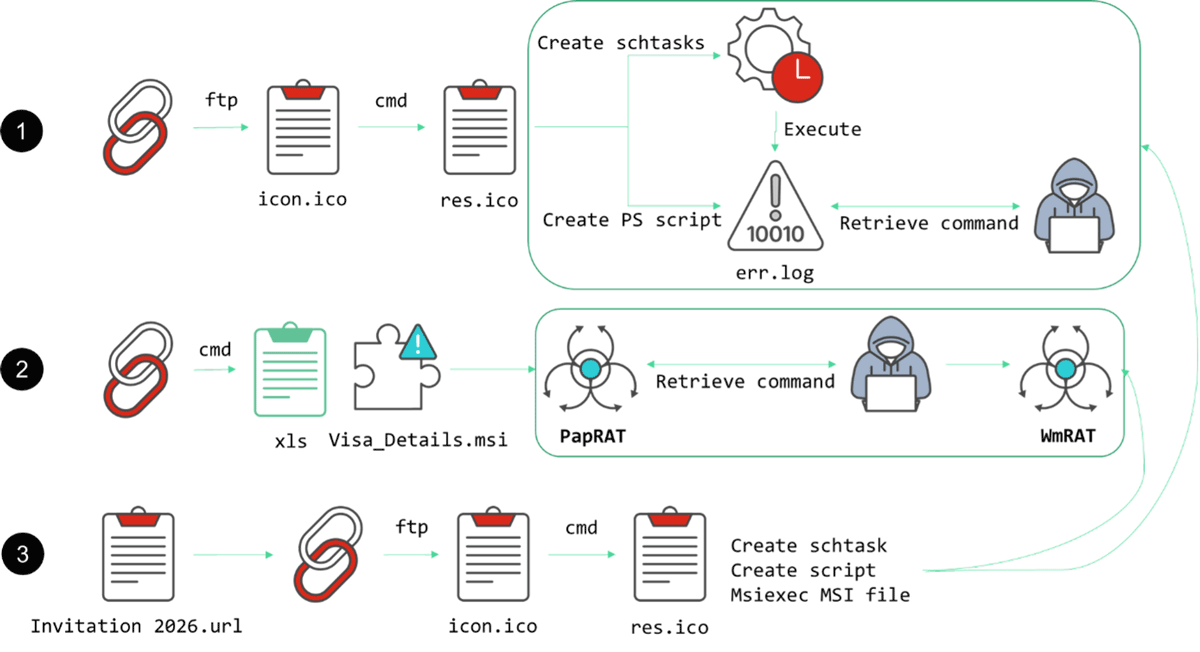
In the first chain, a Windows shortcut invokes the legitimate ftp.exe utility to run commands. Scripts create recurring tasks and retrieve further instructions; the recipient then sees a message saying Explorer could not open the file. Fortinet also observed reconnaissance, including directory listings and information about installed security products.
That reverses the recipient’s likely interpretation. A failed document suggests an interrupted operation. Here, the visible failure is part of the presentation, while the background operation has already started. Trying the attachment again would not establish whether the first attempt was harmless.
A document and an installer can open together
The second route uses a VHDX disk image: its visible shortcut opens a decoy spreadsheet while running an MSI installer. The third retrieves a shortcut through WebDAV and reaches another MSI package. PapRAT provides command execution, file transfer and screenshot capture; Fortinet also identified a Rust implementation and a separate secondary implant, WmRAT.
These are distinct chains. The script-based first route should not be described as proof that every recipient received PapRAT. Equally, recognizing a genuine Windows utility does not validate the attachment that caused it to run. A familiar executable and a trustworthy execution chain are different things.
Investigate the opening, not just the error
If an unexpected invitation produced an error, do not reopen it to test it. Confirm the sender through an established contact method. On a work device, disconnect it from the network and report the attachment, message and approximate opening time to the response team. Preserve evidence before deleting tasks or files.
For a personal Windows PC, removing the attachment alone does not address anything that may already run on a schedule. Security software can remove a visible payload while a loader or scheduled task remains. Download Gridinsoft Anti-Malware, update its database, run a Full Scan, review and remove detected threats, then restart. A scan cannot prove that no data left the machine; suspected account exposure requires a separate response from a trusted device.
The practical lesson is to treat an unexpected attachment opening as an event to investigate. An error message is an observation about the screen, not a clean bill of health for the computer.
A different route to remote access starts with fake help-desk calls in Teams; verify the request through a known channel before accepting software or identity changes.
References
- Cara Lin. BITTER Expands Its Arsenal with PapRAT. FortiGuard Labs, November 2, 2026.