
Stremio is a legitimate media application, but “is Stremio safe?” has three separate answers: where you got the app, which add-on operator you trust, and where the selected stream connects. Getting the official client does not certify every community add-on, configuration page or download advertised under its name. If you have a warning, first identify whether it names a connection, a local file or the app’s signature. Those situations need different responses.
You usually do not need to wipe your device just because you added an unwanted remote add-on. Conversely, removing that add-on will not revoke an API key you gave its operator. Start with the action you actually took.
What happened in your Stremio setup?
- You are about to install Stremio. Start from the official downloads page and follow its platform link. Avoid repackaged installers, “premium unlocked” APKs and search ads offering a special player.
- You added a community add-on. Check its operator and configuration domain. Remove it from your add-on list if you do not trust it; investigate separately any file you installed or information you entered.
- You pasted a key or shared a full add-on URL. Check whether that URL contains private credentials. Revoke an exposed key with the provider that issued it, then update only the integrations you still trust.
- A security tool blocked a connection. Read the destination, process and time in the alert. Leave the block in place while identifying the add-on or stream that triggered it.
- An installer or local file was detected. Keep it blocked or quarantined. Verify its origin and detection details. If you already ran an unexplained installer, use the device-recovery steps below.
- macOS says the app will damage your computer. Check the exact build, download source and current vendor notice. An old certificate incident does not establish the cause of a new warning.
Check the app before checking the add-ons
Use Stremio’s official downloads page as your starting point. It distinguishes desktop, mobile, TV and web options; these do not all have identical capabilities. Follow the store or download link for your device instead of guessing from an app icon or a search-result title. [1]
On Windows, inspect the downloaded file’s Properties and its Digital Signatures information where available. A missing or invalid signature deserves investigation; a valid signature identifies a publisher but does not give every action the software performs a clean bill of health. Compare the source and publisher with the official distribution route. Do not allow a detected file solely because its filename says Stremio.
A web page asking you to install a codec, disable protection or run a command to “verify” a stream is another trust decision. Stop there. If a streaming page led you to an unexpected installer, our guide to free movie streaming site scams explains the surrounding lure.
Are Stremio add-ons safe?
Ordinary remote Stremio add-ons work differently from installing a desktop program. Stremio’s support documentation describes them as websites the app queries for content; adding one normally does not install that operator’s program on your computer. Official add-ons are maintained by Stremio, while community add-ons are maintained independently. Some core official add-ons cannot be removed. [2]
This reduces one kind of exposure, but it leaves other questions: who receives your requests, what a configuration page asks for, and what destination the returned stream uses. A familiar add-on name is not enough to identify its operator. A copied logo or matching display name can appear on another domain.
If you are checking Torrentio or another named community add-on, apply those same checks to the actual endpoint in your setup. A blanket verdict about the name cannot authenticate a lookalike configuration site, a different hosted instance or a bundled installer.
Why does Configure open a website?
The add-on protocol supports a configuration page on the operator’s domain. Settings can be passed in the add-on’s URL, and Stremio’s developer documentation explicitly demonstrates a URL carrying an authentication token. Opening a Configure page is therefore not, by itself, evidence of malware. It is a point where you must decide whether to trust that operator with the requested information. [3]
Example: https://addon.example.invalid/{private-key}/manifest.json
Here, the domain identifies the endpoint, while the middle segment represents a secret. This is an illustrative address, not an add-on to install. Real configurations vary. Do not paste your complete configured URL into a public forum, screenshot or website scanner: it may function like a credential.
Before submitting a key, identify the service that issued it, the access it grants and how to revoke it. If a setup page asks for your Stremio password, email password or a broad account token without a clear, necessary purpose, stop. An explanation of why a key is needed does not establish that its recipient is trustworthy.
The add-on address and the stream address can differ
The SDK supports several stream types, including a direct video URL, a torrent identifier and an external page opened in a browser. A single app interface therefore does not tell you which connection path a particular result uses. [4]
- Direct HTTPS stream: your device connects to the serving endpoint. Encryption protects the connection in transit; the endpoint still receives the request.
- Torrent/P2P stream: your client can communicate with peers. Do not assume your network address is hidden from those peers.
- External page: the browser opens another site. Check that destination before entering credentials, accepting notifications or downloading anything.
A VPN changes part of the network path. It cannot authenticate an add-on operator, make a leaked key private again or make an unknown installer safe. Choose content you are authorized to access; a working stream or a familiar app does not establish distribution rights.
Do not treat every Stremio warning as a false positive
Record the warning’s exact text, affected object and time before changing anything. “Connection blocked” and “file quarantined” describe different events even when both mention the same running app.
Stremio’s support article attributes some antivirus warnings to sources supplied by add-ons that connect to blacklisted sites. That is useful context for a connection alert, not a diagnosis of every installer or executable carrying the Stremio name. Keep the block in place, stop the relevant playback and review the destination and add-on. Do not whitelist the whole application as a shortcut. [5]
There is also a dated macOS example: on March 6, 2026, Stremio announced updated versions of several apps with a new signing certificate. That announcement describes those releases; it does not prove a warning on a different build today is harmless. Get the current compatible package through the official download route. If it remains blocked, consult current vendor support with the exact version and message instead of stripping quarantine attributes or disabling Gatekeeper. [6]
What to do if you already acted
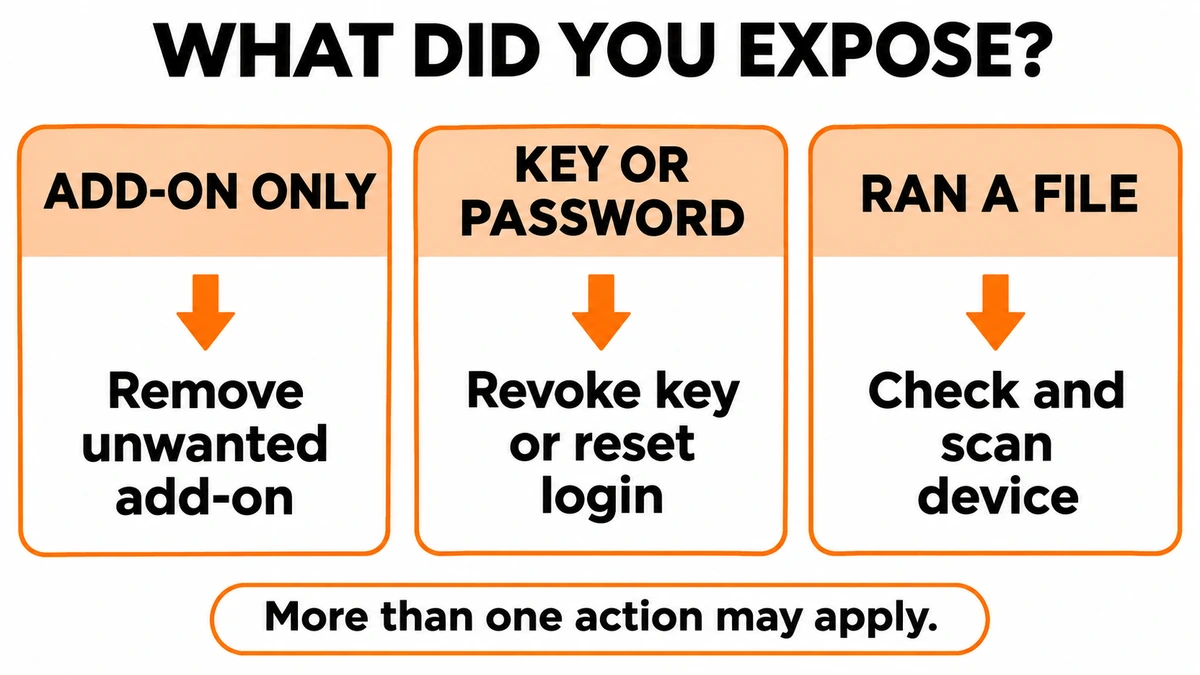
You only added an unwanted add-on
Open Stremio’s add-on management area, locate the installed add-on and use its uninstall/remove control. Menu placement varies by client. Reopen the app and check that the unwanted entry is gone. If a block only occurred while using that add-on, keep it removed while investigating; the absence of another alert is not a reason to reuse the same untrusted endpoint.
Removing an add-on and uninstalling a separate program are different operations. If a setup guide also made you install an APK, executable, browser extension or helper tool, review that installation separately.
You supplied a password, token or API key
Use a trusted device and open the issuing service yourself. Revoke or regenerate the exposed key there; merely deleting the configured add-on does not invalidate a copy. Replace that key in integrations you intentionally retain, and review recent account activity or usage where the service provides it.
If you entered a password on an untrusted page, change it at the real service, change reused passwords and end unfamiliar sessions. Enable multifactor authentication where available. See our account recovery checklist for the wider recovery sequence. A malware scan cannot revoke a stolen credential.
You ran a suspicious installer or command
If you downloaded a file but never opened it, keep it closed and follow the unopened suspicious-file checks. If you ran an unexplained installer or command, especially if redirects or alerts continue, check the device as well as any exposed accounts. A separate installed component may remain after an add-on is removed.
On Windows, Gridinsoft Anti-Malware provides a practical scan-and-cleanup path: install it from the official source, update its database, run a Full Scan, review the detections, apply the recommended cleanup and restart. Recheck the original symptom. This can identify malicious files and persistence; it does not prove that no information was stolen.
On an Android phone or tablet, remove the suspicious sideloaded app and use Gridinsoft Trojan Scanner to scan, review findings and take the available removal actions. A Windows installer is not an Android recovery tool. On a Mac, keep the affected app blocked and use the platform’s trusted security and vendor-support route.
The useful safety check is specific: verify the client you installed, the operator you gave access to and the destination you played. Then fix the part that was actually exposed.
References
- Stremio. Downloads. Official platform distribution links; accessed November 10, 2026.
- Stremio Support. How to install/uninstall Add-ons. Stremio Help Center; accessed November 10, 2026.
- Stremio. Advanced Usage: user data and configuration pages. Add-on SDK documentation; accessed November 10, 2026.
- Stremio. Stream Object. Add-on SDK documentation; accessed November 10, 2026.
- Stremio Support. Malwarebytes detects trojan in Stremio. Stremio Help Center; accessed November 10, 2026.
- Alex, Stremio. MacOS Apps Updated. The Stremio Blog, March 6, 2026; accessed November 10, 2026.