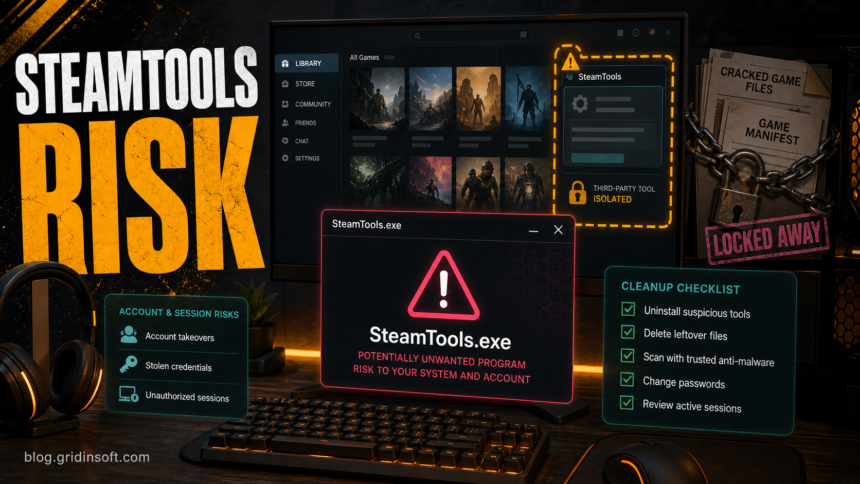
SteamTools is not an official Steam component. If you installed a third-party SteamTools or Steam Tools package, saw SteamTools.exe, or noticed freezing, account warnings, browser changes, or security alerts after using it, treat the case as a malware and account-safety check rather than a normal Steam problem. Remove the tool, delete leftover installers, scan the PC, and review Steam sessions before signing back in on the same computer.
The important distinction is intent. Official Steam files live under Valve’s Steam client folders and update through Steam. SteamTools-style packages are third-party tools commonly discussed around game manifests, DLC unlocking, cracks, or account-login helpers. Even when a specific build is only detected as riskware or a hacktool, the same trust problem remains: the program asks you to run code that can modify game ownership checks, touch account data, load extra modules, or arrive from mirrors you cannot verify.
Is SteamTools a virus?
There is no single answer for every file named SteamTools because users download different builds from different mirrors. That is exactly why it should not be whitelisted blindly. A public ANY.RUN analysis of one SteamTools.exe sample classified the run as malicious loader activity, while community threads show conflicting claims from users who tested other builds. For a home PC, the safer answer is practical: if SteamTools came from an unofficial site, crack bundle, Telegram link, archive mirror, or video tutorial, remove it and verify the system before trusting the machine with Steam, email, Discord, browser passwords, or payment accounts.
Gridinsoft’s URL Scanner has also flagged steamtools.pro as a high-risk phishing page. Do not use that as proof that every similarly named domain hosts the same file, but do use it as a warning that this topic attracts risky mirrors and lookalike download pages.
Official Steam files vs third-party SteamTools
Use this quick split before deciding what to remove:
| What you see | How to treat it |
|---|---|
steam.exe or Steam client files inside the normal Steam install folder |
Usually legitimate if Steam was installed from Valve and updates normally. |
SteamTools.exe, manifest tools, unlockers, cracks, or login helpers from archives and mirrors |
Third-party code. Remove it unless you can fully verify the source, hash, behavior, and purpose. |
| Instructions to disable antivirus, allow a HackTool/GameHack detection, or run as administrator | High-risk signal. Keep the file quarantined and scan before restoring anything. |
| Freezing, browser changes, new startup items, unknown tasks, or account alerts after uninstalling | Possible leftovers or a separate payload. Continue with cleanup and account checks. |
If the process you see is steamwebhelper.exe inside the official client rather than SteamTools.exe, use the SteamWebHelper high-memory and signature checks before removing anything. Several official helper processes can be normal; a third-party SteamTools package is a different trust decision.
What to do if you installed SteamTools
- Disconnect and stop using the tool. Close SteamTools, Steam, browsers, Discord, and launchers. Do not sign in again from the same Windows session until after the first cleanup pass.
- Uninstall what is visible. Check Windows Settings, the Start menu, and the folder where you extracted the archive. Remove the tool, installer, updater, and any crack or manifest package that came with it.
- Delete leftover folders. Look in
%USERPROFILE%\Downloads,%USERPROFILE%\Desktop,%APPDATA%,%LOCALAPPDATA%, and temporary extraction folders for SteamTools, Steam Tools, unknown launchers, or recently created archives. - Check startup and scheduled tasks. Open Task Manager Startup apps and Task Scheduler. Disable suspicious entries that point to user profile folders, Temp, unknown DLL loaders, PowerShell commands, or files you do not recognize.
- Run a full malware scan. Use your installed security tool first. Then run Gridinsoft Anti-Malware to look for loaders, stealers, bundled PUPs, browser changes, startup entries, scheduled tasks, and persistence that may remain after the visible tool is removed.
- Reboot and scan again if symptoms return. Freezing after uninstall, repeated detections, restored files, or new browser redirects mean the visible program may not have been the only component.
If SteamTools or a related loader already ran with administrator rights, the visible uninstall is not enough proof that the system is clean. Cracks and gamehack-style tools can leave scheduled tasks, services, browser changes, Defender exclusions, or bundled modules that relaunch after reboot.
Steam account checks after running SteamTools
Run these checks from a clean browser session or another trusted device:
- change your Steam password after scanning the PC;
- change the password for the email account tied to Steam;
- enable or review Steam Guard Mobile Authenticator;
- deauthorize other devices and review recent login activity;
- revoke any suspicious Steam Web API key if one exists;
- rotate reused passwords for Discord, email, stores, and payment-related accounts.
Steam Support’s stolen-account guidance starts with scanning for viruses, keyloggers, spyware, and other malicious code before password reset. That order matters: changing a password on an infected PC can hand the new password to the same stealer.
Should you whitelist SteamTools?
No. Do not allow or restore SteamTools just because a forum comment says one build is clean. A false positive is only plausible when you know exactly who built the file, where it came from, what hash you tested, and why it needs the permissions it requests. Most users finding SteamTools through crack, manifest, or unlocker instructions do not have that level of assurance.
If your alert uses a broader label such as HackTool or GameHack, compare it with the exact detection behavior in our HackTool:Win32/Crack guide and HackTool:Win64/GameHack!rfn guide. If you ran a game mod, crack, or launcher and then saw account alerts, use the infostealer after a game or mod checklist before logging back into important accounts.
When uninstalling is probably not enough
Escalate to a full cleanup and account recovery flow when any of these are true:
- Windows freezes, opens consoles, or runs unknown processes after reboot;
- security alerts return from
%APPDATA%,%LOCALAPPDATA%, Temp, Startup, or Task Scheduler paths; - Steam, Discord, browser, or email sessions show logins you do not recognize;
- browser search, homepage, proxy, DNS, or notification settings changed;
- the download told you to disable protection or restore a quarantined file;
- the package included several executables, DLL files, password-protected archives, or update scripts.
How to avoid SteamTools lookalikes and risky mirrors
- Install Steam only from Valve’s official site or the normal Steam client update flow.
- Do not download Steam account helpers, manifest unlockers, cracks, or DLC tools from short links, Telegram, Discord, video descriptions, or mirror sites.
- Do not run files that require you to disable antivirus protection.
- Check suspicious domains with Gridinsoft Website Reputation Checker before opening downloads.
- Keep separate backups of save files and important documents so cleanup does not become a data-loss decision.
FAQ
Is SteamTools.exe an official Steam file?
No. Official Steam client files are distributed by Valve through Steam. A separate SteamTools.exe from an archive, mirror, crack bundle, or tutorial should be treated as third-party software.
Can SteamTools steal my Steam account?
A specific sample must be analyzed before making a definitive claim, but the risk is real enough to act on. Tools around cracks, gamehacks, and account helpers may access local sessions, browser data, or install loaders. Scan first, then reset passwords and sessions from a trusted device.
Why does antivirus call it a HackTool, GameHack, PUP, or loader?
Those labels often mean the program can bypass normal software behavior, inject code, modify files, or install additional components. The wording can sound less severe than “virus,” but it is still a security decision on a normal PC.
Can I keep SteamTools if it works?
Keeping it is a bad tradeoff. The tool’s purpose, distribution channels, and account risk outweigh the convenience, especially on a PC where you use Steam, email, Discord, banking, or saved browser passwords.
References
- Valve. “Account Security Recommendations.” Steam Support, accessed July 6, 2026. https://help.steampowered.com/en/faqs/view/6639-EB3C-EC79-FF60
- Valve. “Account Stolen.” Steam Support, accessed July 6, 2026. https://help.steampowered.com/en/wizard/HelpWithAccountStolen
- ANY.RUN. “Malware analysis SteamTools.exe Malicious activity.” ANY.RUN malware sandbox, analysis dated March 17, 2026, accessed July 6, 2026. https://any.run/report/a73519d431a265a35f159a3596d1920956713011024226e4710638b5d993ab00/e4562f6e-d254-4c9c-9223-e82b1dd8ff4c