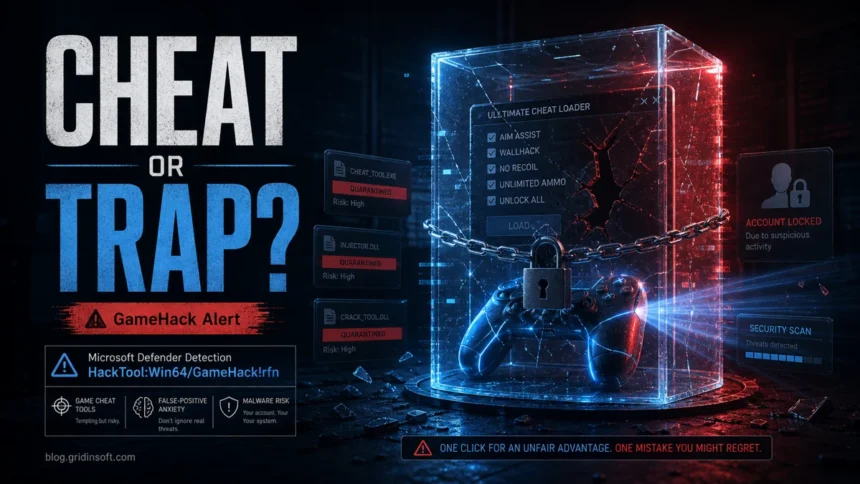
HackTool:Win64/GameHack!rfn is a Microsoft Defender detection for game cheats, trainers, cracked game components, and similar tools that modify or bypass normal game behavior. It is not a label to restore blindly. If the detected file came from a crack, repack, cheat loader, unknown DLL, or instructions that told you to disable protection, keep it quarantined, remove the package, and scan the system before signing back into game, email, or payment accounts.
The confusing part is that some game-hack detections are triggered by tools that users installed on purpose. That does not make the file safe. Defender uses the HackTool name when a program can bypass protections, patch files, inject code, alter memory, or behave like software commonly bundled with malware. Treat the alert as a real security decision: verify the source and the exact file path first, then decide whether removal or a controlled false-positive check is appropriate.
| Detection name | HackTool:Win64/GameHack!rfn |
|---|---|
| Detected by | Microsoft Defender Antivirus |
| Common trigger | Game cheat, trainer, crack loader, patched game file, suspicious DLL, or anti-cheat bypass tool |
| Primary risk | The same permissions used to patch or inject into a game can also steal accounts, add persistence, download payloads, or weaken protection |
| Best first action | Do not restore it yet. Copy the affected item path, quarantine/remove the file, scan the system, and check whether anything was executed |
What is HackTool:Win64/GameHack!rfn?
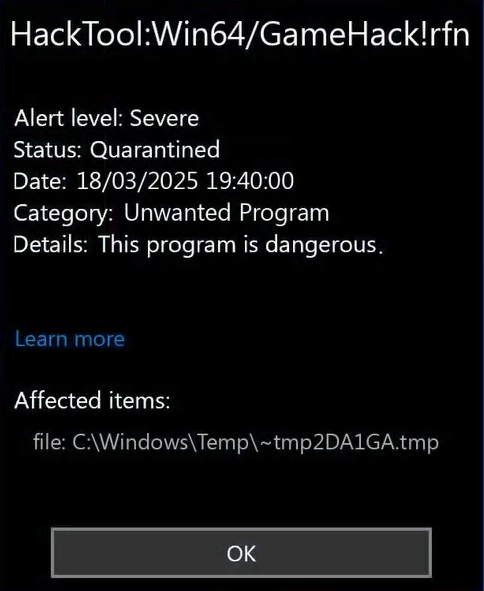
HackTool:Win64/GameHack!rfn is Defender’s name for a 64-bit Windows game-hacking or cheat-related tool. The file may be advertised as a trainer, unlocker, memory editor, patched game DLL, crack component, or launcher fix. From a user’s point of view it may look like “just the file needed to run the game,” but from a security point of view it is code that can interfere with another process, bypass checks, or run with permissions that are valuable to malware.
Microsoft’s threat entry for this exact detection says Microsoft Defender Antivirus detects and removes it, and warns that infections can leave remnant files or system changes that may require updated definitions and a full scan. That is why the safest answer is not simply “delete the game file” or “restore it because cracks are always flagged”; the right answer depends on the source, path, signature, execution history, and whether the alert returns after quarantine.
Is it a virus or a false positive?
It can be either a risky hack tool or part of a broader malware bundle. A false positive is possible with some modding, trainer, or patched-game files, but the burden of proof is on the file, not on the alert. Do not restore or allow it just because a forum comment says “all cracks are false positives.”
| What you see | What to do |
|---|---|
| Defender found it inside a torrent, repack, crack folder, cheat loader, or unknown archive | Keep it quarantined, remove the package, scan the whole system, and change important passwords if anything was run. |
| The file is a known game DLL such as a patched loader or `steam_api64.dll` from an unofficial source | Assume risk until verified. Check the exact hash, source reputation, signature, and multi-engine scan; do not whitelist the folder automatically. |
| The tool asked you to turn off Defender, add exclusions, or run as administrator before the game would start | Treat that as a major red flag. Undo exclusions, re-enable protection, and scan for persistence. |
| You built the tool yourself or use it in a lab/offline single-player test environment | Submit the file to Microsoft or your security vendor for review instead of weakening protection on your normal PC. |
| The alert returns after quarantine or says remediation is incomplete | Look for a running process, scheduled task, startup item, Defender exclusion, browser extension, or dropped file that keeps restoring it. |
Why Defender flags game cheats and cracked game files
Game cheats and cracks often need techniques that overlap with malware behavior: memory editing, DLL injection, process tampering, patching executable files, bypassing license checks, or hiding from anti-cheat systems. Even when the visible goal is “unlock all,” “aim assist,” or “make the game start,” those same techniques can be used to steal browser sessions, game accounts, Discord tokens, cryptocurrency wallets, or payment data.
This is also where cannibalization with other Gridinsoft pages can happen. PUA:Win32/GameHack is the broader potentially unwanted app label and currently captures many “gamehack false positive” searches. HackTool:Win32/Crack covers license-bypass cracks and patched binaries. This page should answer the exact HackTool:Win64/GameHack!rfn Defender alert and route readers to those adjacent guides only when their alert name or file type is different.
If the affected item was advertised as a Sims 4 DLC unlocker, use the Sims 4 unlocker alert and recovery guide to choose between blocked-download cleanup, post-execution checks, account recovery, and the clean-reinstall threshold.
What to do after the alert
- Keep the file quarantined. Do not restore it while you are still checking the source.
- Copy the affected item path. In Windows Security, open Protection History and note the file name, folder, detection name, status, and time.
- Undo dangerous instructions. Re-enable real-time protection, remove Defender exclusions, and close any cheat loader, trainer, or crack installer still running.
- Remove the source package. Delete the archive, installer, repack folder, trainer folder, or suspicious download that produced the alert.
- Run a full scan. Update Defender definitions and scan the whole system. Use GridinSoft Anti-Malware as a second-opinion scan if the file was executed, the alert returns, or you suspect bundled malware.
- Check persistence points. Review startup apps, scheduled tasks, browser extensions, recently installed programs, and unusual processes.
- Protect accounts. If the file ran, change passwords for game stores, email, Discord, Steam/Epic/EA accounts, and payment services from a clean device. Enable two-factor authentication where available.
After uninstalling the suspicious app or deleting the visible threat, use Gridinsoft Anti-Malware to check hidden files, startup entries, scheduled tasks, bundled apps, browser changes, and other persistence points that can restore malware.
Download Anti-MalwareWhen can you restore the file?
Restore only when you can defend the decision with evidence: you know the file’s source, it is expected for the software you intentionally installed, the hash and signature match a trusted release, several scanners agree it is clean or only flag the same hacktool behavior, and you accept any account-ban or game-policy risk. For a normal everyday PC, the safer choice is to remove the file and get the game or mod from a legitimate source.
If you believe the detection is wrong, submit the file to Microsoft for review rather than adding a permanent exclusion. Permanent exclusions are dangerous because future files in the same folder can bypass protection too.
How to tell if cleanup is complete
- Windows Security no longer shows new HackTool:Win64/GameHack!rfn events after a reboot.
- Protection History does not show “Remediation incomplete” or “Quarantine failed.”
- No Defender exclusions were added for the game, downloads, temp, or crack folder.
- Startup apps and scheduled tasks do not contain unknown launchers or random names.
- Your browser, Discord, game client, and email accounts show no unexpected sessions, password changes, or purchases.
For broader context on unsafe game downloads, see Gridinsoft’s guide to cracked games, stealers, miners, and cleanup. If the suffix in your alert is the confusing part, the Microsoft Defender detection names guide explains labels such as `!rfn`, `!MSR`, `!ml`, HackTool, Trojan, and PUA.
FAQ
Is HackTool:Win64/GameHack!rfn always malware?
No. It may be a cheat or crack-related tool rather than a classic self-spreading virus, but it is still unsafe to restore blindly because the same behavior is commonly abused by malware and account stealers.
Why did Defender detect a game DLL?
Cracked or modified game DLLs can patch license checks, inject into a game process, or bypass protections. Defender may classify that behavior as HackTool or GameHack even if the file is part of the package you downloaded intentionally.
Should I allow the file so the game will launch?
Not on a normal PC. Allowing or excluding the file weakens protection for that path. Verify the file first, and remove it if it came from a crack, cheat, repack, or unknown download.
What if I already ran the cheat or crack?
Remove the package, scan the system, check startup and scheduled tasks, undo Defender exclusions, and change important passwords from a clean device. Treat game and messaging accounts as exposed until you verify them.
References
- Microsoft Security Intelligence. “HackTool:Win64/GameHack!rfn threat description.” Microsoft, published December 2, 2020; accessed June 7, 2026. https://www.microsoft.com/en-us/wdsi/threats/malware-encyclopedia-description?Name=HackTool%3AWin64%2FGameHack%21rfn&ThreatID=2147769764