

Yes, Plex is a legitimate streaming service and media player. If you watch its free movies in the official app on your TV, you do not need to install Plex Media Server, open your router to the internet, or download a codec from an ad. The security question changes when you sign in on a shared device or run a server for your own library. A viewer can check where the app came from; only the person running the server can check what version was exposed.
Which Plex are you using?
| What you did | What to check first |
|---|---|
| Watched a movie in the official TV or mobile app | Check the app’s source and keep it updated. A server advisory alone is no reason to reset the TV. |
| Signed in on a borrowed TV or noticed an unfamiliar device | Review the devices connected to your Plex account. Signing out of your own browser does not sign out that TV. |
| Installed Plex Media Server on a PC or NAS | Check the server package version and whether people outside your home could reach it. Updating the player on your phone does neither. |
Two people can watch the same family video and have different jobs afterward. If your sister hosts it and invites you to her library, you control the player and your sign-in. She controls the server, its updates and who else can reach it. Ask her to check a server advisory; installing server software yourself will not fix her copy.
Is the Plex app safe from viruses?
Start at Plex’s own downloads page or the app store built into your device. Choose the player for watching; choose Media Server only if you intend to host a library. A page that uses the Plex name and offers a “required player update” is a separate download. Its name, the movie poster and a padlock in your browser do not establish who distributed the file.
If you downloaded an unexpected Windows installer but never opened it, leave it closed. Check the source and publisher using the Windows executable verification guide, or discard it and get a fresh copy from Plex. If you ran it, use a trusted security tool on that PC. With Gridinsoft Anti-Malware, update the detection database, run a Full Scan, review the findings, apply the indicated cleanup and restart. Recheck the symptom afterward. A PC scan cannot revoke an account session or inspect a separate NAS.
Someone else appears to be using my Plex account
From a device you trust, open Plex yourself and check Authorized Devices. An old television may be yours; a device label alone does not prove theft. Remove a device you no longer use. If you see activity you cannot explain, check the email address and sign-in methods on the account and use Plex’s option to sign out connected devices.
- Plex password: set a unique password. During the reset, keep the option to sign out connected devices selected. Sign back in only on devices you control.
- Google or Apple sign-in: secure the identity provider you actually use. Check its recent sessions and recovery details. If you also set a Plex password, secure that sign-in separately. For broader recovery, see what to do when an account is hacked.
- Shared household: enable two-factor authentication where available and keep recovery codes offline. Plex does not ask for a second factor each time somebody switches between members of the same Plex Home. Grant a friend library access instead of adding them to your Home merely to share a film.
Signing out connected devices can sign out your own Media Server too. If your library disappears immediately after a reset, first sign back in and reclaim the existing server from your trusted local network using Plex’s reset guide below. A missing library listing after sign-out is not evidence that the media files were deleted.
I host a library. Does a secure connection mean my server is safe?
Encryption protects a connection in transit; it does not update the server at the other end. Plex’s default Preferred setting favors encrypted connections but allows a fallback in some circumstances. Authentication decides who can use the library. The server version determines which software fixes you have. Check these separately.
In Plex Web, look under Settings → Server → Remote Access. If you only watch at home, turn off remote access you do not need and review any router or NAS rule that still exposes the service. If a player stops connecting, do not add a broad authentication exception or switch off secure connections to make the error disappear. Check that the player is current and signed in to the right account first.
QNAP owners: check the package and its exposure history
In App Center → My Apps, find Plex Media Server. QNAP’s November 6 advisory covers the Plex package at version 1.43.2 or earlier. Build 1.43.3.10861 fixed those particular flaws; use a newer supported package if one is offered. This is a Plex package version, not a QTS firmware version, and not a warning about every device with a Plex player.
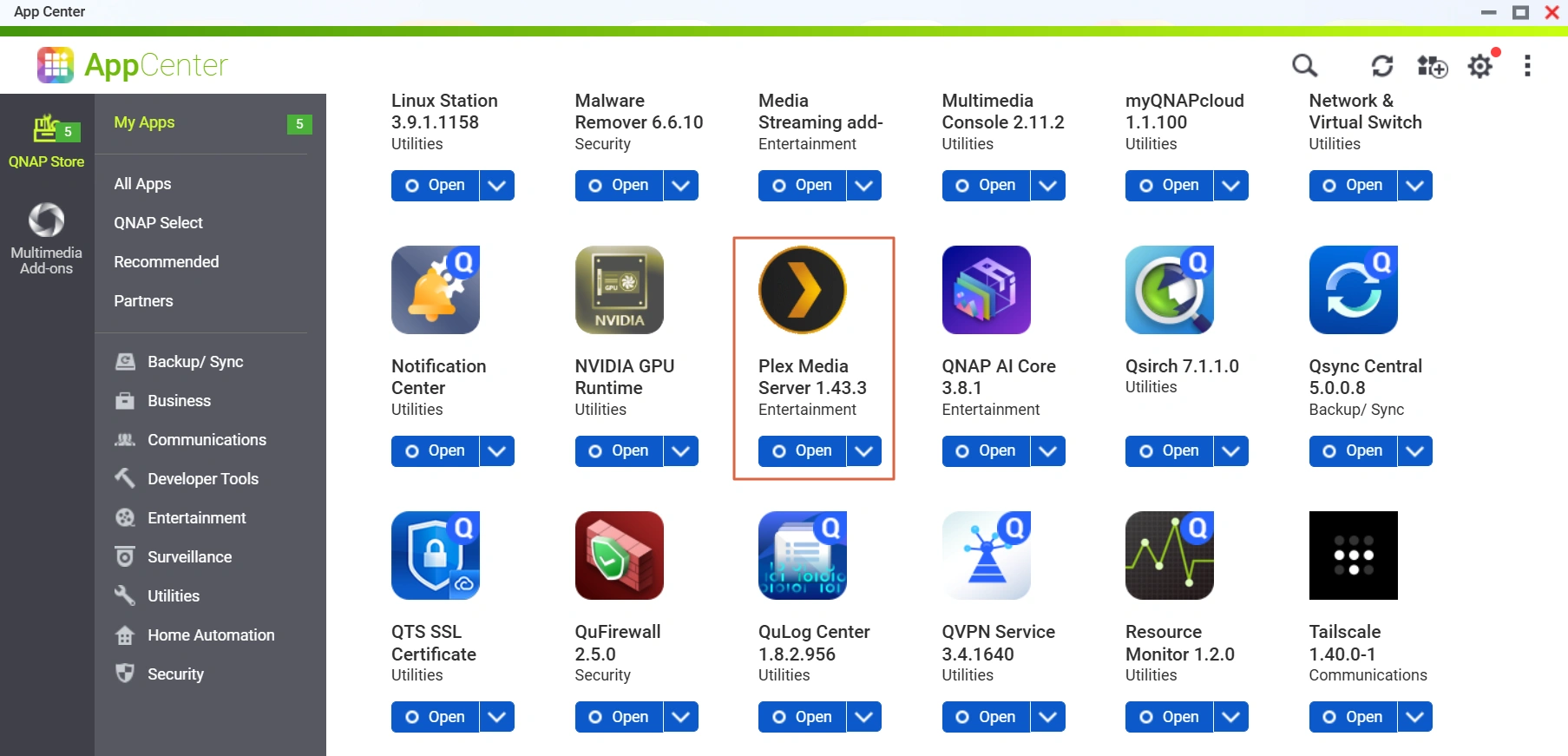
Was the old package reachable? Check the past remote-access setting and any router forwarding or automatic NAS publishing rule. If the server was never reachable from outside, QNAP advises updating and reducing unnecessary exposure. If it was reachable while vulnerable, the update closes the old entry point but cannot undo prior access.
For possible exposure, follow QNAP’s linked recovery procedure. Preserve Plex logs before removing the package if you need support; perform a clean reinstall, check for signs of compromise, then revoke Plex sessions and rotate affected NAS and stored service credentials. Do not restore the old codecs folder over the clean install. If the FAQ is unavailable in your region or you cannot reconstruct the timeline, give QNAP Support the version, approximate update date and what you know about remote access. A current version number alone cannot settle what happened last week.
References
- Plex. What if Your Plex Account Requires a Password Reset? Plex Support. Accessed November 12, 2026.
- Plex. Secure Your Account with Two-Factor Authentication. Plex Support. Accessed November 12, 2026.
- Plex. Network. Plex Media Server settings, Plex Support. Accessed November 12, 2026.
- QNAP. Plex2Shell: Check and Remediation FAQ for QNAP NAS Users. Updated November 6, 2026; accessed November 12, 2026.