Microsoft has paused KB5002907 after the update left some Office 2016 and Office 2019 installations unusable. A repair intended for outdated Microsoft 365 Apps could leave a purchased product appearing unlicensed—or, in rare cases, remove it. Microsoft’s current notice separates the remedies: reactivate a still-installed product or reinstall a missing one. [1]
A repair update with the opposite result
The optional package targeted Microsoft 365 Apps that had fallen more than 90 days behind on the Current or Monthly Enterprise channel. The acknowledgment of damage to older Office editions is the important change. Microsoft has not published a complete technical root cause. [1]
For someone whose Word or Excel suddenly stops working, the useful first distinction is what remains on the computer. A license prompt and a missing application look like one outage, but they require different recovery work. Record the message and whether the app still opens before changing anything.
If Office opens but asks for activation
Follow Microsoft’s activation instructions for the product you own. Where sign-in is requested, use the Microsoft, work, or school account associated with that purchase or subscription. If the Activation Wizard appears, follow its prompts. Different purchasing arrangements have different steps; a workplace volume license belongs with your administrator. [2]
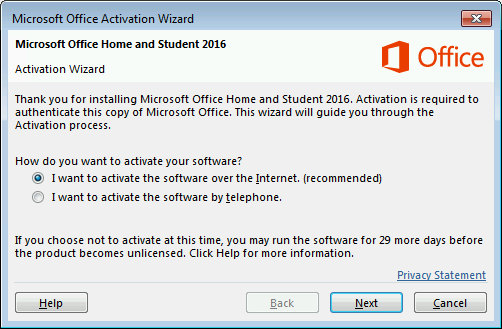
The image shows Microsoft’s documented activation interface, not a screenshot of this update failing. An activation problem alone is not a reason to buy another copy or run an unofficial “activator.” If the error persists, take the exact message and attempted steps to Microsoft or your organization’s support team.
If Word and Excel are no longer installed
For a personal purchase linked to your Microsoft account, open the account dashboard, select Office apps, locate the purchased edition, and choose Install. Use the matching account; an unrelated account will not supply the missing entitlement. After installation, open an app and complete activation if prompted. Microsoft’s reinstall guide also distinguishes workplace and volume-license arrangements. [3]
If your problem is instead a running service consuming resources or a Bad Image error, our OfficeClickToRun.exe troubleshooting guide covers that separate servicing diagnosis.
Restoring the suite restores usability, not its support lifecycle: Office 2016 and 2019 reached end of support on October 14, 2025. Plan a supported replacement separately from recovering access to today’s work. [4]
References
- Microsoft Support. “KB5002907: Optional update for out-of-date Microsoft 365 Apps installations.” Notice revised September 2026; accessed September 28, 2026. Update and recovery notice.
- Microsoft Support. “Activate Office for Windows.” Accessed September 28, 2026. Activation instructions.
- Microsoft Support. “Download and install or reinstall Office 2021, Office 2019, or Office 2016.” Accessed September 28, 2026. Reinstallation instructions.
- Microsoft Learn. “Update history for Office 2016 C2R and Office 2019.” Updated September 20, 2026; accessed September 28, 2026. Support and update history.