A fake Microsoft support worker helped Infoblox researchers get rid of a frightening browser lock—and then asked them to download UltraViewer. That reversal is the revealing moment in a new investigation of Help TDS, a long-running network that routes visitors into tech support scams. The warning creates the emergency; the caller uses the apparent rescue to move toward real remote access. [1]
Infoblox published the research on October 15, 2026. Its recorded call took place in mid-June, so this is a newly released account of an earlier test, alongside findings about the operation’s infrastructure. In that call, the researchers questioned the requested download and the conversation ended. The report does not show them granting access or losing money.
A website visit becomes a manufactured Windows emergency
Help TDS is a traffic distribution system: an intermediary that decides where a visitor goes next. Affiliates bring traffic from sources such as compromised websites, malicious advertising, social posts and spam. The system examines browser characteristics and location, then sends selected visitors toward the support scam. Other visitors can be passed to another advertising network and sold onward. That helps explain why two people opening the same starting site may not see the same destination.
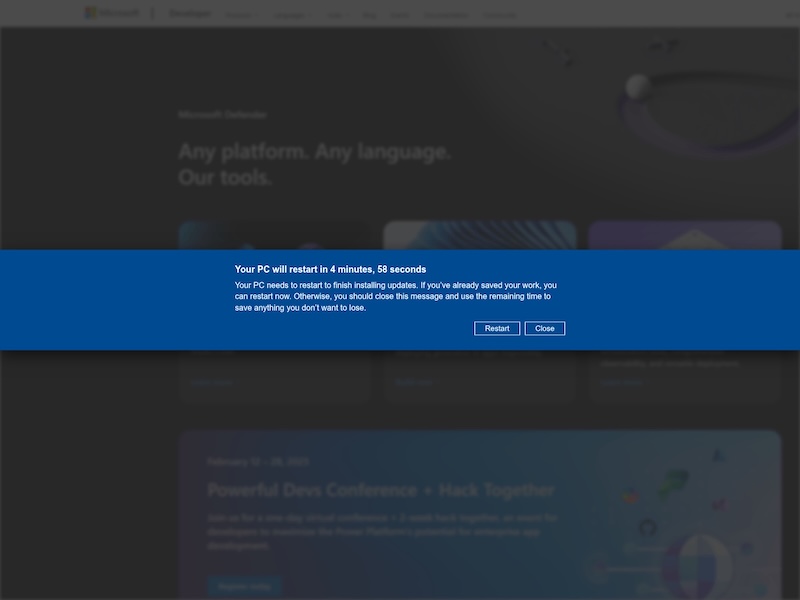
For the selected visitor, the opening act looks like a Windows update. A notice announces an upcoming restart. The sequence then escalates into a full-screen claim that Microsoft has disabled the computer, with alarms and a purported security phone number. A voice discourages restarting. These are claims made by the page, not a diagnosis from Windows.
GoDaddy’s earlier investigation documented a malicious WordPress plugin used to fetch redirect destinations from the operation’s control infrastructure. Compromising a site’s traffic lets an affiliate borrow the trust of a page someone intended to visit; the scam need not begin with an obviously suspicious download link. This is historical background, published in August 2025, rather than a newly discovered flaw in WordPress or WooCommerce. [2]
The caller removes the lock, then changes the task
Infoblox visited a compromised website from a research machine and called the number the scam displayed. The person answering presented himself as Microsoft support, repeatedly said the service was free, and asked whether the computer was personal or used for work.
He then guided the researchers through signing out and back in using Ctrl+Alt+Delete. The browser lock disappeared. That detail undercuts the page’s story: the frightening display could be removed without buying a repair or installing a new security product.
Only afterward did the caller direct them to the Start menu and to download UltraViewer, a legitimate remote desktop application. When the researchers challenged the need for another program given their existing Windows security protection, the call disconnected.
The dangerous change is the permission request. A stranger who has helped dismiss a page still has no authority to operate the computer. Installing a remote desktop tool and authorizing a session can turn a browser-level bluff into access to files and applications. Conversely, the mere appearance of the warning does not establish that such access already occurred. The report describes a request to download the tool, not a completed takeover in this test.
Impersonated support also appears in the separate CHOSEN BRICK campaign. The common lesson is to establish who is asking for access independently; a familiar support identity is part of the lure, not evidence that these different campaigns share an operator.
In a separate October 29 investigation, the UltraViewer trail led Infoblox to QuickBooks callback phishing and hidden email tracking. That campaign uses billing emails rather than Help TDS warnings; the shared investigative starting point does not establish a shared operator.
Disposable pages, persistent routing
Infoblox assesses that the Russian-language affiliate program Hotejka operates Help TDS and is a continuation of ROI777. Its confidence rests on historical DNS records, recurring infrastructure relationships, advertisements and access to an affiliate panel. That is the researchers’ attribution assessment; it does not establish state sponsorship.
Since April 2026, the operation has used Cloudflare Pages infrastructure. Infoblox reports roughly 300 newly announced Pages domains per day, against more than 125,000 new Pages subdomains it typically observes daily across the service. Blocking one visible address therefore leaves the routing operation with replacements. This is abuse of a hosting service, not evidence that Cloudflare itself was breached or that every pages.dev address is malicious.
There is another trap for anyone checking an address in isolation: some domains showed decoy advertising when scanned directly and appeared later in the operation’s announcements. A harmless-looking result from one visit may be a different branch or stage of the routing process.
Infoblox says its detection work identified likely domains about seven days before announcement on average, and that daily exposure in its own cloud-customer population fell from peaks near 4% to around 0.5%. Those figures describe its customer telemetry and detection conditions. They are not the percentage of internet users infected, a victim total, or proof the operation has been dismantled.
Respond to the step that actually happened
If you only saw the warning, do not call its number. Close the browser through Task Manager if ordinary controls fail, and avoid restoring the offending tab. Microsoft says genuine Windows error messages do not include a support phone number. Seek support through a route you open independently. [3]
If you installed software or allowed a stranger to control the machine, end the session and disconnect the device from the network. On a work computer, contact your IT team through a known channel. Record the tool name and what the caller did; use a separate trusted device for password changes and account checks. Contact your bank promptly if payments or financial access were involved.
An antivirus may remove a visible malicious download while another installed tool, service or startup entry remains. After an unwanted download has run, a full Gridinsoft Anti-Malware scan can help check for detections and persistence. A scan does not revoke remote access by itself, recover stolen credentials, or prove nothing was viewed.
The memorable part of this case is that the “helper” could make the scare disappear before requesting the access that mattered. Treat that second request as a new security decision, even when the first problem seems solved.
References
- Infoblox Threat Intel. “Inside Help TDS: Hotejka, Cloudflare Pages, and Predictive Detection.” October 15, 2026. Investigation and recorded-call findings.
- GoDaddy. “Help TDS and its Malicious Plugins Redirect Thousands of Sites to Tech Support Scams.” August 20, 2025. Historical plugin and redirect analysis.
- Microsoft Support. “Protect yourself from tech support scams.” Accessed October 15, 2026. Recognizing and responding to support impersonation.