A fake Android app that promises to find fuel and warn drivers about traffic police instead delivers a ZloyRAT dropper, according to F6’s October 26 report. After installation, the malware asks for access to messages, contacts and calls, then opens a legitimate website to make the app look ordinary. The reassuring page is the cover; the permissions belong to the installed software.
The reported campaign targets Russian-language driver communities. Its recognizable lure is «ДПС радар. Топливо онлайн», roughly “Traffic Police Radar. Fuel Online.” If you installed it from an advertisement or chat link, stop using that phone for sensitive account activity while you remove and investigate the app. Merely seeing the advertisement is a different exposure.
Two useful promises lead to one APK
F6 traces the pitch to chats and channels used by drivers, including taxi, delivery, trucking and car-sharing communities. The advertised app combines two timely reasons to download: finding stations with fuel and locating traffic-police patrols or road cameras. The route leads to an APK, an Android installation package, rather than simply displaying a map in the browser.
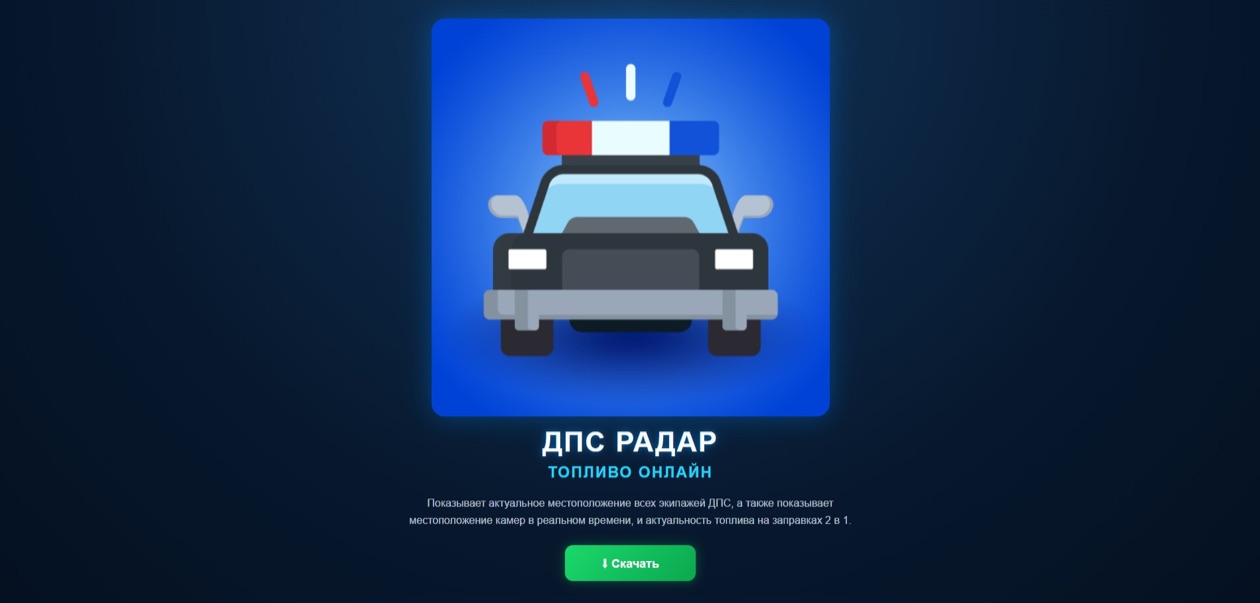
The combination is the new part of this report. F6 had observed malicious traffic-radar apps in autumn 2025 and fuel-finder lures in summer 2026. It dates the domain hosting this combined offer to October 4, 2026. That is the site’s creation date, not a claim that ZloyRAT itself first appeared that day: the researchers identified the malware family in the first half of 2026.
The same .online domain also offered GosuVPN, advertised as a free “government VPN,” and «Радар БПЛА», presented as a live drone-warning map. F6 says all three disguises deliver droppers for ZloyRAT. A dropper’s job is to install another malicious component; the attractive utility name describes the sales pitch, not what the installer can do.
The map does not explain the message permissions
On launch, ZloyRAT first requests permission to handle SMS messages, then asks for further access, including contacts and phone-call management. Those requests are a useful point to stop: locating a filling station does not explain why an unknown APK needs to read messages or control calls.
F6 describes capabilities to collect contacts, incoming SMS and push notifications, send SMS and USSD phone-service commands, and place calls without the owner’s knowledge. Its target list includes more than 60 Russian banking and financial-service applications, as well as marketplaces, government services and Telegram. That is a list of applications of interest, not a count of banks breached or people whose money was stolen. The report does not publish a victim total.
Reading other applications’ notifications is also different from permission to display the app’s own notifications. Check which access was actually granted; the word “notifications” alone does not describe its reach.
A normal website can hide an abnormal installation
The memorable trick happens when the user opens the app. F6 says it displays a legitimate website; tapping its masking notification also takes the user to that site. A normal-looking page therefore does not settle whether the software underneath is trustworthy. The installed component can retain the sensitive access already granted while the visible screen gives the user little reason to investigate.
F6 notes that a phone may slow down after infection, but slowness alone cannot identify ZloyRAT. Nor should this case be confused with the separate fake offline-map warning involving a Telegram installer bot: that October case did not name the malware family. Similar utility promises can conceal different software.
If you downloaded or installed the app
- Only opened the page or downloaded the APK: close the page, delete the unused installer and decline installation or permission prompts. F6’s described chain relies on installing software; its report does not establish infection from viewing the advertisement alone.
- Installed it: check the unfamiliar app under Android’s Settings → Apps, review its permissions and uninstall it. Menu names vary by device. Google’s Android recovery guidance also calls for keeping Play Protect enabled and applying device security updates.
- Granted SMS, notification-reading or accessibility access: use another trusted device to change important account passwords, review active sessions and bank transactions, and contact the bank promptly about unauthorized activity. Removing an app does not invalidate credentials that may already have been exposed.
To check the Android device for malicious apps, install Gridinsoft Trojan Scanner from Google Play, update its threat database and start a scan. Review the findings and follow Android’s removal prompts for detected unwanted apps. The Android malware guide illustrates this scan, review and removal path. If removal is blocked or suspicious behavior continues, seek trusted device support. A scan cannot reverse a transfer, restore an account or guarantee that every trace of an incident is gone.
The decisive mismatch in this case is visible before any bank loss: a tool sold as a map asks to handle the rest of the phone. Treat that permission decision as the security boundary, even when the screen afterward shows a perfectly ordinary website.
References
- F6. “Злое комбо: под видом приложения-радара ДПС и наличия бензина распространяют Android-троян ZloyRAT.” October 26, 2026; accessed October 27, 2026. Research report and lure screenshots.
- Google Account Help. “Remove malware or unsafe software — Android.” Accessed October 27, 2026. Android recovery guidance.