A legitimate translation editor can start normally while a replacement library beside it opens an attacker’s next stage. That is one of the disguises Microsoft describes in its September 28 report on NeedyMantis, malware used to sustain access after an intruder has already entered a network. In the analyzed Poedit package, a file named encryptbase64.ps1 was not a PowerShell script at all: it held x64 machine code.
Microsoft has seen the family in a limited number of targeted intrusions involving telecoms, universities, medical nonprofits, intergovernmental organizations and government contractors. The report is new; the observed activity reaches back to at least October 2025. It does not establish that ordinary Poedit, curl, Vim or TightVNC downloads are infected.
Three files arrive after the break-in
In one incident, an operator already inside the environment used Impacket to copy a legitimate application, a malicious DLL and an archive from a network share to a target device, then execute the application. The legitimate program became the entry point for the planted library. This is DLL sideloading: the executable’s familiar identity says little about the neighboring code it loads.
In the Poedit sample, the replacement was WinSparkle.dll, impersonating the application’s updater component. Beside it sat WinSparkle, an archive with no extension. The first loader’s job was to retrieve the next stage from that archive. Other observed arrangements used names such as %ProgramData%\USOShared\libcurl.dll and %ProgramData%\VIM\vim64.dll. These are investigation clues in context, not instructions to delete every file sharing a name.
The archive mixes real components with false identities
Microsoft’s unpacked WinSparkle archive contained 11 files. Several were genuine 7-Zip or Sysinternals components; others borrowed names whose contents told a different story. The apparent dnsapi.dll held malware configuration, while ws2_32.dll supplied the communications component. The mix matters: finding a legitimate utility inside the package would not validate its neighbors.
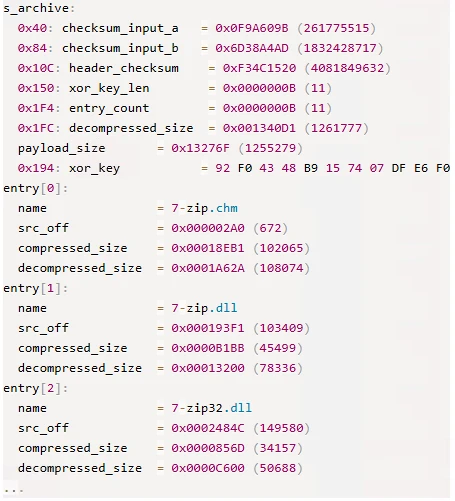
The screenshot shows an entry count of 11 and familiar 7-Zip filenames at the start of the researcher’s archive listing. Microsoft’s analysis of the remaining entries is what identifies the malicious roles. A directory name or extension alone cannot make that distinction.
The next-stage file, encryptbase64.ps1, contained shellcode despite its script extension. It decoded and decompressed the main component, which used a compact custom executable format. Encoded names and changing archive offsets add work for an analyst; they also explain why this infection cannot be understood as one suspicious executable sitting on disk.
A familiar-looking connection carries system details
The main component manages communication and modules. In Microsoft’s analyzed sample, configuration pointed to corp.tripswithengine[.]com on port 443 with the path /library/zip/. The initial HTTPS request carried encoded system information in a Set-Cookie header, including the computer and user names and details about processes and installed-program folders. Communication then switched to WebSockets.
One communications component used the old-looking user-agent firefox/21.0; another implemented the same interface with a different networking library. The main component could load and unload additional modules and pass data to them. Microsoft has not confirmed what those additional modules do. Remote extensibility is supported by the analysis; claims of universal password theft, ransomware deployment or screen recording are not.
What the DAEMON Tools connection does—and does not—show
Microsoft found NeedyMantis while following indicators from the earlier DAEMON Tools compromise. One observed operator, Storm-3069, is associated with that campaign. Microsoft also found activity beyond it and has not established whether all deployments belong to one operator. It assesses China-associated activity, without attributing Storm-3069 to a Chinese nation-state actor.
Crucially, Microsoft has not observed NeedyMantis itself being distributed through a supply-chain compromise. Its report describes what attackers install after obtaining access; it does not identify one common initial entry route for every victim.
Investigate the package, not just the filename
For a suspected managed endpoint, preserve the application, adjacent DLL and extensionless archive as evidence, together with creation times, process ancestry and network logs. Correlate the reported host and user-agent with the executable that made the connection; a string match alone is not a complete diagnosis. Do not browse the defanged command server or execute the sample to check it.
A suspicious non-sensitive file can also be checked with the Gridinsoft Online Virus Scanner, subject to your organization’s rules on uploading files. A file verdict does not reconstruct the earlier intrusion or prove that other components are absent. The decisive question is how the application, its neighboring files and the remote connection fit together.
References
- Microsoft Threat Intelligence. “NeedyMantis: Unpacking a post-compromise malware family used in targeted operations.” Microsoft Security Blog, September 28, 2026. Research report and indicators.