A popup blocker with 2 million users can see far more than the adverts it removes. In a September 28 investigation, Bay Area Labs reported that Poper Blocker collected full browsing URLs and AI conversations, using instructions downloaded after installation. The revealing finding was not simply a long permissions list: the researchers saw collection rules arrive roughly a day after installing the extension. [1]
That makes a quick install-and-watch check a poor measure of what this extension may do later. If you use Poper Blocker for private browsing or work with confidential material in AI chats, review the installed extension and its data-sharing settings before continuing. The findings concern a particular extension and configuration; they do not establish that every user lost every conversation.
The blocking feature and the data-sharing bargain
At our September 30 check, the Chrome Web Store listing still displayed Poper Blocker as Featured, with 2,000,000 users and a 4.8 rating from 81.6K ratings. Its Chrome extension ID is bkkbcggnhapdmkeljlodobbkopceiche. These are listing figures and labels, not a count of people whose information was collected. [2]
The product’s privacy policy supplies a different kind of evidence. It explicitly describes processing browsing activity and AI inputs and outputs, and says some data may be sold to affiliates that can sell it onward to business customers. The policy names Big Star Labs LP as the operator. This disclosure is broader than the ordinary task of deciding which popup to hide. [3]
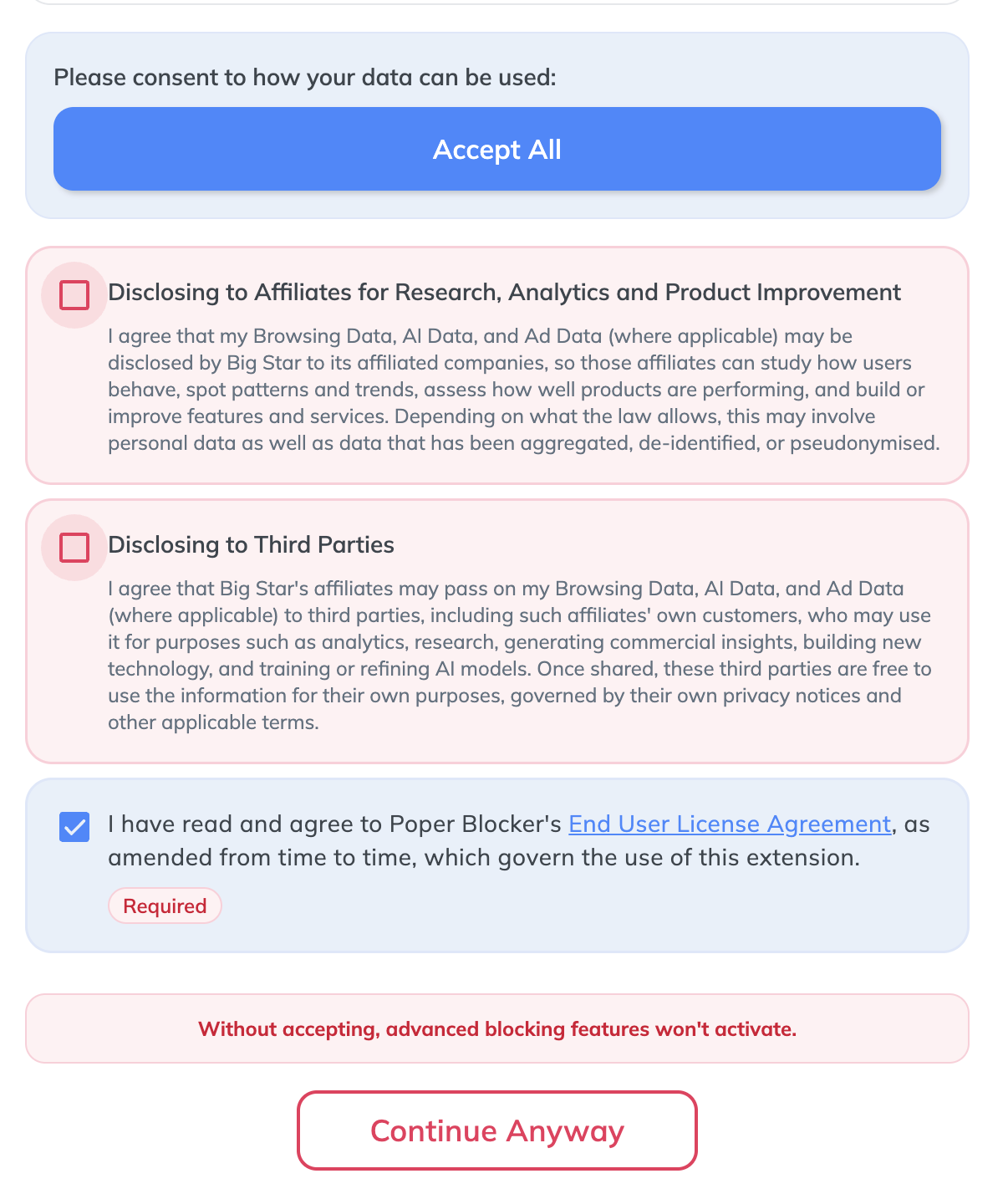
The consent screen reproduced by the researchers ties advanced blocking features to accepting data sharing. The report also identifies a misleading opt-out control. Consent still matters to the technical account: the researchers say uploads required opt-in and an enabled collection category, which was off by default. The accurate concern is the combination of pressure to share, broad collection and difficult-to-inspect behavior—not a claim that the permission choices never affect collection.
Instructions that arrive after the extension
Bay Area Labs describes a built-in interpreter: a small engine that executes instructions supplied by a remote server. The server sends both programs and a separate dictionary that gives numbered commands their meaning. Reading the installed package alone therefore does not reveal the complete collection logic. The researchers retrieved 40 programs in one capture; 23 targeted AI services, including ChatGPT, Claude, Gemini and Google AI Mode.
One Claude rule watched the conversation API response and extracted its message body. That distinction matters: a URL can reveal which service you visited, while a response body can contain the actual exchange. For a work conversation, the exposure question is consequently about what was pasted or discussed, not just whether a chatbot tab was open.
The report documents full URLs and referrers leaving the browser and describes AI collection rules covering prompts, replies and conversation metadata. It also found a shared identifier in Chrome sync storage. Together, these details explain why calling the activity anonymous usage statistics can leave readers with the wrong impression: a record need not contain a typed name to link multiple browsing events.
A delayed response is evidence; universal targeting is not
The researchers initially received no interesting collection programs. Those appeared about 24 hours later, with no matching delay timer found in the client. They also identified a remotely delivered rule checking browser automation indicators. This supports concern about conditional delivery and review evasion. It does not prove which payload every user, reviewer or organization received: the report explicitly limits its comparison to one identifier on one day.
The same boundary applies to the most alarming capabilities. The interpreter supported screenshots and file uploads, but the 40 captured programs did not use full-page capture or file-upload commands. To demonstrate keylogging, the researchers substituted a local server and supplied their own program. That proves a capability in their demonstration; it is not evidence that the live service was recording everyone’s keystrokes.
Decide what access to revoke—and what exposure to assess
Check Poper Blocker through the browser’s Extensions menu, including other profiles or computers where you use it. If you do not accept this collection model, disable and remove the extension. On a managed work device, ask IT to review the installed extension and its policy before changing centrally controlled settings. Our browser-extension safety guide explains how permissions, data access and removal fit together.
Removal prevents the removed copy from continuing to run; it does not recall information already sent. If sensitive work material or a usable secret appeared in an affected chat, identify that material and involve the relevant administrator so any exposed secret can be replaced. The research does not justify assuming a stolen password or compromised account for every installation.
The practical lesson is precise: a store badge describes a store’s assessment, while an extension’s ongoing access determines what it can read. With server-supplied collection rules, those are two different questions.
References
- James Arnott. “Poper Blocker: The Adblocker That Spies on You.” Bay Area Labs, September 28, 2026. Research report.
- Google Chrome Web Store. “Pop up blocker for Chrome™ – Poper Blocker.” Accessed September 30, 2026. Extension listing.
- Big Star Labs LP. “Poper Blocker Privacy Policy.” Last modified August 5, 2026; accessed September 30, 2026. Privacy policy.