Bacon-rumors.xyz is a malicious-domain indicator that deserves investigation, but a blocked request does not by itself prove that an infostealer is running or that data was stolen. ThreatFox lists the domain as a high-confidence command-and-control indicator associated with “Unknown Stealer,” while IPFire also blocks it as malware. The practical task is to preserve the alert, identify which browser or process tried to connect, and scan that source before deciding whether account recovery is necessary.
A fresh user report shows why that distinction matters: the warning appeared only while one familiar WordPress site was open, in both Chrome and Brave, while local security scans were clean. That pattern can come from a compromised page or third-party resource, although a browser extension or local background process must still be ruled out.
What the Bacon-rumors.xyz evidence establishes
ThreatFox records bacon-rumors.xyz as IOC 1852807, type botnet_cc, with the tags c2 and gate. The record associates it with “Unknown Stealer,” gives the indicator high confidence, and dates its first sighting to July 17, 2026. IPFire’s domain blocklist separately shows the exact domain as blocked on its malware list. These are strong reasons not to allow the connection.[1][2]
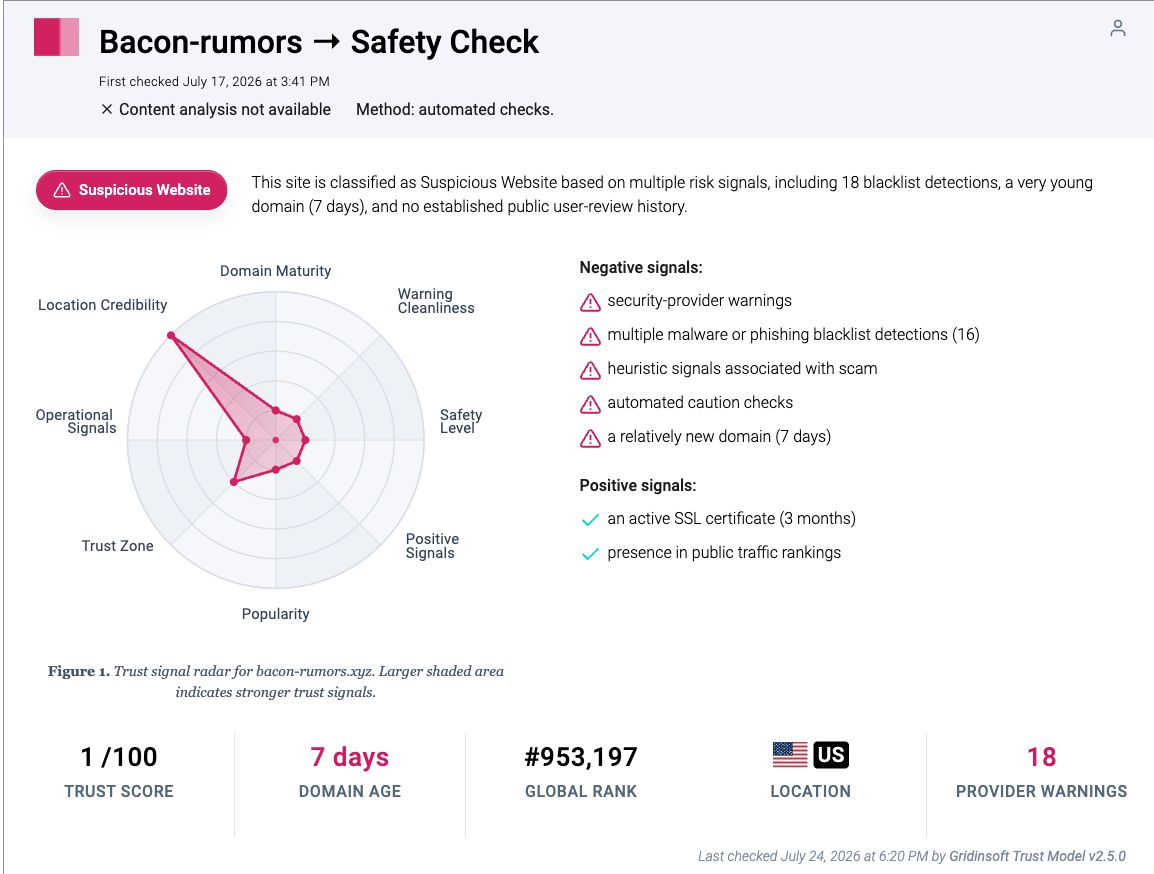
They do not identify the program on your PC that made the request. They also do not prove that a specific stealer executed, that credentials left the computer, or that the familiar website you were viewing intentionally sent the traffic. The current Gridinsoft reputation report is useful as a point-in-time domain verdict, while the alert’s process, timestamp, and source page are the evidence needed for local attribution.
Choose the response that matches what happened
| Situation | Risk and what to do |
|---|---|
| The alert appeared once on one site, no file ran, and it stopped after closing the tab | The request may be page-side. Save the alert details, avoid that page for now, clear its site data, and check again without allowing the domain. |
| The same site triggers it in multiple browsers | A shared page resource, injected script, ad, or DNS response is plausible. The browser alone is not the likely common factor, but extensions and local filtering still need review. |
| The warning continues with all browsers closed or returns after reboot | Treat it as possible local persistence. Find the initiating process, run a full malware scan, remove confirmed items, reboot, and scan again. |
| You ran a recent download, installer, crack, extension, or update before the alert | Assume higher exposure. Disconnect if requests continue, scan the device, and use a clean device for password and session recovery if the source is suspicious. |
Why a familiar website can trigger the warning
A known website can load code and content from many other hosts. A compromised plugin or theme, injected JavaScript, advertising tag, analytics loader, or third-party widget can attempt a request that the visible page owner did not intend. The reported Bacon-rumors.xyz case was limited to one WordPress site across two browsers, which is consistent with a site-side or shared-resource cause, but that remains a hypothesis rather than proof.[3]
A local cause is still possible. An extension can inject requests into every browser where it is installed. Adware can monitor browsing and open connections only when a browser is active. A scheduled task, service, or bundled application can also wait for network activity before contacting a remote host. This is why a clean on-demand scan and a blocked request can coexist: the block may have prevented the connection, the source may be page-side, or the initiating component may not have been identified yet.
If you are unsure whether simply opening the page could have exposed the device, use the decision guide for malware risks from visiting a website. Do not revisit the page repeatedly just to reproduce the alert.
Preserve the alert before cleaning anything
- Capture the exact time and destination. Record
bacon-rumors.xyz, the full blocked URL when shown, the timestamp, direction, port, and the security product’s reason. - Record the initiating application. Look for the process name and path in the protection history. “Chrome” or “Brave” narrows the event to a browser request; an unfamiliar executable, script host, or process outside its normal folder changes the risk.
- Note what was open. Save the page URL and the tabs active at that time. Do not upload private logs, browser profiles, or personal paths to an unknown help site.
- Close all browsers once. If the request continues, the source is more likely a background process, service, task, or separate application.
These details are more useful than the domain name alone. They tell you whether the event belongs to a page, browser profile, extension, or Windows process and prevent an aggressive cleanup from erasing the best attribution evidence.
Find and remove the source of the request
- Keep the block in place. Do not add Bacon-rumors.xyz to an allow list merely to stop the notification.
- Review recent changes. Remove extensions you did not intentionally install, uninstall unfamiliar programs added near the first alert, and check whether the problem began after an installer, archive, mod, crack, or fake update.
- Check browser state. Remove unwanted notification permissions, clear site data for the triggering page, and verify that no unknown extension is managed by policy. If pages or tabs also open by themselves, follow the browser multi-tab troubleshooting steps.
- Run a full Gridinsoft Anti-Malware scan. Scan the whole system, not only the browser cache. Review the process path, persistence items, bundled apps, startup entries, scheduled tasks, and browser changes the scan finds.
- Remove confirmed threats, reboot, and scan again. A second clean scan plus no repeated outbound alert is stronger evidence than one clean result before reboot.
The visible request can stop while its initiating extension, scheduled task, service, or bundled component remains. A full scan helps connect the network symptom to local files and persistence instead of guessing from the domain label.
If the warning returns, compare the new timestamp and process path with the first event. A different page but the same local process points toward the device; the same page in a clean browser profile points back toward the site or a shared third-party resource. The related blocked-domain alert guide for exo-api.tf explains the same attribution principle with a different indicator.
When to reset passwords and sessions
Do not reset every account solely because a request was blocked. Use a separate clean device to change passwords, revoke active sessions, and check email, browser-sync, banking, crypto, Steam, Discord, and social accounts when at least one higher-risk condition is present:
- an unknown file or installer ran before the alert;
- the initiating process is unfamiliar or runs from a suspicious user-writable folder;
- the request continued with browsers closed;
- the scan found a stealer, loader, credential theft, browser data theft, or persistence component;
- you see unexpected logins, password-reset messages, wallet approvals, or new browser sessions.
Start with the primary email account, then accounts that can spend money or reset other passwords. Do not change passwords on a machine that still shows suspicious activity. After cleanup, use the Windows post-malware security audit to check startup, tasks, services, browser state, sessions, and backups.
What not to do
- Do not disable web protection to test whether the domain loads.
- Do not call the alert a false positive only because one or two file scans are clean.
- Do not conclude that “Unknown Stealer” definitely infected the PC; it is the indicator’s database association, not a device diagnosis.
- Do not wipe Windows before preserving the alert source and checking whether the event was page-side.
- Do not upload private diagnostic logs to unverified people or services.
FAQ
Is Bacon-rumors.xyz malware?
Bacon-rumors.xyz is listed as a high-confidence malicious command-and-control indicator and is blocked by multiple security sources. Treat the domain as unsafe, but identify the local process before naming the infection on the computer.
Does a blocked Bacon-rumors.xyz request mean my PC is infected?
No. The block proves that a request was attempted and stopped. The source could be a page resource, browser extension, adware component, or background process. The application and process path in the alert determine the next step.
Can the alert be a false positive if scans are clean?
A clean scan does not make the domain safe. It can mean the request was page-side, the block prevented contact, or the local source was not found. Keep the domain blocked and compare the process, page, and recurrence pattern.
Should I change passwords after the alert?
Change passwords from a clean device if a suspicious file ran, an unknown process made the request, a scan found stealer-related malware, or accounts show unusual activity. A single blocked page request without execution does not automatically require resetting every account.
Should I allow Bacon-rumors.xyz to stop the pop-up?
No. Do not allow-list the domain. Preserve the alert details, find the initiating source, clean confirmed threats, and verify that the request does not return after reboot.
References
- abuse.ch ThreatFox. “bacon-rumors.xyz — IOC 1852807.” ThreatFox IOC Database, first seen July 17, 2026; accessed July 24, 2026. ThreatFox database entry.
- IPFire Project. “Malware — Domain bacon-rumors.xyz.” IPFire Domain Blocklist, block added July 17, 2026; accessed July 24, 2026. IPFire DBL entry.
- Reddit user Gribble-Grubs601. “Malwarebytes seems to think something is wrong, but what?” r/antivirus, July 24, 2026; accessed July 24, 2026. public discussion.