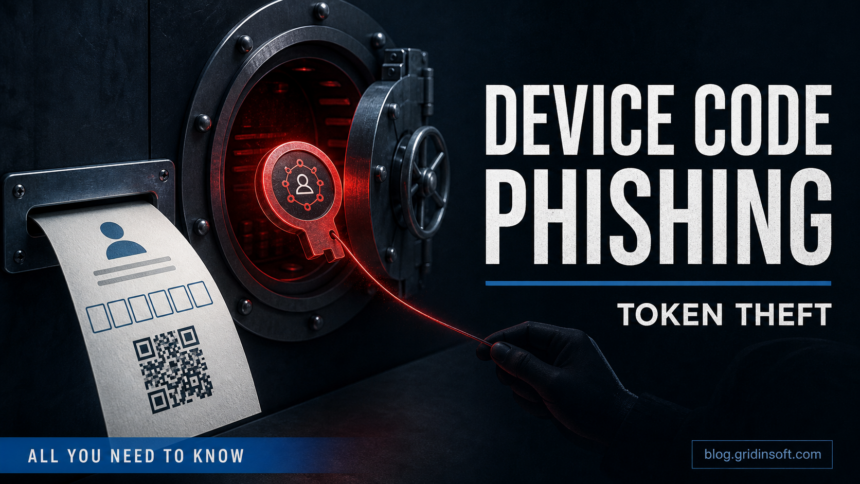
Device code phishing tricks you into authorizing an attacker session through a real Microsoft login page. The page can be legitimate, the code can look harmless, and the message can still be a trap: entering the attacker-provided code may give someone else access to Microsoft 365, email, SharePoint, Teams, or other cloud apps without handing them your password directly.
This is why device-code lures feel different from ordinary password phishing. A fake invoice, PDF, Teams notice, QR code, or shared-file message may send you to microsoft.com/devicelogin or another legitimate Microsoft sign-in flow. The dangerous part is not the domain by itself; it is the code and the session you are being asked to authorize.
Recent Microsoft reporting shows attackers packaging this flow inside polished Teams, WhatsApp, Signal, shared-document, and other collaboration lures. The safe test is still simple: did you start this device login yourself, and do you recognize the device or app that will receive access?
How device code phishing works
| What the victim sees | What the attacker wants |
|---|---|
| A message says a document, voicemail, or Teams file is waiting. | Curiosity and urgency before the user checks the sender. |
| The page shows a short code and says to enter it on a Microsoft login page. | The victim authorizes the attacker’s waiting device-code session. |
| The browser opens a real Microsoft sign-in page. | The legitimate domain lowers suspicion. |
| The account may ask for MFA as usual. | The attacker may receive valid OAuth/session access after the user completes the flow. |
September 22 findings: EvilTokens turned mailbox access into fraud reconnaissance
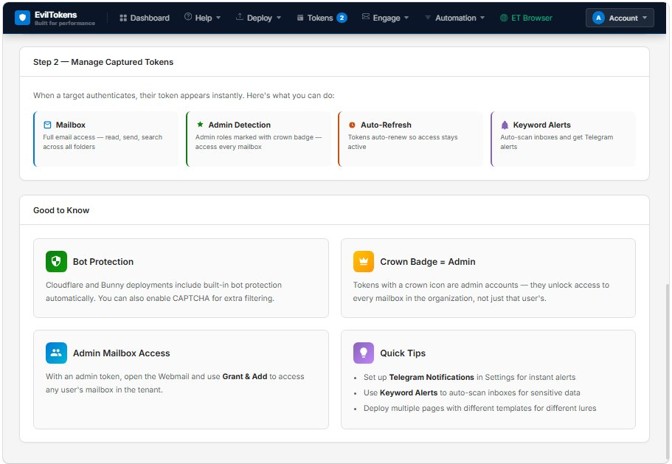
Microsoft’s September 22 investigation linked EvilTokens to more than 12,000 compromised inboxes across over 10,000 organizations since the service emerged in February 2026. Microsoft also reported a coordinated disruption of the service’s infrastructure. These are cumulative findings, not a count of new victims today or evidence that every affected account has been recovered [4].
The case shows why the session matters after the login screen closes. Microsoft documented operators using AI to identify financial, executive and administrative roles in stolen mailboxes, then examine invoices, wire-transfer details and trusted correspondence. The panel offered token auto-refresh and keyword alerts. In some incidents, attackers registered a new device within ten minutes to obtain a Primary Refresh Token for longer access; other incidents progressed later to inbox rules or email theft.
Infrastructure disruption does not replace account recovery. If you completed an unsolicited device-code sign-in, have your administrator review sessions, tokens, registered devices and mailbox rules through trusted channels. The checks below address both the initial authorization and the access left behind; changing only a password can miss that second part.
What changed in 2026 device-code lures
The stronger 2026 campaigns do not always look like a crude password-stealing page. They may ask the victim to enter a short code on a real Microsoft page, complete MFA, and then leave the victim with no obvious error. From the user’s side, the suspicious clues are the unexpected message, the external page or PDF that supplied the code, the app/device name, and any permission wording shown during sign-in.
For personal accounts, focus on recent sign-ins, active sessions, recovery details, and mailbox rules. For Microsoft 365 tenants, treat a completed device-code prompt as possible token theft until sign-in logs, consent grants, sessions, mailbox rules, and device-code flow policy are reviewed.
A password change is important after a mistake, but it may not be enough if the attacker already received an app token, session, or consent grant. Treat this as an account-access incident, not just a bad password event. If the screen asked you to approve app permissions instead of entering a device code, use the OAuth consent phishing cleanup guide first, because the app grant must be revoked directly.
If you entered the code
- Change the Microsoft account password from a trusted device.
- Sign out of all sessions and remove unfamiliar devices.
- Review recent sign-ins, MFA prompts, inbox rules, forwarding rules, and connected apps.
- Tell your IT/admin team immediately if this was a work or school account.
- If the lure included a download, HTML file, browser extension, or remote-support tool, scan the computer before continuing.
For a personal PC, Gridinsoft Anti-Malware can help check whether the phishing page also delivered a file, extension, startup entry, or other local payload. For pure Microsoft 365 account access, however, cleanup must also happen inside the Microsoft account or tenant: sessions, tokens, consent grants, inbox rules, and MFA methods need review.
Microsoft 365 admin checks
| Area | What to inspect |
|---|---|
| Sign-in logs | Device code flow events, unusual countries, unfamiliar devices, and impossible travel. |
| Consent and apps | Unknown enterprise applications, delegated permissions, or user consent granted near the incident time. |
| Mailbox rules | Forwarding, delete, move, or mark-read rules that hide attacker activity. |
| MFA methods | New phone numbers, authenticator apps, or recovery details added by someone else. |
| Conditional Access | Block or restrict device-code flow where it is not needed, and document exceptions for Azure CLI, PowerShell, TV/IoT, or managed-device workflows. |
| Files and chats | Recent sharing activity in OneDrive, SharePoint, Teams, and Outlook attachments. |
Red flags before you enter a device code
Some Microsoft sign-in screens are legitimate service prompts rather than device-code phishing. If the prompt names Microsoft Defender Platform and app ID cab96880, compare it with the cab96880 sign-in verification checklist before treating it as safe or malicious.
- The request arrives from an unexpected sender, external address, or compromised contact.
- The message asks you to copy a code into a Microsoft page to read a file.
- The wording pushes urgency: invoice overdue, voicemail waiting, shared payroll file, security review, or account closure.
- The code appears on a non-Microsoft page, PDF, QR landing page, or shortened link.
- The sign-in asks for permissions you did not expect for a document view.
Do not enter a device code just because the final login page is legitimate. Open the file-sharing service from a known bookmark, ask the sender through a separate channel, and check whether the message makes sense for your role.
Why this attack gets past careful users
The strongest part of device code phishing is that the victim can end up on a real Microsoft page. Many security habits teach people to look for HTTPS and the correct domain, and those checks are still useful. In this attack, however, the attacker abuses a legitimate authorization flow instead of building only a fake login form.
That is why the safer question is: “Who gave me this code, and what session am I authorizing?” If the code came from a PDF, QR page, shortened link, email attachment, or unknown sender, do not enter it. The legitimate Microsoft page only proves that Microsoft is handling the sign-in; it does not prove the request is safe.
User response by what happened
| What happened | Best next move |
|---|---|
| You only opened the email or page. | Close it, report it, and do not enter the code. No password reset is usually needed if no data was entered. |
| You entered the device code but stopped before completing login. | Change password if unsure, review recent sign-ins, and report the attempt to IT. |
| You completed the Microsoft sign-in. | Revoke sessions, review connected apps, remove suspicious consent grants, and check mailbox rules. |
| You downloaded a file from the lure. | Do the account steps and scan the device for scripts, HTML files, extensions, and persistence. |
Prevention rules for teams
- Train users that a real Microsoft device-login page can still be part of a phishing chain.
- Limit user consent to apps where possible and review risky OAuth permissions.
- Monitor device-code sign-ins, unfamiliar locations, and impossible travel.
- Use Conditional Access policies for unmanaged devices, high-risk sign-ins, and device-code flow where the business does not need it.
- Review mailbox forwarding and inbox rules after every suspected identity incident.
A newer Microsoft 365 social-engineering variant abuses passkey enrollment rather than the device-code screen. See the related guide to fake Microsoft 365 passkey setup calls if a caller asked you to register a new sign-in method.
FAQ
Is device code phishing the same as password phishing?
No. Password phishing tries to capture the password on a fake page. Device code phishing can use a legitimate Microsoft login page but asks the victim to authorize a session started by the attacker.
Can MFA stop device code phishing?
MFA helps, but it does not automatically stop this attack if the victim completes the real sign-in flow and authorizes the attacker-controlled session.
Should I scan my computer after entering a code?
Scan the computer if the lure included an attachment, download, browser extension, or support tool. If you only entered the code, the highest priority is account/session review.
What should I check before entering a Microsoft device code?
Ask whether you personally started the login, whether the code came from a trusted app or device, and whether the app name and requested access match the task. Do not enter a code from an unexpected email, PDF, QR page, chat message, or shortened link.
References
- Microsoft Learn. “Microsoft identity platform and OAuth 2.0 device authorization grant flow.” Microsoft, accessed July 8, 2026. https://learn.microsoft.com/en-us/entra/identity-platform/v2-oauth2-device-code
- Microsoft Threat Intelligence. “Inside an AI-enabled device code phishing campaign.” Microsoft Security Blog, April 6, 2026, accessed July 8, 2026. https://www.microsoft.com/en-us/security/blog/2026/04/06/ai-enabled-device-code-phishing-campaign-april-2026/
- Microsoft Learn. “Protecting tokens in Microsoft Entra ID.” Microsoft, accessed July 8, 2026. https://learn.microsoft.com/en-us/entra/identity/devices/protecting-tokens-microsoft-entra-id
- Microsoft Threat Intelligence, Microsoft Defender Experts and Microsoft Security Research. “Unmasking EvilTokens: Getting to the root of device code phishing.” Microsoft Security Blog, September 22, 2026; accessed October 5, 2026. Investigation and account-response guidance.