Calipso ransomware is associated with files ending in .calipso and a ransom note named recovery.txt. If formerly usable documents now have that suffix and will not open, disconnect the affected computer from networks and leave backup drives disconnected. Preserve the note and encrypted originals before cleanup. Removing the malicious program and recovering your files are separate jobs; neither automatically secures accounts used on the infected PC.
The public sample discussed here also triggered sandbox warnings about backup deletion and access to browser data. Those observations make a file-only recovery plan incomplete, but they do not establish what happened on your computer. This guide separates identification, cleanup, data recovery, and account checks.
Does your incident match this Calipso sample?
Recorded Future’s public Triage report 261006-nzbfjaay5m identifies its submitted file as Calipso.exe. The extracted note names the .calipso suffix, uses the label [CALIPSO], and directs the victim to Session with a case identifier. It offers a small-file decryption test. These are recognition clues, not instructions to follow. [1]
| What you see | What it supports and what to do |
|---|---|
Many previously usable files now end in .calipso, alongside a matching recovery.txt note. |
A close match to the documented incident pattern. Isolate the device and preserve the original filenames, note, and discovery time for identification. |
| A security alert names Calipso, but your documents still open and there is no note. | The alert may describe a blocked payload rather than completed encryption. Keep it quarantined, record its path and detection details, and check the affected files without running the detected program. |
You found only a file named recovery.txt. |
The filename alone is too generic to identify a family. Inspect it as text and compare the surrounding symptoms; do not run a linked tool or rename files to force a match. |
| Your suffix, contact format, or note is different. | Keep the exact evidence and request identification for that incident. A similar name in a search result is not enough to choose a decryptor. |
Search results also contain Calypso threat-actor reports and older names involving “Calipso.” Do not transfer their attribution, encryption method, or recovery tools to this sample. In particular, an antivirus family label is not a test of whether a particular decryptor can restore your files.
What the sandbox tells us—and what it does not
The Triage overview flags shadow-copy and backup-catalog deletion, browser-profile reads, and suspicious access involving Windows Credential Manager. It also reports mass file renaming. These are automated observations from the submitted sample, not a forensic report about a victim’s PC. They do not demonstrate that every backup was deleted or that credentials were successfully sent to an attacker. [1]
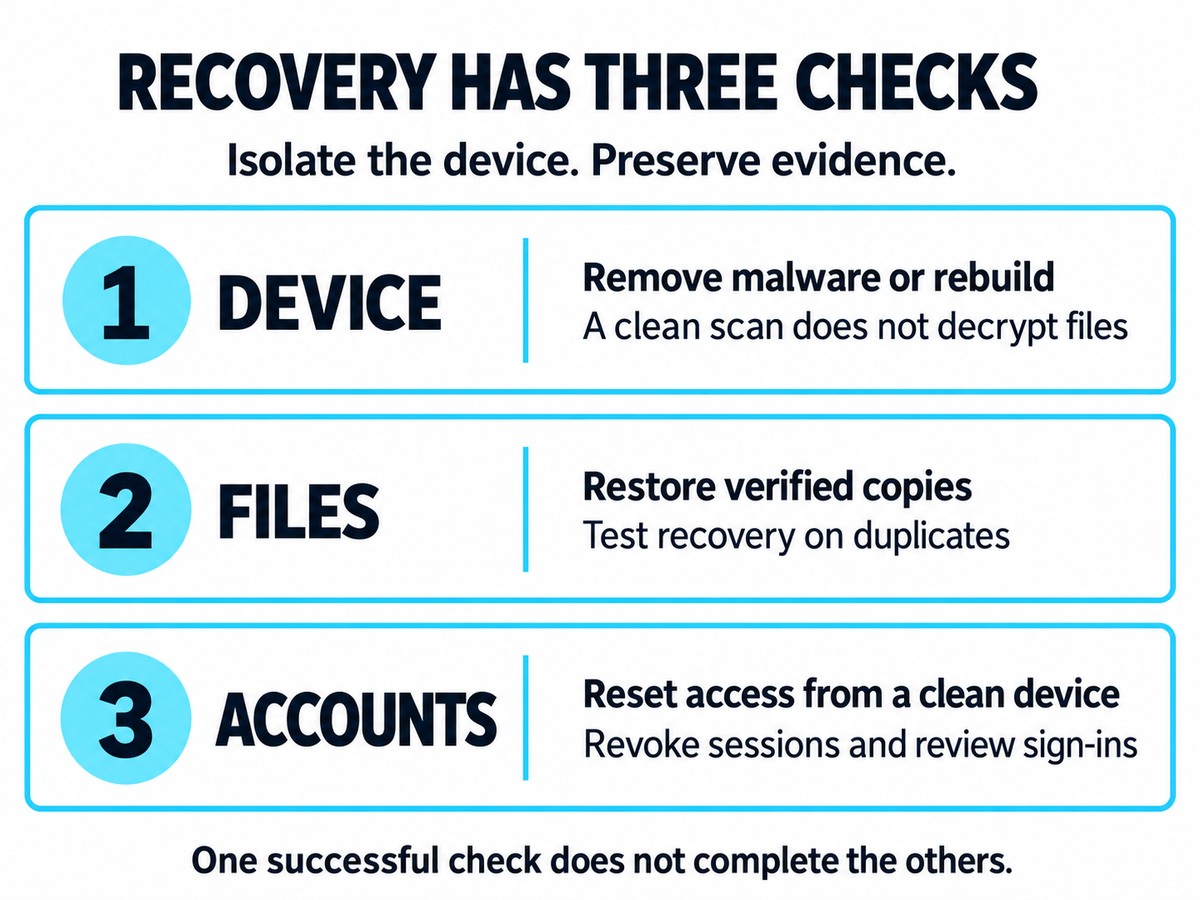
Use those signals to choose checks with different success criteria. Missing local snapshots point toward disconnected backups or earlier cloud versions. Browser-data access makes clean-device account recovery relevant even after the ransomware stops. A restored photograph proves that one file is usable; it says nothing about remaining remote access or an email session.
We reviewed the public report and its extracted note; we did not execute the malware or test a decryptor. This evidence does not establish an initial infection route, an operator identity, a universal file-size destruction threshold, or successful data exfiltration.
Contain the incident before changing the disk
- Disconnect Wi-Fi, Ethernet, VPN access, and shared storage. Keep unaffected backup media away from the PC. From an unaffected device, pause affected cloud synchronization where possible so that encrypted versions do not continue propagating.
- Preserve what identifies the incident. Keep the original note, representative filenames, security alerts, and the time you first noticed the problem. Avoid posting case identifiers, contact details, or confidential documents publicly. At work, contact IT or incident responders before scanning, deleting files, or reinstalling.
- Decide whether recovery evidence needs specialist preservation. If the only copies of irreplaceable data are on the affected disk, seek help before installing utilities onto it. An image of the disk can preserve options that later writes may reduce.
CISA recommends isolating affected systems; powering them down is a fallback when network disconnection is not possible, with the tradeoff that volatile evidence is lost. Follow your incident-response team’s instructions rather than repeatedly restarting the machine. [2]
Remove Calipso without confusing cleanup with decryption
For a personal Windows PC, start cleanup after preserving the evidence and recovery copies you need. The file that caused the visible damage may not be the only unwanted component: a loader, startup entry, service, or remote-access tool can remain. A full scan checks for detected threats and related components; it does not reverse encryption.
- Obtain Gridinsoft Anti-Malware from its official download page using an unaffected device if necessary. Keep the infected computer isolated from other devices and backup storage.
- Install the application and update its detection database when a safe connection can be arranged. Run a Full Scan.
- Review the results, apply cleanup to detected threats, and retain the scan report.
- Restart when cleanup requires it. Check for new encrypted files or returning detections, and rescan if symptoms recur. Keep backup drives disconnected during these checks.
If Windows or the scanner cannot run, use trusted technical assistance or an offline recovery environment to regain access. Return to a scan once access is restored. Persistent encryption or unexplained remote access calls for further investigation or a clean rebuild, not repeated restoration of valuable files onto the same system.
A completed scan is one part of recovery. Our explanation of malware versus ransomware covers why removing a threat and undoing its damage are different tasks.
Choose a file-recovery path from evidence
If an intact copy exists
Check offline backups, earlier cloud versions, another trusted device, and copies previously sent to colleagues or family. Inspect them from a clean environment. Open representative files and compare their contents and dates before treating a backup as complete. Restore into a cleaned or rebuilt environment after the route of compromise has been addressed.
Do not assume Windows Previous Versions survived. The sample’s backup-related warnings are a reason to check availability, not a reason to discard an existing backup without examining it.
If you have only encrypted files
Preserve an untouched copy, including the note and original directory structure. On October 15, 2026, we found no Calipso entry in the No More Ransom decryption catalog. That is a dated catalog check, not proof that recovery is impossible or that a future tool will appear. [3]
Before using any decryptor, verify that its documentation supports your actual variant and read its requirements. Test a duplicate, write output to a separate location, and confirm that the restored document opens with meaningful contents. Removing .calipso from a filename does not decrypt its contents. A tool for a similarly named threat is not a safe substitute.
Keep two separate questions in mind: can a compatible tool decrypt this data, and can another intact copy be recovered? Deleted-file recovery software addresses a different problem from decryption and can be harmed by continued disk writes. A specialist should explain which method they propose and what result they have demonstrated.
Protect accounts from a clean device
For accounts used or stored on the affected PC, review sign-in history and active sessions from an unaffected device. Prioritize email, cloud storage, administrator access, and accounts that can reset other passwords. Change exposed credentials, revoke unfamiliar sessions, and check recovery addresses and multifactor settings. Business accounts need the organization’s response team.
The reason for this separate check is practical: malware removal cannot revoke a session that is already active elsewhere. Conversely, unusual browser-access signatures in one public sandbox run do not justify telling every Calipso victim that their passwords were stolen. Investigate the actual account evidence while reducing further exposure.
FAQ
Does a successful test decryption make payment safe?
No. It demonstrates only that the tested file could be restored. It does not establish recovery of the whole collection, the safety of software supplied afterward, or the deletion of any stolen information. Do not send confidential files to an attacker as a test.
Should I obey the note’s warning against antivirus software?
No. A ransom demand is not a trustworthy recovery procedure. Preserve evidence first, then contain and remove the infection with appropriate help. Keeping active malware because the note tells you to do so exposes more data.
Does the deadline in recovery.txt determine whether my files can be recovered?
The deadline is an attacker demand, not an independently verified technical cutoff. Preserve your own note and assess backup or decryptor options on their evidence. Do not treat an expired offer as a reason to erase encrypted originals.
Keep the device, files, and accounts as three separate recovery checks. For longer-term planning after the incident is contained, see our ransomware protection guidance.
References
- Recorded Future Triage. “Calipso.exe: public sample report 261006-nzbfjaay5m.” Accessed October 15, 2026. Public analysis report.
- Cybersecurity and Infrastructure Security Agency. “#StopRansomware Guide.” September 2023; accessed October 15, 2026. Ransomware response guidance.
- The No More Ransom Project. “Decryption Tools.” Accessed October 15, 2026. Supported decryption tools.