A Windows information stealer has a shopping list for the applications people use to work with AI. Check Point Research’s October 23 analysis of Aokigahara identifies a dedicated aisessions module that collects local authentication files, session data and settings for Claude, ChatGPT Desktop, Codex, Cursor and other tools. A separate module looks for Git, SSH and cloud credentials on the same computer.
The important boundary is the device: the report describes malware collecting files after it is running on a compromised machine. It does not establish a breach of the AI providers. A valid stolen token could let someone use an account without entering its password, but a file appearing on the collection list does not mean it contains a usable secret.
A familiar stealer, with an AI-specific collection route
Aokigahara also gathers the more familiar material found in infostealer investigations: browser passwords and cookies, wallet data, screenshots, clipboard contents and messaging-app files. AI access is an additional target, rather than a replacement for those sources of stolen data.
This is a new technical analysis, not the malware’s first public appearance. Symantec and Carbon Black’s Threat Hunter Team reported on Aoki, also called Aokigahara, on October 15. Their earlier comparison found AI-related collection in newer samples but not in older ones. Check Point’s October 23 report maps the dedicated handlers, their local targets and the encrypted upload protocol in greater detail.
That distinction matters when reading the headlines: the new evidence describes what the malware can collect. Check Point has not confirmed how its operators monetize stolen AI access. Paid-service abuse, resale and exposure of private conversations are potential consequences when usable access survives; they are not confirmed outcomes for every infected device.
The files reveal what the attacker wants
The aisessions routine searches known application locations. The report lists Codex’s auth.json, config.toml and .env files under its local configuration directory, Claude credential and settings files, and Cursor and Windsurf state databases. It also names GitHub Copilot, Gemini CLI, JetBrains AI Assistant, Amazon Q and AWS sign-on data.
- Authentication and session files. They can contain tokens or credentials. Whether stolen material grants access depends on its contents, validity and the service’s controls.
- Settings and local state databases. These can hold configuration or session-related information; collecting them does not establish that every file contains a password.
- Git, SSH and cloud files. A separate
idehandler looks for repository credentials, SSH-related files that may contain private keys, and AWS, Azure and Google Cloud configurations.
The two modules should not be collapsed into an invented attack chain. The research shows AI and development secrets available to the same stealer, not a proven sequence in which a stolen chatbot session was used to break into a cloud account. The practical connection is that one compromised workstation can hold several independent sets of access.
The stolen material leaves in labeled, encrypted archives
Check Point documents an initial key exchange with the command-and-control server, followed by uploads of ZIP archives encrypted with AES-GCM. Upload headers distinguish collection categories, including aisessions. That label is a revealing detail: AI session data has its own place in the upload process, alongside browser and system information.
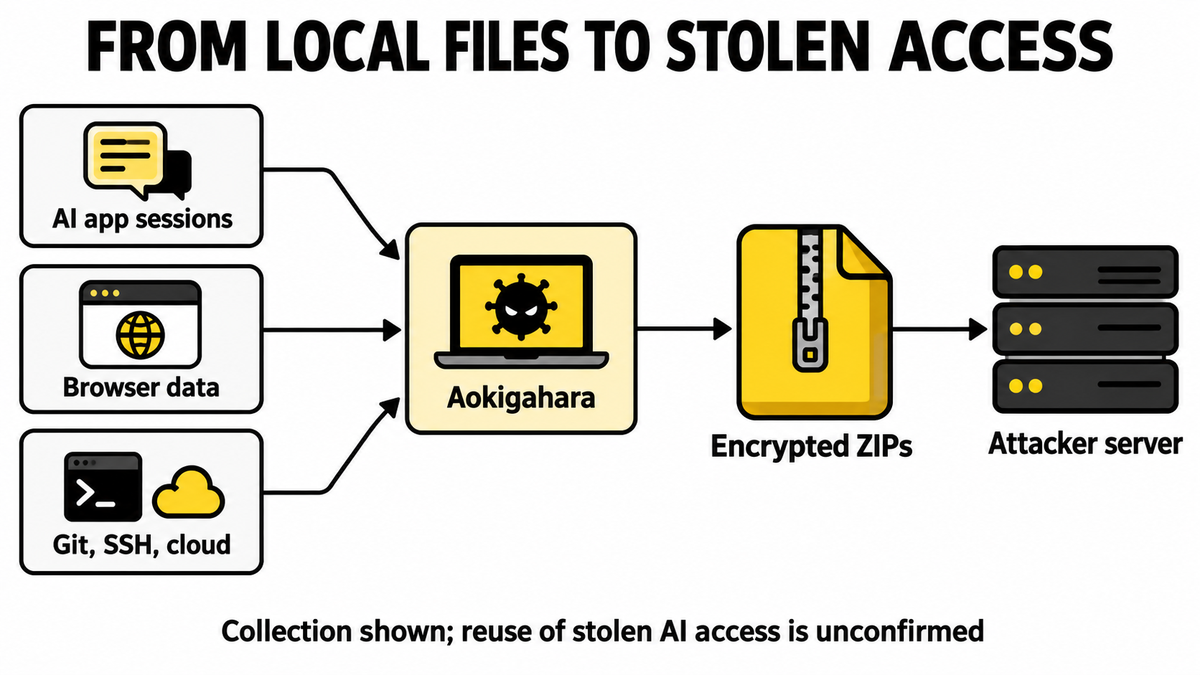
The final completion notification marks the end of the upload phase; the researchers caution that it does not independently prove every upload succeeded. Similarly, a list of supported modules is not a list of everything stolen from a particular victim: configuration flags determine which collection routines execute.
The report also describes optional language and analysis-environment checks. A language exclusion that appears in the code is not a reliable protection strategy: the check is configuration-dependent. Changing a keyboard layout is no substitute for investigating a suspected infection.
Cleanup and account recovery solve different problems
If a stealer detection or other evidence points to a compromised Windows computer, stop using it for sensitive sign-ins and preserve the alert, detection name and relevant timestamps. From a separate trusted device, review the AI, cloud and developer accounts used on that computer. Revoke exposed sessions or tokens using each provider’s controls, replace affected API keys and inspect usage, billing and access logs. Changing a password alone should not be assumed to invalidate every API key or active session.
Local cleanup is a separate task. Security software may quarantine a visible payload while another loader, scheduled task, service or bundled component remains; that possibility matters particularly when alerts return after restarting. For the Windows cleanup route, download and install Gridinsoft Anti-Malware, update its database, run a Full Scan, review and remove detected threats, then restart and check again if symptoms return.
If a token stealer ran here, logging back in can hand the attacker your new Discord session, email cookie, Steam token, or wallet access. Scan this Windows PC first, then reset passwords from a clean device.
Scan this Windows PCA scan cannot revoke secrets already copied elsewhere or restore private information. Our earlier account of stolen Claude sessions consuming paid usage explains that separate recovery problem; it is a different incident, not evidence that Aokigahara caused those losses.
The October 23 finding expands the account inventory worth checking after an infection: alongside browser logins and wallets, include the local AI tools, repositories and cloud accounts used on the device. Their presence on the same machine is convenient for work, and valuable to a collector.
References
- Check Point Research. Infostealer riding the AI Train. October 23, 2026; accessed October 24, 2026.
- Threat Hunter Team, Symantec and Carbon Black. Aoki: Infostealer Targets AI Coding Assistant Credentials. SECURITY.COM, October 15, 2026; accessed October 24, 2026.